

By Judy Zhou, Founder
Key Takeaways
- Google launched its sitemap program in June 2005, and the same XML mechanism still controls indexing for AI Overviews, ChatGPT citations, and Perplexity responses nearly two decades later.
- Submit a complete XML sitemap listing every canonical URL to give Googlebot and AI crawlers the primary discovery path for large or new sites.
- Sites with well-maintained sitemaps achieve faster crawl rates and more complete indexing, directly determining visibility in generative AI features.
- Fix broken, incomplete, or stale sitemaps first, before any answer-engine optimization work, because the sitemap is the required foundation for all subsequent discovery.
In June 2005, Google quietly launched a program called Google Sitemaps. A direct upload portal that let webmasters hand Google a list of their URLs rather than wait for crawlers to find them organically. It felt minor at the time, a utility feature tucked inside Webmaster Tools. Nearly two decades later, the underlying mechanism is almost identical, but the stakes have changed entirely. Today, that same XML file doesn't just influence traditional search rankings. It shapes which pages get surfaced by AI answer engines, cited by large language models, and indexed into the retrieval systems powering agentic commerce.
A google sitemap is a structured XML file that lists every canonical URL on your site so Googlebot and AI crawlers can discover, prioritize, and index your pages efficiently. According to Google's Search Central documentation, sitemaps are the primary discovery mechanism for large or new sites, and Google's own guide to optimizing for generative AI features confirms that AI search features rely on the same core Search index your sitemap feeds. Sites with well-maintained sitemaps see faster crawl rates and more complete indexing, which directly impacts whether your content appears in Google AI Overviews, ChatGPT citations, and Perplexity responses.
I've spent years auditing content operations and watching teams skip sitemap fundamentals. In my work at Meev, where I oversee AI-driven content research and publishing, I see the same pattern: teams obsess over answer engine optimization while their sitemaps are broken, incomplete, or stale. That's backwards. Your sitemap is the foundation. If Googlebot can't crawl your pages, no amount of answer engine optimization will save you.
What a Google Sitemap Actually Does
A google sitemap is a roadmap for crawlers. Think of it as a guest list for a party. Without one, Google has to wander your hallways knocking on doors, hoping to find something interesting. With one, Googlebot walks in, sees exactly who's attending, where they're sitting, and how important each guest is.
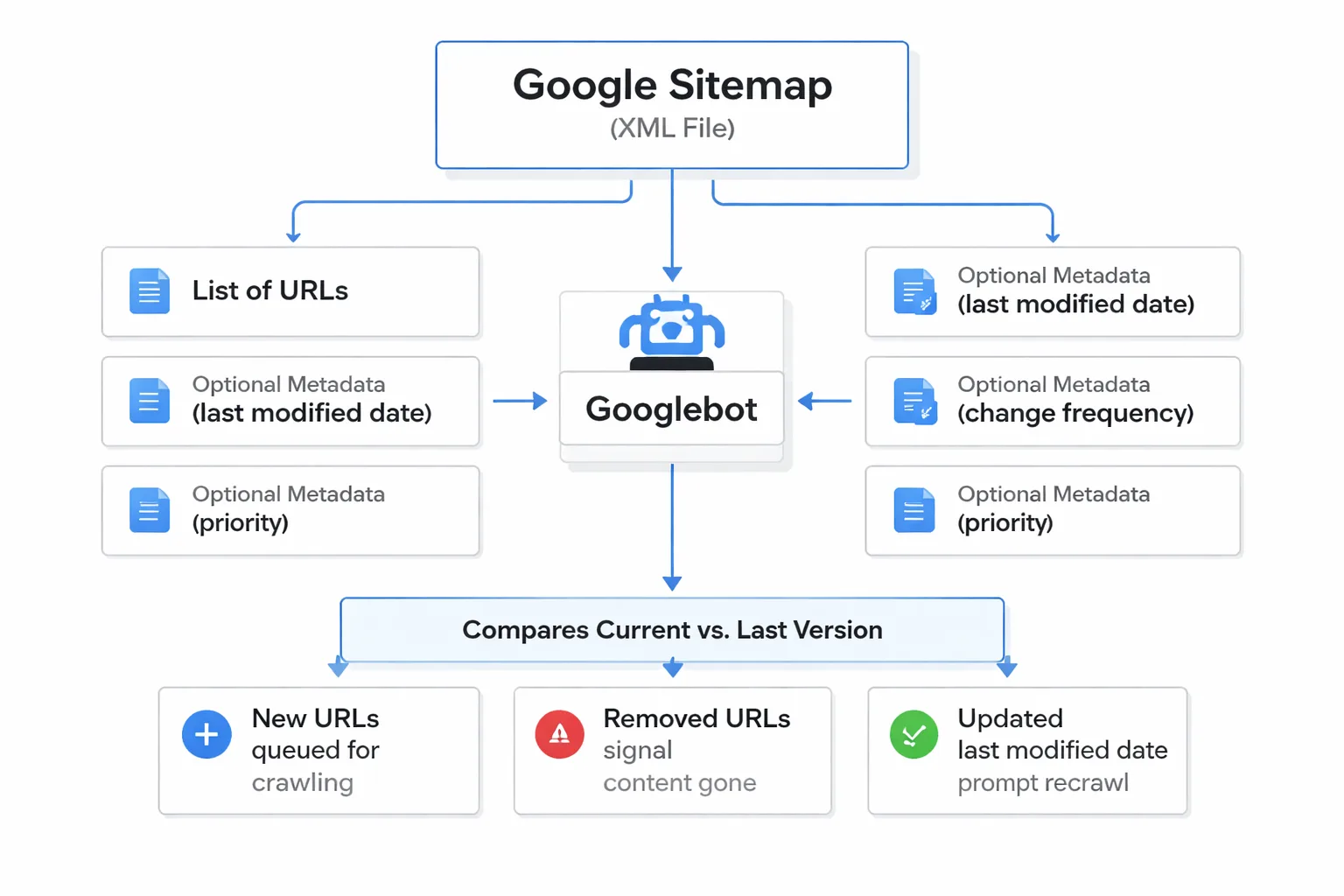
The file itself is XML. It contains a list of URLs plus optional metadata: last modified date, change frequency, and priority. Google uses this metadata as a hint, not a command. If you say a page changes hourly but it hasn't been updated in six months, Google learns to ignore your hints.
Here's what most guides get wrong: they treat sitemaps as a submission tool. Submit and forget. In reality, a sitemap is a living document that Google reads repeatedly. Every time Googlebot revisits your sitemap, it compares the current version to what it saw last time. New URLs get queued for crawling. Removed URLs signal that content is gone. Updated <lastmod> tags tell Google to recrawl pages that changed.
This matters more than ever because of crawl budget. Google doesn't crawl every page on every site equally. It allocates resources based on perceived quality, server response times, and historical value. A clean sitemap with only canonical, indexable URLs helps Google spend its crawl budget efficiently. A bloated sitemap with redirects, 404s, and noindexed pages wastes that budget and signals poor site hygiene.
The connection to AI search is where this gets interesting. Google's generative AI optimization guide states that "best practices for SEO continue to be relevant" because AI features like AI Overviews and AI Mode are built on top of the core Search index using retrieval-augmented generation (RAG). If your pages aren't indexed, they can't be retrieved. If they can't be retrieved, they can't be cited. Your sitemap is the on-ramp to the entire AI citation pipeline.
Step 1. Generate Your Sitemap
Generating a sitemap is the easiest step in this entire process, and it's where most teams go wrong by overcomplicating it.
If you're on WordPress, sitemaps are built in. Since version 5.5, WordPress generates XML sitemaps natively. If you use Yoast SEO or Rank Math, they override the default with their own versions, which are better. You don't need to configure anything. The sitemap exists at /sitemap_index.xml by default.
Webflow generates sitemaps automatically at /sitemap.xml. You can customize which pages are included in your Webflow project settings under the SEO tab. Shopify does the same at /sitemap.xml, automatically excluding cart, checkout, and account pages.
For custom-built sites, you have three options. First, use a server-side script that reads your database or file structure and generates XML on a schedule. Second, use a crawling tool like Screaming Frog to crawl your site and export an XML sitemap. Third, use a sitemap generator service like XML-Sitemaps.com for sites under 500 pages.
The manual approach looks like this. You create a file called sitemap.xml in your root directory. The structure is simple:
xml https://example.com/page-1/ 2026-09-01 weekly 0.8
Three rules for generation. Include only canonical URLs. Every URL in your sitemap should be the version you want indexed, with consistent trailing slashes and protocol (https). Exclude noindexed pages. If a page has a noindex directive, it should not appear in your sitemap. Split large sitemaps. Google limits each sitemap to 50,000 URLs and 50MB uncompressed. If you exceed that, create a sitemap index file that references multiple child sitemaps.
For large ecommerce sites, this is non-negotiable. A Shopify store with 30,000 product variants needs a clean sitemap structure that separates products, collections, and blog posts into distinct files. Google's structured data guidance for ecommerce recommends clear product page markup, and your sitemap should point Googlebot to those well-structured pages efficiently.
This is also where ai and search engine optimization intersect. AI crawlers like GPTBot, Claude's crawler, and Perplexity's bot all respect robots.txt directives, but they discover URLs through the same crawl pathways Googlebot uses. A sitemap that's clean for Google is clean for them too.
Step 2. Validate Before You Submit
This is the step most teams skip. Don't.
A malformed sitemap is worse than no sitemap. If Google encounters XML errors, it may stop processing the file entirely and fall back to organic crawling, which means your new pages sit in limbo. I've seen sites lose indexing on fresh content for weeks because of a single unclosed tag.
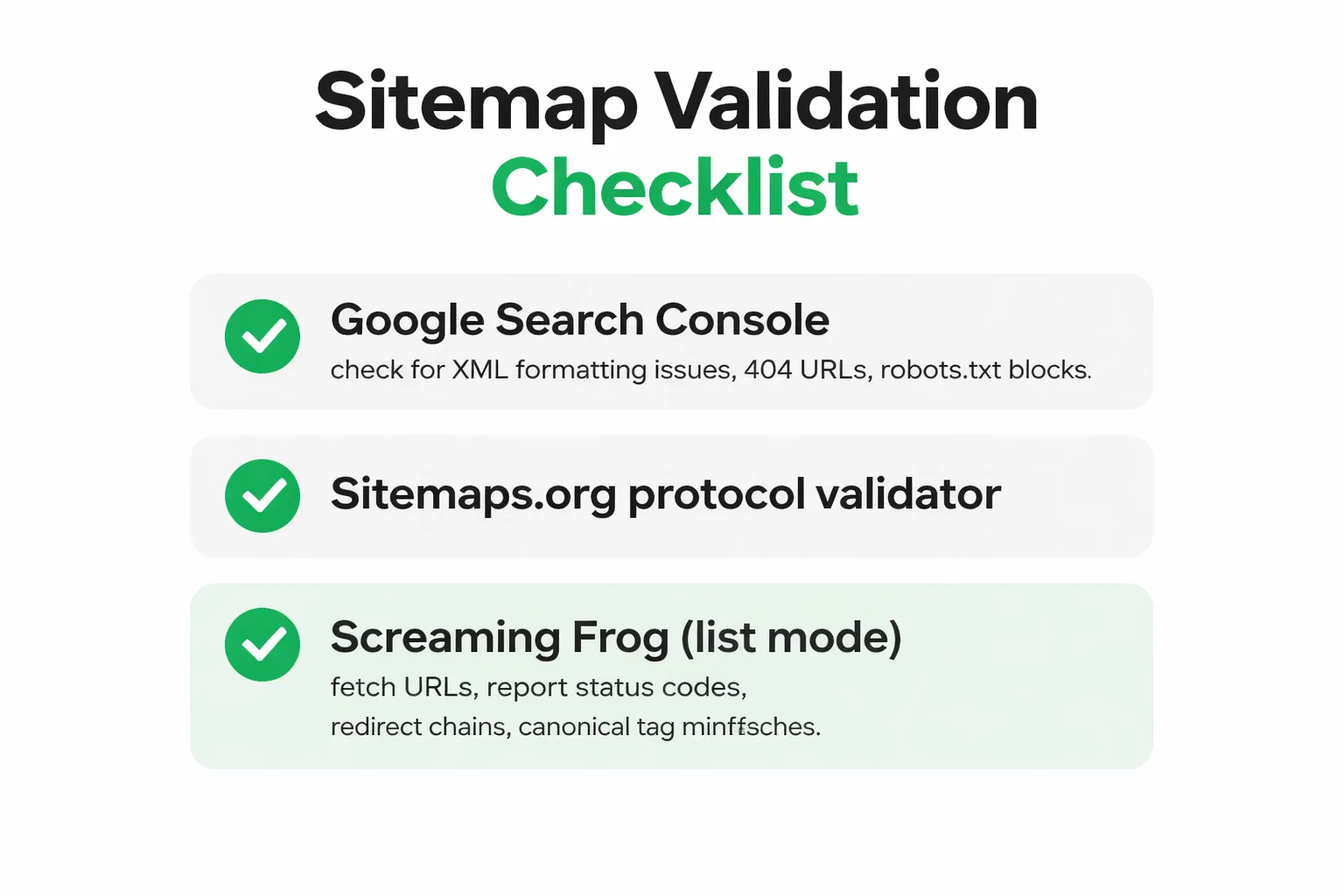
Start with Google Search Console's own sitemap validator. You don't need to submit the sitemap to test it. Go to Search Console, navigate to Sitemaps, enter your sitemap URL, and click Submit. Even if submission fails, GSC will tell you why. Common errors include XML formatting issues, URLs that return 404 status codes, and URLs blocked by robots.txt.
For a deeper check, use the Sitemaps.org protocol validator or run your sitemap URL through Screaming Frog's list mode. Screaming Frog will fetch every URL in your sitemap and report status codes, redirect chains, and canonical tag mismatches.
Here's my validation checklist. Run through every item before you submit:
1. XML is well-formed. No unclosed tags, no encoding errors. Load the URL in a browser. If it renders as a clickable link list, you're good. If you see a raw XML error, fix it.
2. Every URL returns 200 status. No 301s, no 404s, no 500s. If a URL redirects, replace it with the destination URL in your sitemap.
3. No noindexed URLs. Check each URL's meta robots tag and X-Robots-Tag header. If a page is noindexed, remove it from the sitemap.
4. Consistent URL format. Pick one format (https, www or non-www, trailing slash or no trailing slash) and use it everywhere. Mixed formats create duplicate content signals.
5. Last modified dates are accurate. Don't set every page to today's date. Google ignores <lastmod> tags that don't match the actual page content.
One more thing. Check your robots.txt file. It should include a reference to your sitemap:
Sitemap: https://example.com/sitemap.xml
This line tells every crawler (Googlebot, Bingbot, GPTBot, PerplexityBot) where to find your sitemap without you having to submit it to each one individually. It's a one-line setup that pays dividends forever.
Step 3. Submit via Google Search Console
Now you're ready to submit. This takes about 30 seconds.
Open Google Search Console. Select your property (make sure it's the correct one if you manage multiple sites). In the left sidebar, click Sitemaps.
You'll see a field labeled "Add a new sitemap." Enter your sitemap URL. If your sitemap is at https://example.com/sitemap.xml, just enter sitemap.xml. GSC prepends your domain automatically.
Click Submit. Google will process the sitemap immediately and show a status. "Success" means Google found and parsed the file. This does not mean your pages are indexed. It means Google has accepted the sitemap as a discovery source and queued the URLs for crawling.
Here's what each status means:
- Success: The sitemap was fetched and parsed. URLs are queued for crawling. - Has errors: The sitemap was fetched but contains issues. Click the sitemap URL to see a detailed report. - Couldn't fetch: Google couldn't access the file. Check robots.txt blocking, server response codes, and DNS resolution. - Discovered. Currently not indexed: This is a URL-level status, not a sitemap status. It means Google found the URL but chose not to index it. This is a quality signal, not a technical error.
After submission, check the Coverage report in GSC after 48-72 hours. You should see new URLs appearing under "Indexed" or "Discovered." If you see URLs stuck in "Crawled. Currently not indexed" after weeks, that's a content quality issue, not a sitemap issue. I've been there. No amount of resubmission fixes it. You need better content, stronger internal links, and more external authority signals.
In my experience, Google's indexing speed varies wildly. I've seen new pages indexed in under 24 hours and others take three months. The difference is almost always site authority and internal linking, not sitemap submission. Bing, by contrast, indexes submitted URLs much faster. If you want quick visibility, submit your site to search engines across both Google and Bing, and use IndexNow for instant pinging.
This is also a good time to think about your broader web indexing strategy. Submitting a sitemap is step one. Step two is making sure the pages you're submitting are worth indexing. Google's quality algorithms are ruthless, and AI answer engines are even more selective about which sources they cite.
Is your sitemap actually helping you get cited by AI search engines, or just sitting there?
How Does Sitemap Freshness Affect AI Crawler Access?
This is the question nobody asks, and it's the one that matters most in 2026.
Googlebot isn't the only crawler reading your sitemap anymore. AI crawlers from OpenAI (GPTBot), Anthropic (ClaudeBot), Perplexity (PerplexityBot), and Google's own AI crawlers all discover URLs through similar pathways. When you update your sitemap, you're not just telling Google about new content. You're telling the entire AI search ecosystem.
Here's the mechanism. When you publish a new page, your CMS updates the sitemap. Googlebot revisits the sitemap (frequency depends on your site's crawl budget), finds the new URL, and queues it for crawling. Simultaneously, if you ping IndexNow, Bing's crawler gets notified instantly. AI crawlers that respect IndexNow or monitor sitemap changes will also pick up the new URL.
The faster this cycle runs, the faster your content enters the retrieval pipeline. And retrieval is where AI citations come from. When ChatGPT or Perplexity generates an answer, it pulls from its index of crawled content. If your new article isn't crawled yet, it can't be cited. Sitemap freshness is the difference between being cited in tomorrow's AI answers and being invisible for weeks.
In my work at Meev, I've seen how this plays out. Teams that automate sitemap updates and use IndexNow pinging on every publish get content into AI indexes faster. The GSC + IndexNow dual indexing approach is something we built into Meev's publishing pipeline because it works. Every published article auto-submits to Google Search Console and pings IndexNow simultaneously. No manual steps.
But here's the nuance. Sitemap freshness alone doesn't guarantee AI citations. It gets you into the index. What happens after that depends on content quality, entity clarity, and whether your content matches what AI engines are looking for. That's where generative engine optimization comes in, and it's a separate discipline from sitemap management.
Why Does Entity Grounding Start With Your Sitemap?
This is where sitemaps stop being a technical utility and start being a strategic asset.
Entity grounding is the process by which AI models connect your content to real-world entities (people, places, organizations, concepts) in their knowledge graphs. Google's AI optimization guide emphasizes "consistent entity naming across your site and profiles" as a key practice for AI visibility.
Your sitemap plays a role here that most SEO guides completely miss. The URL structure in your sitemap tells Googlebot (and AI crawlers) how your content is organized. A sitemap that groups content by topic, uses descriptive URL slugs, and separates content types (products, blog posts, landing pages) into distinct files helps crawlers understand your site's semantic structure.
Consider two sitemaps for the same site. Sitemap A dumps 500 URLs into one file with no organization. Sitemap B splits into /sitemap-products.xml, /sitemap-blog.xml, and /sitemap-pages.xml, with clean URL slugs like /blog/ai-search-optimization-guide instead of /blog/post?id=4827. Sitemap B gives crawlers semantic context. The URL itself signals what the page is about, and the sitemap structure signals how pages relate to each other.
This semantic structure feeds into Google's Knowledge Graph. When Google understands that your site has a cluster of content about a specific topic, it's more likely to cite your site as an authority on that topic in AI Overviews. The sitemap is the map. The content is the territory. AI engines need both to cite you confidently.
For ecommerce sites, this is even more critical. Google's ecommerce structured data guide recommends product schema, but schema alone doesn't help if your product pages aren't discoverable. A sitemap that clearly delineates product URLs from category pages from blog content helps AI agents understand your catalog structure, which matters for agentic commerce where AI assistants research and recommend products.
Step 4. Monitor Indexing and Fix Errors
Submission is not the end. It's the beginning of monitoring.
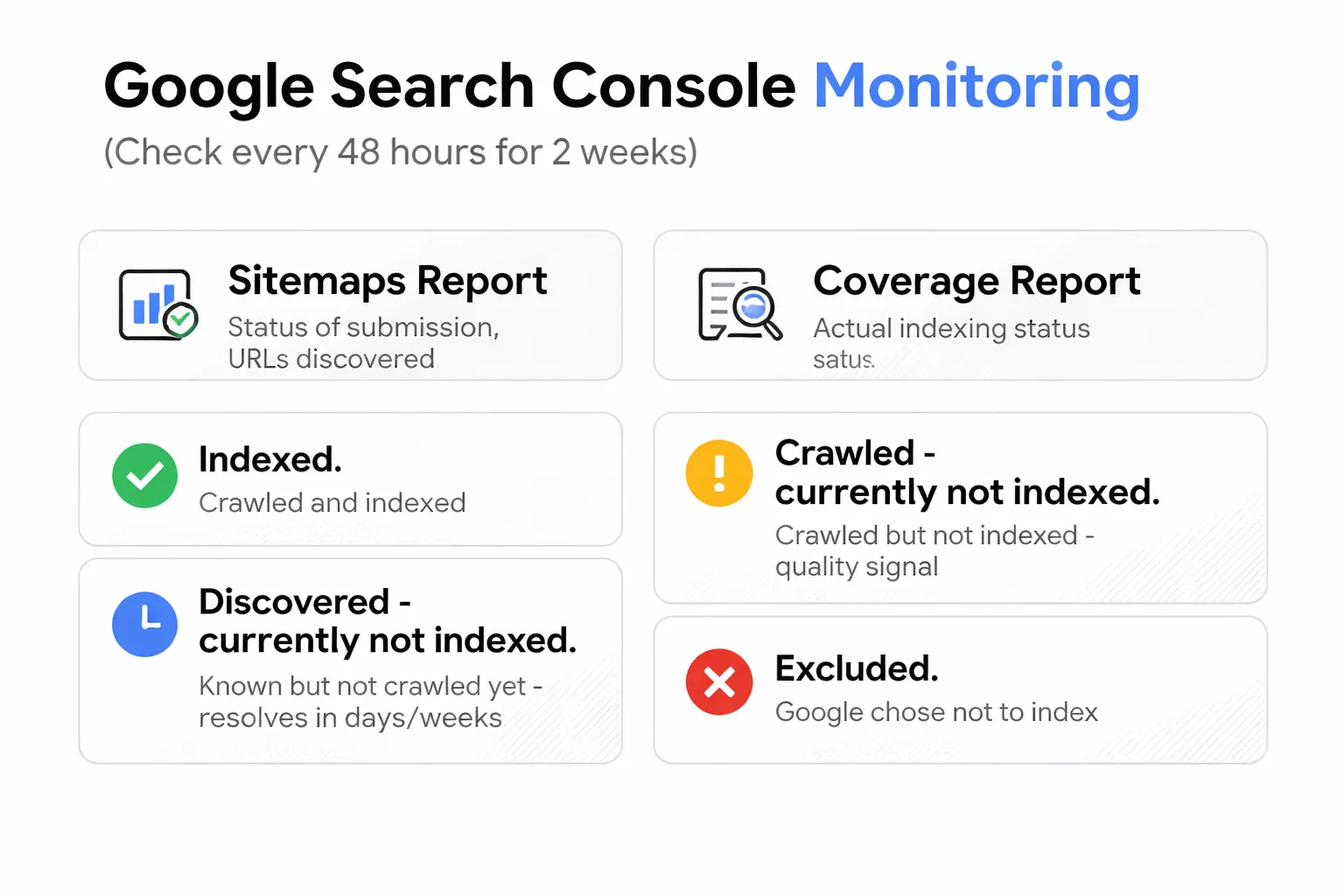
After you submit your sitemap, check Google Search Console every 48 hours for the first two weeks. Look at three reports:
Sitemaps report. This shows the status of your sitemap submission and the number of URLs discovered. If the discovered URL count is lower than what's in your sitemap, Google is filtering out URLs (usually due to canonical conflicts or noindex directives).
Coverage report. This is where you see the actual indexing status of your URLs. The four statuses you need to understand:
- Indexed: Google has crawled and indexed the page. You're in. - Crawled. Currently not indexed: Google crawled the page but chose not to index it. This is a quality signal. The page exists, Google found it, but it didn't meet the quality bar. - Discovered. Currently not indexed: Google knows the URL exists (from your sitemap) but hasn't crawled it yet. This usually resolves within days to weeks. - Excluded by 'noindex' tag: The page has a noindex directive. Remove it from your sitemap or remove the noindex tag.
URL Inspection tool. For individual URLs, enter the URL in GSC's top search bar. You'll see crawl status, index status, last crawl date, and any issues. You can also request indexing for individual URLs here, though Google treats this as a suggestion, not a command.
Common errors and how to fix them:
"URL not found" (404). The URL in your sitemap returns a 404. Either the page was deleted and the sitemap wasn't updated, or the URL is misspelled. Fix the URL or remove it from the sitemap.
"Couldn't fetch". Google couldn't access the sitemap file itself. Check that the sitemap URL is accessible in an incognito browser. Check robots.txt for blocking directives. Check server response times (if your server is slow, Googlebot may time out).
"Duplicate URL without canonical". Your sitemap contains multiple URLs that point to the same content. Pick one canonical version and remove the others.
"URL blocked by robots.txt". Your robots.txt file blocks a URL that's in your sitemap. Remove the block or remove the URL from the sitemap. These two files should never contradict each other.
I check these reports weekly. Not because I expect errors every week, but because indexing issues compound. A single broken URL in your sitemap won't hurt much. Fifty broken URLs signal to Google that your site is poorly maintained, which affects crawl budget and trust.
Step 5. Keep Your Sitemap Current
A stale sitemap is a liability. Here's how to keep it fresh.
If you're on a modern CMS (WordPress, Webflow, Shopify), your sitemap updates automatically when you publish or update content. You don't need to do anything. But you should verify this by checking the <lastmod> dates in your sitemap after publishing a new post.
For custom sites, set up a cron job or scheduled task that regenerates the sitemap whenever content changes. The frequency depends on your publishing cadence. If you publish daily, regenerate daily. If you publish weekly, weekly is fine.
IndexNow is the fastest way to notify search engines of changes. When you publish or update a page, IndexNow sends a ping to participating search engines (Bing, Yandex, and others) with the updated URL. Google doesn't currently support IndexNow for sitemap updates, but GSC's sitemap submission and URL inspection tool serve a similar function.
Here's my automation setup. Every time a new article publishes through Meev, two things happen simultaneously. The sitemap regenerates with the new URL. And IndexNow pings search engines with the new URL. This dual approach ensures both Google and Bing discover new content within minutes, not days.
For AI crawlers, the picture is evolving. GPTBot and ClaudeBot don't currently announce their crawl schedules, but they discover URLs through standard web crawling. A fresh sitemap with accurate <lastmod> dates helps them prioritize recently updated content. If you're publishing content specifically for ai search optimization, sitemap freshness directly impacts how quickly your content enters the AI citation pipeline.
One warning about over-optimization. Don't set <changefreq> to "always" for every page. Don't set <priority> to 1.0 for everything. Google explicitly states that these values are hints, and abusing them teaches Google to ignore your sitemap's metadata entirely. Be honest. Set priority based on actual importance. Set changefreq based on real update patterns.
When This Fails
This tutorial assumes your content is worth indexing. Sometimes it isn't.
If you're publishing thin content, AI-generated slop without human review, or pages that duplicate existing content on your site, a perfect sitemap won't help. Google's Helpful Content System evaluates page quality independently of discovery signals. I've seen sites with flawless technical SEO get zero indexing because the content didn't meet quality thresholds. Pages sit in "Crawled. Currently not indexed" for months. No sitemap fix resolves that.
Second, if your site has fundamental authority problems (no backlinks, no brand mentions, no organic traffic history), sitemap submission alone won't trigger indexing. Google prioritizes sites it trusts. New domains with no external signals can wait weeks or months for first-time indexing regardless of sitemap quality. Build authority through internal linking, external mentions, and consistent publishing before expecting sitemap submission to move the needle.
Third, if your server is slow or unreliable, Googlebot will throttle its crawl rate. A fast sitemap can't compensate for a slow server. Check your Core Web Vitals and server response times before blaming sitemap issues for indexing problems.
How Do Sitemaps Connect to AI Search Visibility?
Let me connect the dots explicitly, because this is the part that traditional SEO guides miss entirely.
Your google sitemap feeds Google's index. Google's index feeds Google AI Overviews and AI Mode. When a user asks Google's AI a question, the system retrieves relevant pages from the index, generates an answer, and cites sources. If your page isn't in the index, it can't be retrieved, and it can't be cited.
The same logic applies to other AI search surfaces. Perplexity crawls the web and builds its own index. ChatGPT's search feature retrieves from the web in real time. Claude can access web content through tool use. All of these systems discover URLs through crawling, and crawling starts with discovery. Your sitemap is a discovery tool.
But discovery is just the first step. Once a page is in an AI system's index, it needs to be retrievable for relevant queries. That requires entity clarity, structured data, and content that matches user intent. This is where aeo vs seo diverges. Traditional SEO optimizes for ranking position. Answer engine optimization optimizes for citation in AI-generated answers.
The practical implication is this. Your sitemap strategy should prioritize pages that are most likely to earn AI citations. That means pages with clear, factual answers, strong entity signals, and authoritative content. Don't just submit everything. Submit your best content first, make sure it's crawlable, and let the sitemap structure communicate topical authority.
In my work auditing content ops, I've seen teams with 500-page sitemaps where 400 pages are thin tag archives and pagination pages. Those pages dilute your crawl budget and send mixed signals about what your site is actually about. A lean sitemap with 100 high-quality, topically focused pages will outperform a bloated one every time, both in Google rankings and in AI citations.
What This Actually Means
Your sitemap is not a formality. It's the foundation of your entire search presence, traditional and AI alike.
The five steps I've outlined here are not complicated. Generate a clean sitemap. Validate it. Submit it to Google Search Console. Monitor for errors. Keep it current. Most teams can execute this in an afternoon.
But the strategic layer is what separates sites that get cited by AI engines from sites that don't. A sitemap that reflects your site's semantic structure, prioritizes your best content, and stays fresh gives every search system, from Googlebot to GPTBot, a clear path to understanding what you're about and why you're authoritative.
I'll be blunt. If you're investing in ai search engine optimization tools and AI visibility tracking without a clean sitemap, you're building on sand. Fix the foundation first. Then layer on entity optimization, structured data, and content strategy. The teams that get this order right are the ones showing up in AI citations across every major AI search surface in 2026.
Your google sitemap is where answer engine optimization begins. Not where it ends.
FAQ
Can I submit multiple sitemaps to Google?
Yes. If your site has separate sitemaps for products, blog posts, and landing pages, submit each one individually in Google Search Console. You can also submit a sitemap index file that references all child sitemaps. Google treats sitemap index files as a single submission and processes all referenced sitemaps.
How long does it take Google to index pages after sitemap submission?
Typically 48 hours to 4 weeks for new pages on established sites. New domains may wait 2-6 weeks for first-time indexing. Indexing speed depends on site authority, crawl budget, content quality, and internal linking strength. Sitemap submission accelerates discovery but doesn't guarantee faster indexing.
Do I need to resubmit my sitemap every time I update my site?
No. Once Google has accepted your sitemap, it revisits the file periodically based on your site's crawl budget. If you publish new content frequently, Google may check your sitemap daily. For major structural changes (new sitemap files, changed URLs), a manual resubmission ensures Google picks up the changes faster.
What is the difference between a sitemap and robots.txt?
Robots.txt controls which pages crawlers are allowed to access. A sitemap lists which pages exist and provides metadata about them. They serve different purposes and should never contradict each other. If a URL is in your sitemap but blocked by robots.txt, Google will flag it as an error.
Does Bing use the same sitemap format as Google?
Yes. Both Google and Bing support the XML sitemap protocol defined at Sitemaps.org. You can submit the same sitemap file to both. Bing Webmaster Tools also supports sitemap submission and tends to index submitted URLs faster than Google.
How do sitemaps affect AI search engines like ChatGPT and Perplexity?
AI search engines discover and crawl web content using similar mechanisms to traditional search engines. A clean sitemap helps AI crawlers find your pages faster. Once crawled, your content enters the AI system's retrieval pipeline, making it eligible for citation in AI-generated answers. Sitemap freshness directly impacts how quickly new content appears in AI search results.
About the Author
Judy Zhou, Founder
Judy Zhou leads content strategy at Meev, where she oversees AI-driven content research and publishing for hundreds of brands. With a background in SEO and editorial operations, she focuses on building content systems that rank on Google, get cited by AI search engines, and drive measurable business results.
See exactly where your brand appears across every major AI search surface and fix the gaps that matter. Start your free Meev trial today.