

By Judy Zhou, Founder
Key Takeaways
- Use Google's URL Inspection Tool to see exactly how Googlebot renders any page, replacing server-log guesswork with direct crawl diagnostics.
- Block Googlebot from even one foundational page and it earns zero rankings, AI Overviews, or LLM citations, since crawl access is the prerequisite for every downstream signal.
- 83% of the 487 top-ranking pages in a Rankability study were non-AI content whose quality signals Googlebot could actually read.
- Most crawl blocks are fixed in minutes via robots.txt or server-response checks, yet the resulting traffic and backlink losses compound for months.
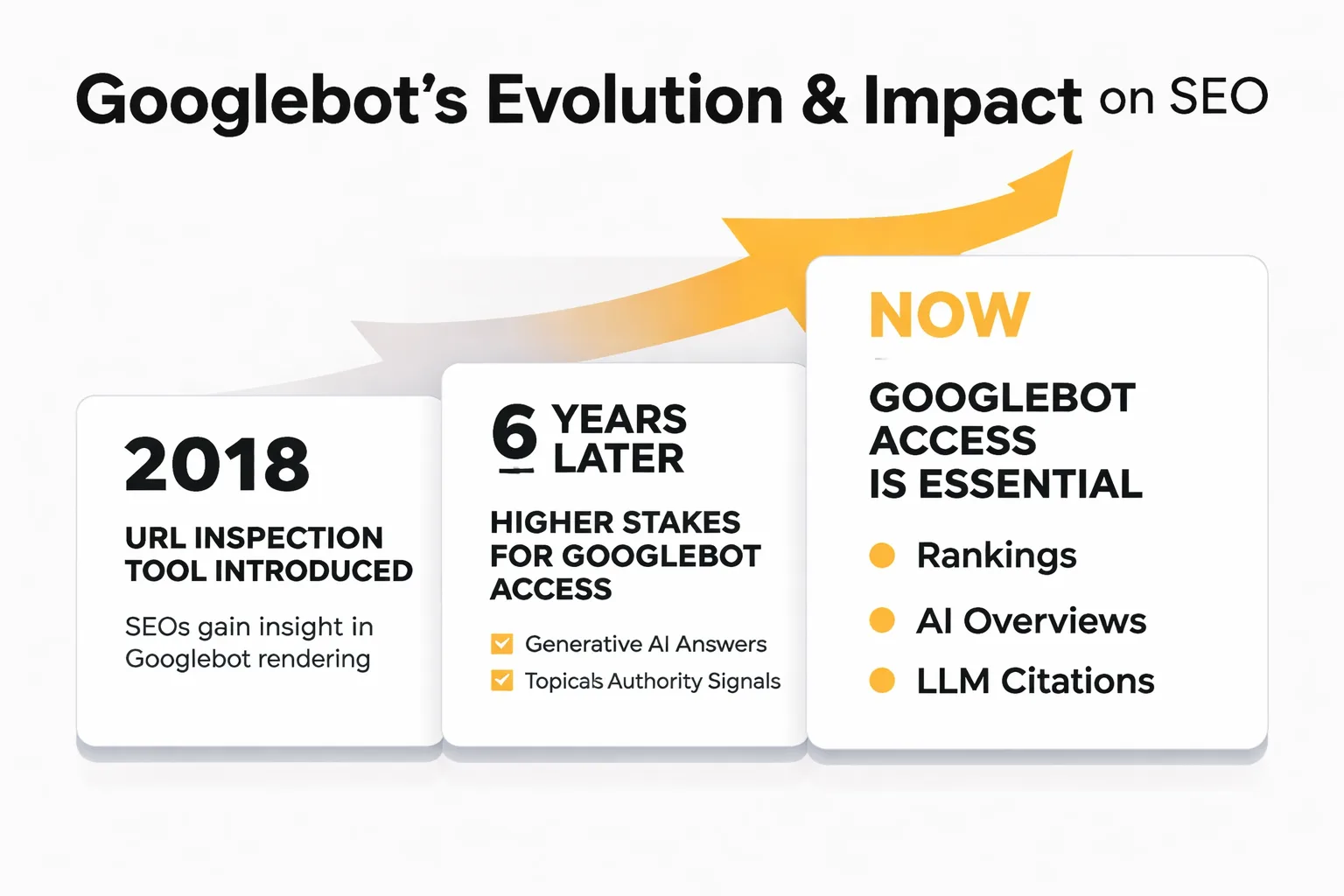
When Google first introduced the URL Inspection Tool in 2018, it gave SEOs something they'd never had before: a direct line to see exactly how Googlebot renders and evaluates a specific page. Before that, diagnosing crawl issues meant piecing together server logs, crawl reports, and guesswork. Six years later, as search has evolved into generative AI answers and topical authority signals feed large language models, the stakes of knowing whether Googlebot can reach your pages have never been higher. Yet the diagnostic habits of most SEO teams haven't kept pace.
The googlebot tester isn't just an SEO hygiene tool anymore. Googlebot access is the prerequisite for every ranking, every AI Overview appearance, and every LLM citation your content might earn. If Googlebot can't crawl a page, that page doesn't exist to Google. And it doesn't exist to the AI systems that pull from Google's index either. According to Ahrefs' analysis of topical authority, sites that achieve strong topical coverage earn significantly more backlinks and organic traffic, but none of that matters if your foundational pages are blocked from crawl. The fix usually takes minutes. The cost of ignoring it compounds for months.
A Rankability study of 487 Google search results found that 83% of top-ranking pages are not AI-generated — which tells me the pages that do rank have earned it through quality signals Googlebot could actually read. And Keyword Insights research on topical authority frames content gap analysis as a moat against AI search displacement — but a moat only works if the content inside it is crawlable.
Why Googlebot Access Determines Whether You Rank at All
Googlebot operates as a cascading gate system. Before a page can rank, it must pass through four checkpoints in sequence: the robots.txt file must allow the URL, the server must return a 200 status, the page must not carry a noindex directive, and the rendered HTML must be parseable. Fail any one of those and the page drops out of the pipeline entirely. It never enters the index. It never appears in search results. It never gets evaluated for AI Overviews.
This matters more in 2026 than it did three years ago. Google's AI Overviews draw from indexed content, and the generative answers you see for informational queries are built on top of pages Googlebot has already crawled and processed. If you're thinking about Answer Engine Optimization — getting your content cited in AI-generated answers rather than just ranked in blue links. Crawlability is the floor, not the ceiling. You cannot optimize for something Google has never seen.
The same logic extends to third-party AI crawlers. GPTBot (OpenAI), ClaudeBot (Anthropic), and PerplexityBot all follow similar crawl protocols. A page blocked to Googlebot is almost always blocked to these bots too, because the underlying issue. A robots.txt rule, a server error, a noindex tag. Applies universally. Fixing crawlability for Google fixes it for the entire AI search ecosystem.
I keep seeing teams spend weeks on Generative Engine Optimization tactics. Structured data, entity optimization, topical authority mapping. While their core product pages return 403 errors to crawlers. That's backwards. A googlebot tester run before any of that work would have caught the problem in ten minutes.
How to Run a Googlebot Tester: 4 Concrete Methods
There are four practical methods for testing crawlability, each suited to a different scenario. Use all four for a thorough audit; use the first one as your daily diagnostic.
Method 1: Google Search Console URL Inspection Tool
This is the official googlebot tester and the most authoritative signal you can get. Here's the exact process:
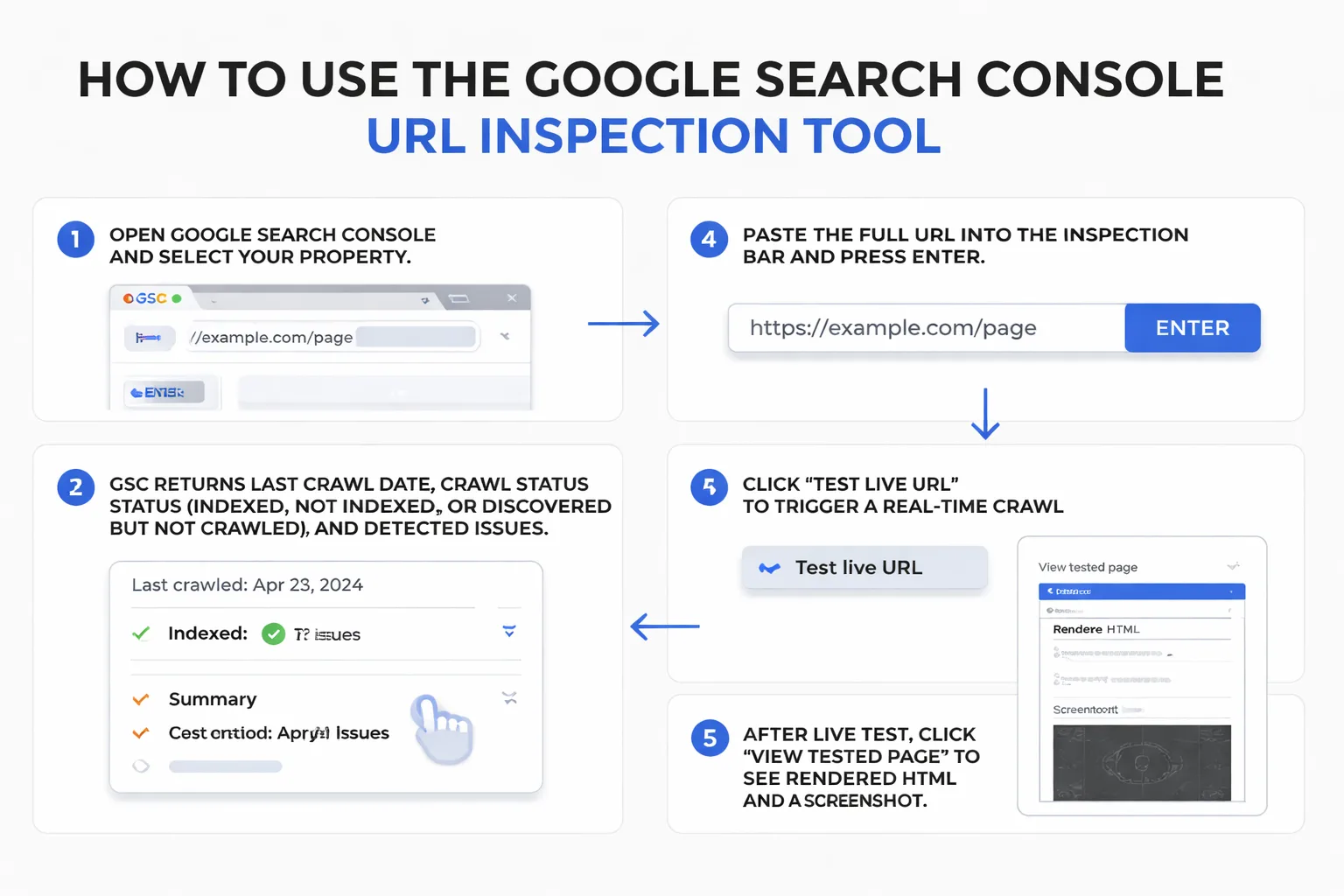
1. Open Google Search Console and select your property. 2. Paste the full URL into the inspection bar at the top and press Enter. 3. GSC returns the last crawl date, the crawl status (indexed, not indexed, or discovered but not crawled), and any detected issues. 4. Click "Test live URL" to trigger a real-time crawl. This is critical. The cached result shows what Google saw last time, but the live test shows what Googlebot would see right now. 5. After the live test completes, click "View tested page" to see the rendered HTML and a screenshot of how Googlebot rendered the page visually.
The rendered HTML tab is where most teams stop looking. Don't. Compare it against your actual page source. If JavaScript-loaded content is missing from the rendered version, Googlebot can't read it. And neither can AI systems trying to extract structured information from your page.
Method 2: robots.txt Tester in GSC
GSC has a dedicated robots.txt testing tool under Settings > robots.txt. Paste any URL and it tells you whether your current robots.txt file blocks or allows that path. This is especially useful when you've recently changed disallow rules or migrated to a new site structure. Run every URL pattern you care about. Not just the homepage.
Method 3: Third-Party Crawl Simulators
For bulk testing or pre-launch audits, third-party tools simulate Googlebot's crawl across an entire site. Screaming Frog is the standard here. Set the user agent to "Googlebot" in Configuration > User-Agent, then crawl your site. The output shows status codes, redirect chains, noindex tags, and canonical URLs at scale. For AI-specific crawl simulation, Meev's AI Crawler Simulator tests how AI bots (not just Googlebot) see your pages. Useful when you're auditing for LLM citation eligibility, not just Google indexing.
Method 4: Manual User-Agent Switching in Browser DevTools
This is the method most teams skip, and it's genuinely useful for diagnosing JavaScript rendering issues. In Chrome DevTools (F12), go to the Network tab, click the three-dot menu, select "Network conditions," uncheck "Use browser default," and paste in Googlebot's user agent string: Mozilla/5.0 (compatible; Googlebot/2.1; +http://www.google.com/bot.html). Then reload the page. What you see is a rough approximation of what Googlebot's browser-based rendering engine receives. If your navigation, hero content, or main body text disappears, you have a JavaScript dependency problem that will suppress crawl quality.
What to Look for in the Results (and What Each Error Means)
Once you've run your tests, the output falls into five common error categories. Each one has a specific cause and a specific fix.
Blocked by robots.txt. This means your robots.txt file contains a Disallow rule that covers the tested URL. The fix: open your robots.txt file (yoursite.com/robots.txt), find the offending Disallow rule, and either remove it or narrow its scope so it doesn't catch the URL you want indexed. Verify with the GSC robots.txt tester after editing.
Noindex tag detected. Either a <meta name="robots" content="noindex"> tag in the page's <head>, or an X-Robots-Tag: noindex HTTP header, is telling Googlebot to skip indexing. The fix: remove the tag or header. Check both. Some CMS platforms set noindex via HTTP headers on staging environments and forget to remove them at launch.
Redirect chain detected. The URL passes through more than one redirect before reaching its destination. Google can follow redirect chains, but chains longer than three hops waste crawl budget and dilute link equity. The fix: update the redirect to point directly to the final destination URL.
Server errors (5xx). The server failed to respond or returned an error. This is the most urgent issue. Googlebot will retry, but persistent 5xx errors cause pages to drop from the index. The fix: diagnose at the server level (check error logs, server load, and hosting status). A 503 during a planned maintenance window is acceptable; recurring 500 errors are not.
Canonical mismatch. The page's canonical tag points to a different URL than the one you're testing. This tells Google the tested URL is a duplicate and the canonical URL is the "real" version. The fix: if the tested URL is the page you want indexed, update the canonical to point to itself (<link rel="canonical" href="https://yoursite.com/this-page/">).
For Google Search Console data analysis beyond single-URL inspection, look at the Coverage report under Indexing. It segments your entire site into Valid, Excluded, Warning, and Error buckets. The Excluded bucket is where crawlability problems hide at scale. Specifically the "Blocked by robots.txt" and "Excluded by 'noindex' tag" rows.
Want to know if your pages are actually visible to AI search engines — not just Google?
Fixing Crawl Blocks That Kill AI Search Visibility
Here's the connection most SEO guides miss entirely: every crawl block you fix for Googlebot also fixes your visibility to AI crawlers. GPTBot, ClaudeBot, and PerplexityBot all use HTTP-based crawl protocols. They check robots.txt. They follow redirects. They read HTTP headers. A page that's blocked or broken for Googlebot is broken for all of them.
This matters because AEO vs SEO is increasingly a question of which content gets ingested by AI systems, not just which content ranks in blue links. If you want your brand cited in Perplexity answers or included in Google AI Overviews, the content has to be crawlable. Full stop. You can have the best-structured data on the internet, but if the page returns a 403, no AI system will ever see it.
I've been tracking this pattern across content teams I work with at Meev: brands that invest in AI visibility tracking often discover their citation gaps aren't content quality problems. They're crawl access problems. The AI engines aren't ignoring them. The AI engines literally cannot reach their pages.
The fix sequence is straightforward:
1. Run a full-site crawl with Googlebot user agent and export the status code report.
2. Prioritize any 5xx errors (server failures) and fix them first. These are the most damaging.
3. Fix 4xx errors (not found, forbidden) on pages with existing backlinks or internal links pointing to them.
4. Audit robots.txt for overly broad Disallow rules. Especially anything disallowing / or blocking CSS and JavaScript files Googlebot needs to render pages.
5. Check that your llms.txt file (if you have one) is correctly configured using a tool like Meev's LLMs.txt Validator, which confirms whether AI crawlers can parse your access permissions correctly.
6. Resubmit corrected URLs via GSC's URL Inspection tool after fixing each issue.
For teams running automated content workflows, Meev's auto-publish system includes IndexNow and GSC sitemap submission on every publish. Which means newly published pages get crawled faster, reducing the lag between publishing and AI visibility. That's the operational version of crawlability management: not just fixing problems reactively, but building a system that minimizes the window between publish and index.
Topical authority compounds this. The Keyword Insights research on topical authority is clear that generic content no longer suffices in AI search. You need depth and coverage. But depth and coverage only register if every page in your topical cluster is crawlable. One blocked page in a ten-article cluster creates a gap in the entity graph Googlebot builds for your site.
Where This Approach Breaks Down
I want to be direct about the limits of a googlebot tester workflow, because most guides won't tell you this.
First, GSC's live URL test doesn't reflect Googlebot's crawl budget allocation. A page can be fully crawlable and still get crawled infrequently if your site has thousands of low-quality URLs diluting crawl budget. Fixing the individual page won't fix that. You need to address the broader site architecture, specifically by reducing crawlable junk (thin pages, faceted navigation URLs, parameter-driven duplicates).
Second, passing a crawl test doesn't guarantee indexing. Google can crawl a page and choose not to index it if the content is deemed low-quality, thin, or duplicative. The Rankability study found 83% of top results are human-written. Crawlability gets you into the room, but content quality determines whether you stay.
Third, JavaScript-heavy pages that appear fine in DevTools user-agent testing may still have rendering delays that affect how Googlebot processes them. Google's rendering queue operates separately from its crawl queue, and render delays can mean your page is crawled but not fully processed for weeks. If your page depends heavily on client-side rendering, consider server-side rendering or static generation for critical content.
Quick Crawl Health Checklist Before You Publish
This is the five-point check I run on every page before it goes live. Each item maps to a specific crawl failure mode.
Pre-publish crawl health checklist:
1. robots.txt allows the URL. Test the exact URL path in the GSC robots.txt tester. Don't assume. Verify.
2. No noindex in meta tags or HTTP headers. Check the page source for <meta name="robots"> and use a header-checking tool (curl or browser DevTools > Network tab) to inspect the X-Robots-Tag response header.
3. Canonical points to itself. The <link rel="canonical"> in the <head> should match the URL you're publishing. If it points elsewhere, Google treats this page as a duplicate.
4. Page returns HTTP 200. Use the GSC URL Inspection live test or a status code checker. A 200 with a noindex is still blocked. Check both.
5. Structured data is parseable. Run the URL through Google's Rich Results Test. Broken JSON-LD doesn't prevent indexing, but it does prevent structured data extraction. Which matters for AI Overviews and Perplexity citations that rely on Structured Data Extraction to pull clean answers.
If all five pass, publish. If any fail, fix before publishing. Not after. Post-publish fixes require waiting for Googlebot to recrawl, which can take days to weeks depending on your crawl frequency.
For teams building toward Generative Engine Optimization at scale, this checklist is the minimum. The googlebot tester methods above are the diagnostic layer. And the AI visibility monitoring that follows. Tracking whether your now-crawlable pages actually get cited in AI answers. Is where the work pays off.
Frequently Asked Questions
How often does Googlebot crawl a typical page?
Crawl frequency depends on page authority, site crawl budget, and how often the page changes. High-authority pages on active sites may be crawled daily. New or low-authority pages may wait weeks between crawls. Submitting URLs via GSC's URL Inspection tool or through sitemap resubmission can accelerate the timeline, though it doesn't guarantee immediate recrawl.
Does fixing crawlability issues directly improve rankings?
Not directly. Crawlability is a prerequisite, not a ranking signal. A page that was previously blocked and is now crawlable will enter the index, but its ranking depends on content quality, backlinks, and relevance signals. Think of crawlability as getting your content into the evaluation pool; ranking is what happens after.
Can a page be indexed but still blocked to AI crawlers?
Yes. If your robots.txt disallows GPTBot or ClaudeBot specifically while allowing Googlebot, Google can index the page but AI systems won't crawl it. This is increasingly common among publishers who've added AI-specific disallow rules. Check your robots.txt for user-agent-specific blocks if you want AI citation eligibility alongside Google ranking.
What's the difference between a crawl error and an indexing error in GSC?
A crawl error means Googlebot couldn't successfully retrieve the page (server errors, DNS failures, connection timeouts). An indexing error means Googlebot reached the page but chose not to index it (noindex tag, duplicate content, thin content signals). Both show up in the Coverage report, but they require completely different fixes.
How does structured data affect crawlability?
Structured data doesn't affect whether Googlebot can crawl a page. It affects what Googlebot extracts from the page after crawling it. Valid JSON-LD schema makes it easier for Google to parse entities, relationships, and answer-ready content. For AI Overviews and LLM citation purposes, parseable structured data significantly increases the likelihood that your content gets extracted and surfaced in generative answers.
About the Author
Judy Zhou, Founder
Judy Zhou leads content strategy at Meev, where she oversees AI-driven content research and publishing for hundreds of brands. With a background in SEO and editorial operations, she focuses on building content systems that rank on Google, get cited by AI search engines, and drive measurable business results.
Meev tracks your brand's crawlability and AI citation status across every major AI search surface. Run your first audit free.