
How to Check If Google Can Crawl Your Site in 5 Steps
By Judy Zhou, Founder
Key Takeaways
- If Googlebot cannot fetch your page, it never enters the index and cannot appear in AI Overviews, ChatGPT citations, or Perplexity results.
- Organic CTR for Google AI Overviews fell 61% (1.76% to 0.61%) since mid-2024, with only 8% of users clicking traditional results when Overviews appear.
- 60% of searches now end with zero clicks, so fix robots.txt blocks and JavaScript rendering issues before chasing entity grounding or generative engine optimization.
- Run the five-step crawl check in order from fastest to deepest to confirm Googlebot can reach every page you want cited in AI answers.
Chasing AI citations, entity grounding, and generative engine optimization is mostly wasted effort if you haven't verified one unglamorous thing first: whether Google can actually crawl your site. The SEO industry has sprinted toward agentic commerce and LLM citation tracking while treating crawl accessibility as a solved, legacy problem. It isn't. Crawl errors, misconfigured robots.txt files, and blocked JavaScript rendering quietly exclude pages from Google's index every day. And no AI Overview, no Perplexity citation, no agentic SEO strategy can rescue a URL that Googlebot was never allowed to touch.
If Googlebot cannot fetch your page, the page does not exist in the index. If it does not exist in the index, it cannot appear in AI Overviews, cannot be cited by ChatGPT or Perplexity, and cannot feed the knowledge graph signals that ground your brand entity. The dependency chain is absolute. Yet most teams skip this check entirely.
The data makes the stakes concrete. Organic click-through rate for Google AI Overviews fell 61% (from 1.76% to 0.61%) since mid-2024, according to research analyzed in a study on measuring visibility in AI search. Only 8% of users click traditional results when AI Overviews are present, versus 15% without them. Roughly 60% of searches now end without any click to a destination site, per Bain & Company's zero-click research. When zero-click search dominates, being the cited source inside the AI answer becomes the entire game. And you cannot be cited if you were never crawled.
This is a how-to guide. Five steps, each with a concrete action, ordered from fastest to deepest. By the end, you will know exactly whether Googlebot can reach your pages and what to fix if it cannot.
Why Google Crawl Access Determines Whether You Rank at All
The dependency chain is simple and unforgiving. Crawl comes first. Googlebot discovers a URL (via sitemaps, internal links, or external backlinks), fetches the page, renders any JavaScript, parses the content, and then decides whether to index it. If the crawl step fails, every subsequent step is moot. No rendering. No indexing. No ranking. No AI citation.
Small teams assume their site is crawlable because it loads fine in a browser. That assumption is wrong often enough to be dangerous. A browser visit comes from a user agent with cookies, JavaScript execution, and no rate limits. Googlebot visits with a different user agent, often gets blocked by robots.txt rules written years ago, hits JavaScript that renders differently (or fails entirely under a headless Chromium budget), and operates within a crawl rate limit that may cause it to abandon slow pages before they finish loading.
The result: pages that look live to you are invisible to Google. And in 2026, invisible to Google means invisible to the AI search ecosystem that depends on the Google index as a retrieval layer.
Consider what happens downstream. Google's Search Central blog advises creating "unique, valuable content for people" to perform well in Google's AI experiences. But content quality is irrelevant if the crawl never completes. An ecommerce site with thousands of SKUs can pass a basic crawl test on its homepage while product pages remain blocked by robots.txt disallow rules, buried under redirect chains, or returning 5xx server errors that Googlebot encounters before it ever reaches the product metadata that would ground those entities in the knowledge graph.
The pages Googlebot cannot reach are the same pages that will never appear in AI Overviews, never be cited by Perplexity, and never contribute to your brand's entity signals in the knowledge graph. Crawl access is not a technical SEO chore. It is the gatekeeper for every downstream visibility investment you make, from answer engine optimization to agentic commerce strategies.
The financial stakes are enormous. McKinsey estimates that $750 billion in e-commerce revenue is at stake as the search paradigm shifts from SEO to AEO. That revenue flows to brands that are cited inside AI-generated answers, not to brands that are invisible. And visibility inside AI answers requires crawl access as the first link in the chain. When 80% of consumers rely on zero-click results for 40% or more of their searches, the cost of being uncrawlable is not lower traffic. It is total absence from the buying journey.
How Do I Check If Google Can Crawl My Site?
The fastest free method is Google Search Console's URL Inspection tool. Enter any page URL, hit Enter, and read the verdict: "URL is on Google" or "URL is not on Google." The tool also shows the last crawl date, the index status, and any blocking issues detected. This single check takes 10 seconds and answers the question definitively for any individual URL.
For a site-wide view, the Pages report in Google Search Console shows index coverage broken down by status: indexed, not indexed, crawled but not indexed, and discovered but not crawled. Each category links to a list of affected URLs with reasons. This is where most teams discover that hundreds or thousands of pages are silently excluded.
The URL Inspection tool is the right starting point because it uses Google's own data. Third-party crawlers like Screaming Frog or Sitebulb can simulate a crawl, but they do not have access to Googlebot's actual crawl history, rendering budget, or index decisions. Start with GSC. Confirm the verdict. Then use third-party tools to find the scope of the problem across your full site.
If you have never opened Google Search Console, the setup takes about 10 minutes: verify domain ownership (via DNS TXT record for domain-level verification, or HTML file upload for URL-prefix verification), wait for data to populate (can take 2-7 days for historical data, but new data flows within hours), and navigate to the URL Inspection tool under the Search results section.
A common misconception is that simply submitting a sitemap and requesting manual indexing will force Google to crawl your pages. In practice, pages can remain stuck in "Crawled, currently not indexed" for months even after multiple submission attempts. Google prioritizes content quality, mobile-friendliness, and robust internal linking far more for actual indexing than it does direct submission signals. Bing, by contrast, is far more reactive to direct submission methods, making it a quicker win for initial visibility. But for Google, the crawl check is about removing blockers, not pushing a button.
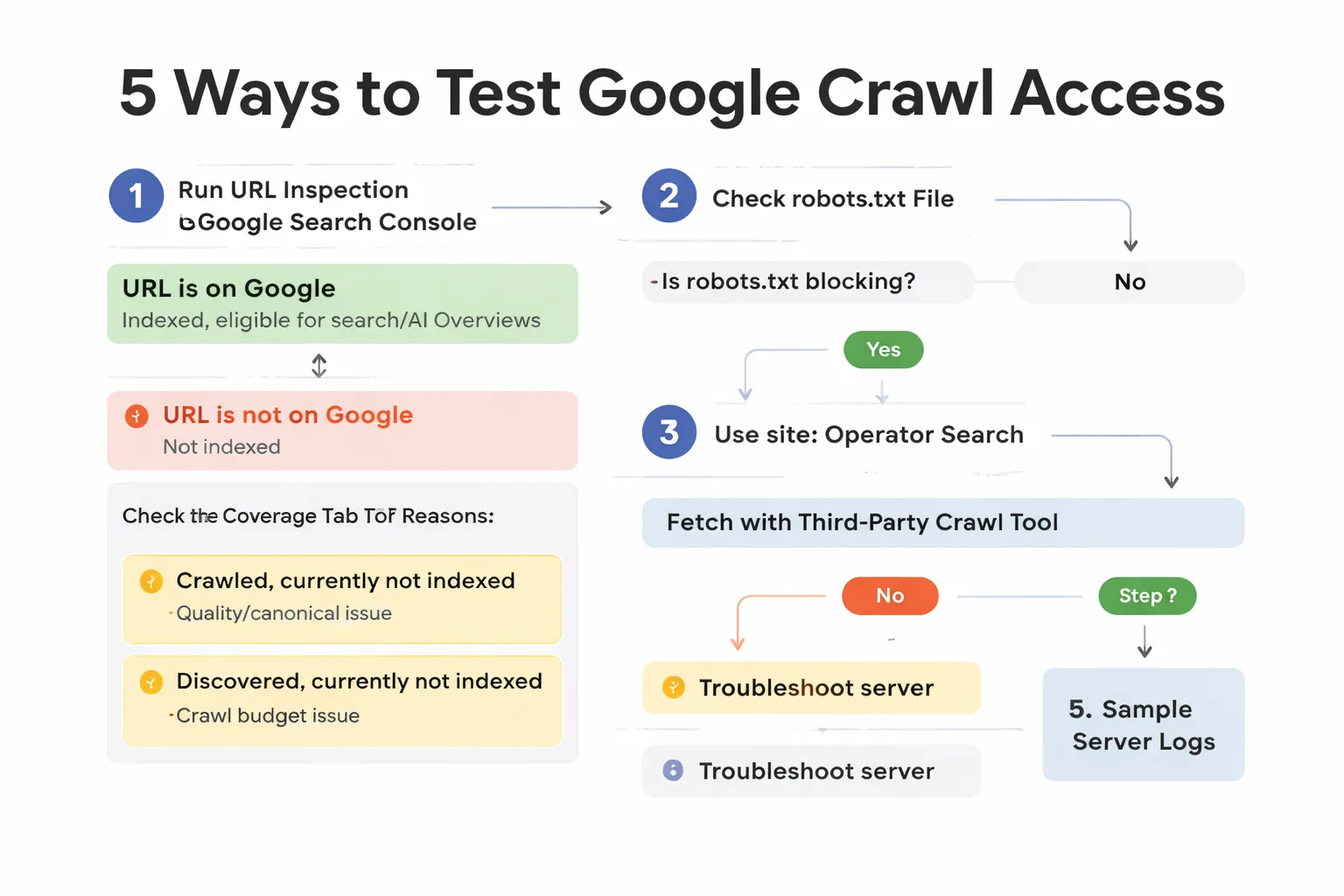
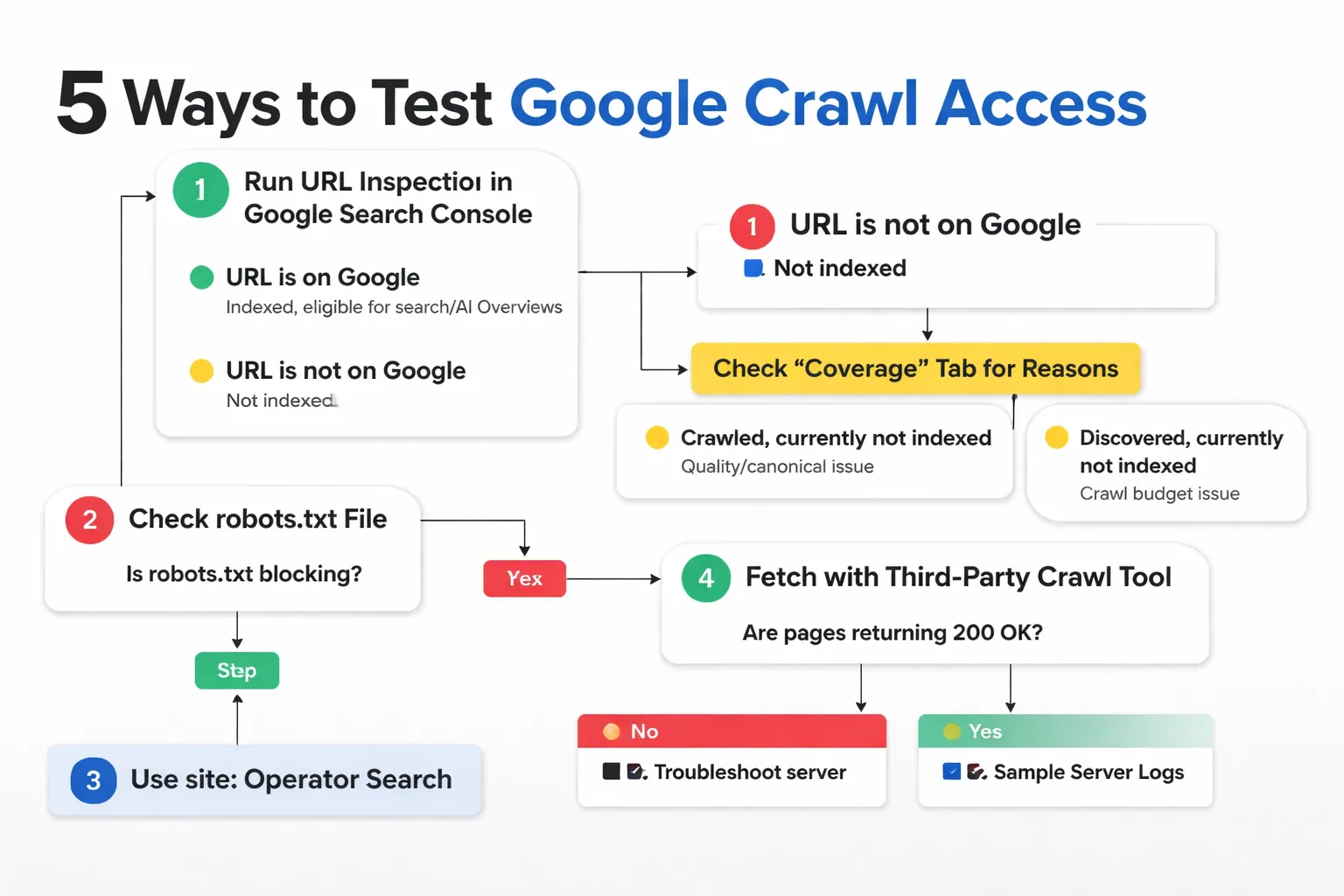
Step-by-Step: 5 Ways to Test Google Crawl Access
Step 1: Run URL Inspection in Google Search Console
Open Google Search Console. Paste your page URL into the URL Inspection bar at the top. Wait for the result. The verdict line will read one of several things.
"URL is on Google" means the page is indexed and eligible to appear in search results and AI Overviews. "URL is not on Google" means it is not indexed. Click the "Coverage" tab to see why. Common reasons include "Crawled, currently not indexed" (Google fetched the page but chose not to index it, often a quality or canonical issue), "Discovered, currently not indexed" (Google knows the URL exists but has not crawled it yet, often a crawl budget issue), and "Blocked by robots.txt" (self-explanatory and the most fixable).
If the verdict includes a "Live Test" button, click it. This triggers a fresh fetch of the page and shows whether Googlebot can reach it right now, what HTTP status it receives, and whether rendering completes successfully. The live test is the closest thing to being inside Googlebot's head.
One concrete action: test your three most important pages (homepage, top product or service page, and your best-ranking blog post) right now. If any of them return "not on Google," you have found your first problem before spending another dollar on AI search optimization.
Step 2: Check Your Robots.txt File
Your robots.txt file tells Googlebot which URLs it is allowed to crawl. A single misconfigured disallow rule can block your entire site. The file lives at yourdomain.com/robots.txt and is the second most common cause of crawl exclusion (after noindex tags).
To check it, open your browser and navigate to yourdomain.com/robots.txt. Read every User-agent and Disallow line. Look specifically for broad rules like Disallow: / (blocks everything), Disallow: /<em>? (blocks all URLs with query parameters, which can wipe out filtered ecommerce pages), or Disallow: /wp-admin/ (fine for WordPress, but make sure it is not accidentally expanded).
Google Search Console also has a robots.txt Tester tool (under Legacy tools and reports, or Settings > Crawl > robots.txt Tester depending on your property type). Paste any URL into the tester and it will tell you whether that URL is blocked for Googlebot specifically. This catches cases where a rule was written for a different user agent string but accidentally matches Googlebot.
One concrete action: read your robots.txt file now. If you see Disallow: / under User-agent: </em>, that is your problem. Remove it or narrow it to specific paths that genuinely should be blocked (admin panels, checkout pages, internal search results).
A common ecommerce failure pattern illustrates how robots.txt rules silently destroy crawl coverage. A store adds faceted navigation (filter by color, size, price), generating thousands of parameterized URLs like /products?color=red&size=large. To prevent duplicate content, the dev team adds Disallow: /<em>? to robots.txt. This blocks every URL with a question mark, which includes the filtered pages but also blocks tracking URLs, UTM-tagged landing pages, and pagination URLs. Googlebot never crawls these pages, so they never enter the index. The fix is to use canonical tags or parameter handling in GSC instead of broad robots.txt disallow rules.
Step 3: Run a Site Operator Search
Type site:yourdomain.com into Google Search. This returns every page from your domain that Google has indexed. The number above the results ("About X results") gives you a rough count of your indexed pages.
Compare that number to your actual page count. If you have 500 product pages and site: search returns 47 results, 90% of your catalog is not in the index. The site: operator does not tell you why pages are missing, but it tells you the scope of the problem in five seconds.
You can also use site: search to check specific URL paths. site:yourdomain.com/blog/ shows only indexed blog pages. site:yourdomain.com/products/ shows only indexed product pages. This helps you isolate whether the problem is site-wide or limited to a specific section.
One concrete action: run site:yourdomain.com now and compare the result count to your actual page count. If the gap is more than 20%, you have a crawl or indexation problem worth investigating with the next two steps.
A subtlety: the site: operator count is an estimate, not an exact number. Google has acknowledged that the count can be imprecise, especially for large sites. But the order of magnitude matters. If you have 10,000 pages and site: returns 800, that is a real problem. If you have 500 pages and site: returns 480, you are in good shape. Use this as a directional check, not a precise audit.
Step 4: Fetch With a Crawl Tool
Download Screaming Frog SEO Spider (free for up to 500 URLs) or use a cloud crawler like Sitebulb or the Meev site audit tool. Enter your domain and start a crawl. The crawler will fetch every page it can find via internal links and report HTTP status codes, redirect chains, blocked URLs, and rendering issues.
The key column to sort by is "Status Code." Look for anything that is not 200 OK. 301 and 302 redirects are fine if they are intentional, but redirect chains (A redirects to B redirects to C) waste crawl budget and dilute link equity. 404 errors mean broken links. 5xx errors mean your server is failing under crawl load. All of these prevent Googlebot from accessing the final page content.
Also check the "Blocked by Robots.txt" and "Blocked by Meta Robots" columns. These catch disallow rules and noindex directives that you might have missed in the manual robots.txt review.
One concrete action: run a 500-URL crawl on your site with Screaming Frog. Filter the results to show only non-200 status codes. Every row in that filtered view is a page Googlebot cannot fully access.
For JavaScript-heavy sites (React, Vue, Angular SPAs), the crawl tool will also flag rendering issues. Screaming Frog can render JavaScript using a headless browser, but it may not perfectly replicate Googlebot's rendering behavior. If your content loads via JavaScript (client-side rendering), check whether the crawl tool sees the same content a user sees. If the tool reports empty pages or missing text where users see full content, you have a rendering problem that will block Googlebot from parsing your content, even if the HTTP status is 200 OK.
Step 5: Sample Your Server Logs
Server log analysis is the deepest method and the one most teams skip. Your server logs record every request made to your server, including the user agent string. By filtering for Googlebot's user agent, you can see exactly which URLs Googlebot requested, when it requested them, what HTTP status it received, and how long your server took to respond.
This matters because Google Search Console and third-party crawlers tell you what should be happening. Server logs tell you what is actually happening. If GSC says a page is indexed but your logs show Googlebot has not requested it in 90 days, the page is stale and may drop from the index. If your logs show Googlebot requesting a URL and receiving a 500 error, you have a server problem that no amount of content optimization will fix.
To access logs, ask your hosting provider or dev team for raw access logs (Apache: /var/log/apache2/access.log, Nginx: /var/log/nginx/access.log). Filter for Googlebot in the user agent field. Tools like Screaming Frog Log File Analyser or Kibana can parse the logs and visualize crawl patterns.
One concrete action: request your server access logs from your dev team or hosting provider. Filter for Googlebot requests from the last 30 days. If your most important pages are not in that list, Googlebot is not reaching them and no SEO or AEO investment will produce results until that changes.
Log analysis also reveals crawl budget waste. If Googlebot is spending 80% of its crawl requests on low-value pages (parameterized URLs, faceted navigation, duplicate content), it has less budget left for your important pages. The fix is to block low-value URLs in robots.txt or add canonical tags, redirecting Googlebot's attention to pages that matter. A site audit tool can help identify these patterns, but only server logs confirm what Googlebot is actually doing.
Common Crawl Blockers and How to Fix Them Fast
Four issues account for the vast majority of crawl exclusion problems on small and mid-size sites. Each has a specific symptom and a one-line fix.
Disallow Rules in Robots.txt
The symptom: pages return "Blocked by robots.txt" in GSC URL Inspection, or the site: operator search returns far fewer pages than expected. The cause is usually a robots.txt rule written during development that was never removed, or a wildcard rule like Disallow: /</em>? that was intended to block parameterized URLs but also blocks legitimate pages.
The fix: remove or narrow the disallow rule. Test the change in GSC's robots.txt Tester before deploying. After deploying, use URL Inspection's Live Test to confirm Googlebot can now fetch the page, then click "Request Indexing" to prompt a recrawl.
A specific pattern seen in ecommerce: a development agency sets Disallow: / during staging to prevent Google from indexing the unfinished site. The site launches. The robots.txt file is never updated. Googlebot is still blocked from the entire domain. The site owner wonders why traffic is zero despite months of content production. The fix is literally deleting one line from robots.txt. This happens more often than anyone would believe.
Noindex Tags Applied Site-Wide
The symptom: pages return "Crawled, currently not indexed" or "Excluded by noindex tag" in GSC. The cause is usually a WordPress setting ("Discourage search engines from indexing this site" checked under Settings > Reading), a global noindex directive in the site header, or a noindex tag applied to a template that affects every page.
The fix: find and remove the noindex directive. In WordPress, uncheck "Discourage search engines" in Settings > Reading. In custom sites, search the HTML source for <meta name="robots" content="noindex"> or check HTTP response headers for X-Robots-Tag: noindex. After removing, use GSC Live Test to confirm the tag is gone, then request indexing.
A variant of this problem: a CMS plugin (usually an SEO or security plugin) adds noindex tags to specific page types. For example, a security plugin might add noindex to all pages with query parameters, or an SEO plugin might add noindex to paginated archives. These settings are often buried in plugin configurations and difficult to find. Check every SEO and security plugin's settings page for noindex-related options.
Login Walls and Authentication Barriers
The symptom: pages return 200 OK in a browser but show as "Crawled, currently not indexed" or are absent from the index entirely. The cause is that the page requires authentication (login, cookie, session) to access content. Googlebot does not log in. It sees a login redirect or a thin login page instead of the actual content, decides the page has no value, and does not index it.
The fix: either remove the login requirement for the specific pages you want indexed, or ensure Googlebot can access the content without authentication. If content must be gated, accept that those pages will not be indexed and focus your crawl accessibility efforts on pages that can be public.
A related issue: cookie consent banners that block content rendering. If a cookie consent overlay covers the page content and Googlebot's rendering sees the overlay but not the content beneath it, the page may be indexed as thin content. Ensure cookie consent banners do not prevent content from rendering in the DOM. Test with GSC's Live Test to see what Googlebot actually sees.
Slow Server Response Times
The symptom: pages are indexed intermittently, or Googlebot's crawl rate is low despite a large site. The cause is server response times exceeding 2-3 seconds. Googlebot operates within a crawl budget, and if your server takes too long to respond, Googlebot reduces its crawl rate and may abandon pages before they finish loading.
The fix: improve Time to First Byte (TTFB) to under 1 second. Common solutions include upgrading hosting, enabling caching (page caching, object caching, CDN caching), optimizing database queries, and using a CDN like Cloudflare or Fastly. Measure TTFB using Google PageSpeed Insights or Chrome DevTools Network tab.
The mechanics here are important. Googlebot allocates a crawl rate limit based on your server's response times and error rates. If your server consistently responds in 200ms, Googlebot may crawl 10 or more pages per second. If your server takes 3 seconds to respond, Googlebot throttles back to 1 page per second or slower. On a 10,000-page site, that difference is the gap between a full crawl in 17 minutes versus a full crawl in nearly 3 hours. Slow servers do not just hurt user experience. They directly cap how much of your site Google can discover and index.
Are crawl errors quietly blocking your AI search citations?
What Crawl Coverage Means for AI Search Visibility
Here is where the stakes get sharply higher. In 2026, crawl accessibility is not just about ranking in classic Google Search. It is about whether your brand appears in the AI-generated answers that are rapidly replacing classic search results as the primary information surface.
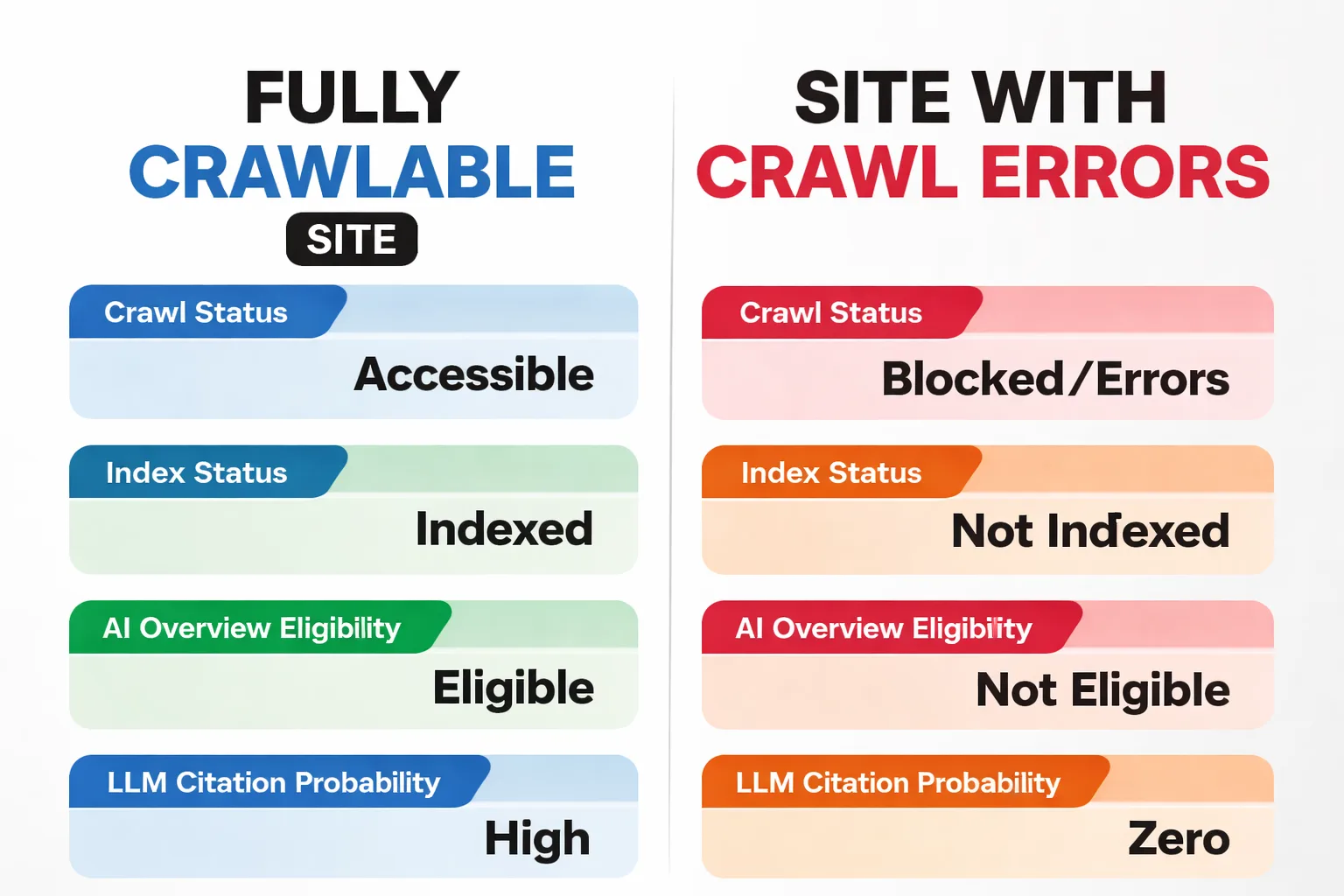
The connection is direct. AI Overviews, ChatGPT search, Perplexity, and other AI search surfaces rely on retrieval systems that pull from the Google index (or indexes that mirror its coverage). If Googlebot never crawled your page, that page's content is not in the retrieval layer. The AI model cannot cite what it cannot retrieve. A site ranking #1 in classic Google Search can be invisible in AI Overviews if its content is not structured for AI readability and fact density, despite having strong traditional SEO and robots.txt compliance.
The data on this gap is stark. A study referenced by Jason Berkowitz found 95% fewer product listings in Google AI Mode compared to standard search for identical queries. Standard search returned products on 88% of queries. AI Mode returned products on only 23%. And only 0.8% of products appearing in standard search also appeared in AI Mode responses, per research shared on LinkedIn. AI Mode averaged 4.3 products per response versus 22.5 in standard search.
This means brands with strong SEO footprints and verified crawl access are still losing visibility in AI Mode. The crawl is necessary but not sufficient. After crawl access is confirmed, the next layer is entity grounding: structured data that helps AI models understand what your brand is, what it offers, and how it relates to other entities in the knowledge graph.
Louis Smith, an ecommerce SEO practitioner, noted on LinkedIn that ecommerce sites with thousands of SKUs experience cascading crawl failures: products deleted, made out of stock, redirected to new SKUs, compounding into redirect chains and 404 errors. "Spending money on backlinks won't save a sinking ship," he wrote. "A good SEO will help Google crawl, render and rank your pages. Other LLMs will thank you for it too." That last sentence is the key insight: clean technical foundations serve both Googlebot and the LLMs that depend on the same index.
This is where the connection between crawl access and AI search visibility becomes concrete. A platform like Meev diagnoses where a brand is cited across AI search surfaces and where it is absent. But that diagnosis only works on pages that are actually in the index. If Googlebot cannot crawl your product pages, your blog posts, or your entity landing pages, no amount of AI visibility tracking will surface citations that do not exist. The crawl gap becomes an AI visibility gap.
The workflow is sequential. First, verify crawl access using the five steps above. Second, confirm indexation in GSC. Third, check whether your indexed pages are appearing in AI search results using an AI visibility checker. Fourth, if pages are indexed but not cited in AI answers, the problem shifts from crawl accessibility to content structure, fact density, and entity signals. That is where AEO and structured data work begins.
The pages Googlebot cannot reach are the same pages that will never appear in AI Overviews, never be cited by Perplexity, and never contribute to your brand's entity signals in the knowledge graph. Fix crawl first. Everything else builds on that foundation.
How Does Crawl Access Affect Entity Grounding?
Entity grounding is the process by which AI models understand what your brand is, what it offers, and how it relates to other entities in the knowledge graph. It is the foundation for AI citations. When ChatGPT or Perplexity generates an answer about "the best CRM for small businesses," it retrieves entities from its index and synthesizes an answer. If your brand is not grounded as an entity in the retrieval layer, it cannot be cited.
Crawl access is the first step in entity grounding. Googlebot must be able to crawl your pages to extract the structured data (schema markup, entity descriptions, relationship signals) that feeds the knowledge graph. If your product pages are blocked by robots.txt, your schema markup is invisible. If your JavaScript rendering fails and Googlebot cannot see your product data, your entity signals are lost.
The failure pattern in ecommerce is particularly destructive. A product page with proper Product schema (price, availability, reviews) tells Googlebot exactly what the product is and how it relates to the brand entity. But if that page is buried under a redirect chain (product deleted, redirected to a category page, then redirected to a new product), Googlebot may never reach the schema markup. The entity signal is fragmented across the redirect chain, and the knowledge graph cannot properly ground the product entity. The result: zero AI citations for that product, despite the content existing and being high quality.
The fix is to ensure that every page with entity-defining structured data is crawlable, returns 200 OK, and is not blocked by robots.txt or noindex directives. Test schema markup with Google's Rich Results Test (part of GSC) to confirm Googlebot can parse it. If the test returns errors, fix them before investing in additional content.
How Does Crawl Budget Impact Large Sites?
Crawl budget is the number of pages Googlebot will crawl on your site within a given timeframe. For small sites (under 10,000 pages), crawl budget is rarely a concern. Googlebot will crawl most pages regularly. For large sites (100,000+ pages, especially ecommerce with faceted navigation), crawl budget becomes a critical constraint.
If Googlebot wastes crawl budget on low-value pages (parameterized URLs, duplicate content, faceted navigation variants), it has less budget left for your important pages. The result: important product pages, blog posts, and category pages are crawled less frequently, indexed less reliably, and cited less often in AI answers.
The fix is to manage crawl budget actively. Block low-value URLs in robots.txt (faceted navigation, sorting parameters, filtered variants). Use canonical tags to consolidate duplicate URLs. Remove internal links to low-value pages. Submit a clean XML sitemap that includes only your most important URLs. Monitor server logs to see where Googlebot is spending its crawl budget and adjust accordingly.
For ecommerce sites, this is where the cascading crawl failure pattern becomes critical. When products are deleted and redirected, the redirect chains consume crawl budget. Each redirect in the chain costs Googlebot a fetch. If you have 1,000 redirect chains of 3 hops each, that is 3,000 wasted fetches that could have been spent on new or updated product pages. Clean up redirect chains by redirecting old URLs directly to the final destination (one hop, not three).
What This Won't Fix
Verifying crawl access is step one. It is not the only step. Teams that complete the five-step check above and find no issues may assume their AI visibility problems are solved. They are not.
Crawl access ensures Googlebot can fetch and index your pages. It does not guarantee that AI search engines will cite those pages. A page can be fully crawled, properly indexed, and ranking well in classic search while remaining invisible in AI Overviews and LLM citations. The gap between "indexed" and "cited by AI" involves content structure, fact density, entity signals, and third-party authority. Those are separate problems requiring separate work.
Additionally, crawl access does not address content quality. Google's AI search guidance emphasizes unique, non-commodity content. A site with perfect crawl accessibility but thin, duplicated, or AI-generated content that fails Google's Helpful Content System will not rank or get cited regardless of how well Googlebot can reach it. The crawl check is the foundation, not the building.
A practical boundary: if your team has invested in generative engine optimization and is still not seeing AI citations, the problem may not be your content strategy. It may be a crawl gap that you have not detected. Run the five-step check. Rule out crawl accessibility as the cause before investing more in content production or answer engine optimization tools. The most expensive mistake is spending budget on content for pages Googlebot cannot reach.
FAQ
How long does it take for Google to recrawl a fixed page?
Typically 3 to 14 days for a page with existing index history. For a brand new page, it can take longer. Use GSC's Request Indexing feature after fixing a crawl issue, but understand that requesting indexing does not guarantee immediate recrawl. Google prioritizes based on crawl budget, page authority, and update frequency. Pages with strong internal linking and frequent content updates get crawled faster.
Can I check if Bingbot can crawl my site too?
Yes. Bing Webmaster Tools offers a URL Inspection tool similar to GSC's. Bing tends to be more responsive to direct submission methods, so submitting URLs through Bing Webmaster Tools often produces faster indexing results than Google. The robots.txt file applies to all crawlers, so fixes made for Googlebot generally benefit Bingbot as well.
What does "Crawled, currently not indexed" mean?
Google fetched the page but chose not to include it in the index. This is a quality signal, not a crawl access problem. Googlebot reached the page successfully but determined it did not meet quality thresholds for indexing. Common causes include thin content, duplicate content, canonical conflicts, or low-quality signals. Fixing crawl access will not resolve this. You need to improve content quality and internal linking.
Does crawl access affect my AI search visibility reporting?
Yes. If pages are not crawled and indexed, they cannot appear in AI search results. Any AI visibility reporting will show those pages as absent, but the absence is caused by a crawl gap, not an AI optimization gap. Fix crawl access first, then re-measure AI visibility to see if citations appear. Without crawl access, you are measuring a void.
Should I use IndexNow to speed up crawling?
IndexNow is useful for getting new or updated URLs discovered faster. Meev submits to both IndexNow and Google Search Console on every publish, which covers Bing and Google. However, IndexNow only notifies search engines that a URL exists. It does not guarantee crawl or indexing. If there are crawl blockers (robots.txt, noindex, server errors), IndexNow will not override them. Use it as a supplement to, not a replacement for, the five-step check above.
How do I know if JavaScript is blocking Googlebot from seeing my content?
Use GSC's URL Inspection Live Test. After the test completes, click "View Tested Page" to see the rendered HTML and a screenshot of what Googlebot saw. If the screenshot shows your content, JavaScript rendering is working. If the screenshot shows a loading spinner, a blank page, or a cookie consent banner covering the content, you have a rendering problem. The fix is usually to implement server-side rendering or static generation for critical content, so Googlebot does not need to execute JavaScript to see your text and structured data.
Crawl access is the foundation. Everything else in AI search visibility, from AEO vs SEO strategies to entity grounding and knowledge graph presence, depends on it. Run the five steps. Fix what you find. Then build upward from there.
About the Author
Judy Zhou, Founder
Judy Zhou leads content strategy at Meev, where she oversees AI-driven content research and publishing for hundreds of brands. With a background in SEO and editorial operations, she focuses on building content systems that rank on Google, get cited by AI search engines, and drive measurable business results.
Run a full crawl and AI visibility diagnostic in minutes. See exactly where Googlebot is blocked and which pages are missing from AI search answers.