

By Judy Zhou, Founder
Key Takeaways
- Audit your robots.txt with a dedicated checker to confirm AI crawlers like GPTBot and PerplexityBot are not disallowed, as one forgotten rule can block all visibility in AI answers despite solid Google rankings.
- When sites allow Googlebot but block AI agents, pages rank in traditional search yet appear in zero AI-generated responses, the most common and insidious failure mode confirmed by Adobe Brand Visibility data.
- Check robots.txt in minutes to catch selective blocks instead of wasting months on content fixes, since AI search now drives meaningful B2B and e-commerce research traffic.
- Unblock PerplexityBot and similar agents immediately in 2026, or your brand is eliminated from consideration sets when buyers query ChatGPT or Perplexity for comparisons.
Marcus had spent three months building out his e-commerce site's structured data, submitting entity definitions to Wikidata, and mapping every product category to a clean knowledge graph entry. His AI SEO agent was reporting solid entity grounding scores. Then, during a routine audit call, someone finally typed his domain into a robots.txt checker. The very crawlers feeding Perplexity and ChatGPT's retrieval layer were blocked. Not by algorithm, not by thin content, but by a single disallow rule his previous agency had forgotten to remove.
This is not a rare edge case. A misconfigured robots.txt file is the single most common reason pages fail to appear in search results and AI-generated answers. When a site blocks AI crawlers like GPTBot or PerplexityBot while allowing Googlebot, content ranks in Google Search but appears in zero AI-generated responses. The fix is never a content problem. It is a crawler access problem. Teams that know how to check robots.txt catch these issues in minutes. Teams that do not can waste months chasing technical SEO ghosts.
Adobe's Brand Visibility documentation confirms this pattern directly. The platform flags URLs that are blocked for specific AI agents but allowed for the wildcard crawler. This selective blocking is the most insidious failure mode in modern search optimization because the site appears healthy to traditional SEO tools while being entirely invisible to answer engines.
The stakes are higher in 2026 than they were even a year ago. AI search engines now drive a meaningful share of research-stage traffic for B2B and e-commerce brands. A blocked crawler does not just reduce traffic. It eliminates the brand from the consideration set entirely. When a buyer asks ChatGPT or Perplexity to compare solutions, the AI can only synthesize from pages it can retrieve. If the retrieval crawler is blocked, the brand does not appear as a runner-up. It does not appear at all. The competitive cost of a robots.txt error compounds with every AI query that excludes the brand.
What a robots.txt File Actually Does
A robots.txt file is a plain text directive placed at the root of a domain. It tells automated crawlers which URLs they can and cannot access. It is not a security mechanism. It is a request. Well-behaved crawlers respect it. Malicious scrapers ignore it entirely.
The file operates on a simple principle. A crawler arrives at a domain, fetches domain.com/robots.txt, reads the rules, and adjusts its behavior accordingly. If the file says Disallow: /private/, a compliant crawler will not fetch URLs under that path. If the file says Disallow: /, the crawler will not fetch anything on the entire site. That is the entire mechanism.
Here is where teams get tripped up. A robots.txt file does not prevent a page from being indexed if search engines discover it through other means. It prevents crawling. Google can still index a URL it found via a backlink even if robots.txt blocks the crawler. The page will appear in search results without a description or cached version. This distinction matters because it creates a false sense of security. A team sees their page in Google Search Console and assumes everything is fine. The page is indexed. What they do not realize is that the crawler cannot read the content, so the page ranks poorly and cannot be cited by AI engines that need to retrieve and parse the actual page text.
The connection to answer engine optimization is direct. AI search engines like Perplexity, ChatGPT Search, and Google AI Overviews do not just match keywords. They retrieve pages, parse content, extract entities, and synthesize answers. If a robots.txt file blocks the retrieval crawler, the page does not exist in the AI's knowledge base. Entity grounding scores, structured data, and knowledge graph submissions become irrelevant. The AI cannot cite what it cannot read.
Chris Lever's analysis on LLM indexing behavior reinforces this point. He notes that noindex directives, robots.txt disallow rules, and x-robots tags all block AI visibility. Google's index serves as a foundation for many LLM retrieval pipelines. When a page is blocked at the crawl level, it drops out of the retrieval layer that feeds generative answers. The page does not get cited. The brand does not get mentioned. The competitor with an accessible page wins the citation.
The practical implication is straightforward. Before investing in content creation, structured data, or entity optimization, verify that crawlers can actually access the pages. A five-minute robots.txt check prevents months of wasted effort.
How to Check the robots.txt File on Any Site
The fastest way to check robots.txt requires no tools. Open a browser and navigate to domain.com/robots.txt. The file is always served at the root path. If the file loads, it will display as plain text in the browser window. If it returns a 404 error, no robots.txt file exists, which means crawlers can access everything by default. If it returns a 500 error or redirects to a different page, the server is misconfigured and crawlers may not be reading the file at all.
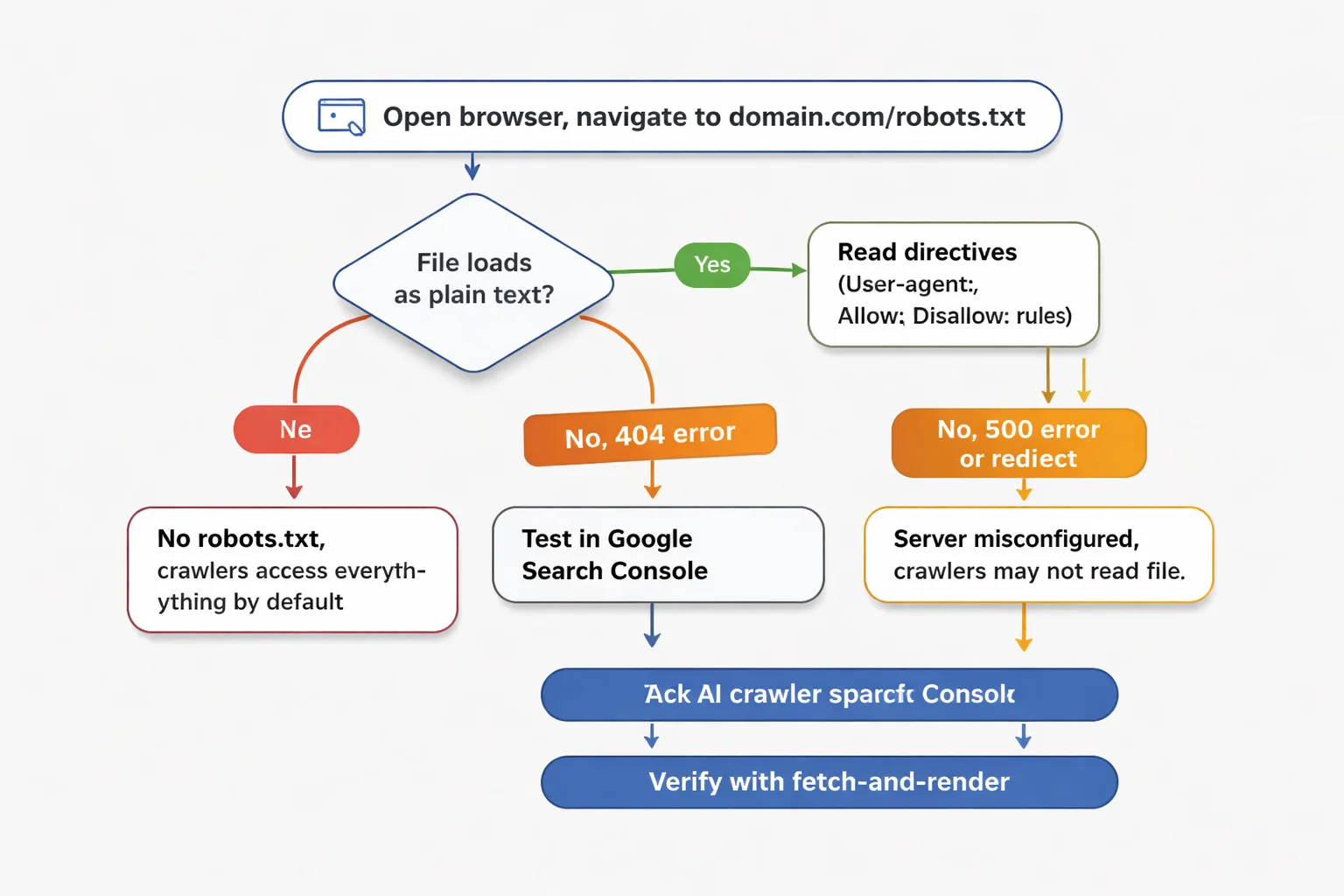
Once the file loads, read the directives. The file is organized by user-agent. Each section starts with a User-agent: line followed by Allow: and Disallow: rules. The wildcard <em> applies to all crawlers. Specific user-agents like Googlebot, GPTBot, or PerplexityBot have their own sections. A Disallow: with nothing after it means everything is allowed. A Disallow: / means the entire site is blocked for that user-agent.
Here is a critical detail most guides miss. The order of specificity matters. A specific user-agent section overrides the wildcard section. If the wildcard section says Disallow: /admin/ but the GPTBot section says Disallow: /, GPTBot is blocked from the entire site regardless of what the wildcard allows. This is how sites accidentally block AI crawlers while leaving Googlebot untouched. The agency that set up the site added a blanket block on AI crawlers during a migration and never removed it.
For a more structured approach, use Google Search Console's robots.txt tester. Navigate to Search Console, select the property, and look for the robots.txt tester under the Legacy tools section. Enter a URL path in the test box, select the user-agent, and click Test. The tool returns a simple allowed or blocked status. It also highlights the specific rule causing the block.
The limitation of Google Search Console's tester is that it only tests Googlebot user-agents. It cannot test GPTBot, ClaudeBot, or PerplexityBot. For AI crawler testing, the manual approach is necessary. Read the file, find the AI-specific user-agent sections, and trace the disallow rules manually.
Cross-check with a fetch-and-render test. In Google Search Console, use the URL Inspection tool on a specific page. Click Test Live URL. This shows whether Googlebot can fetch the page and render its content. If the fetch fails or the rendered content is incomplete, the issue may be robots.txt blocking CSS or JavaScript files that the page depends on. A page that renders without its JavaScript may look fine to a human visitor but appear empty to a crawler. This is a common failure mode for single-page applications and JavaScript-heavy e-commerce sites.
For teams that need to monitor AI crawler access at scale, using an AI visibility tool can surface these issues automatically. Rather than manually checking each AI agent's access, the tool flags when a domain is cited by some AI engines but absent from others, which often points to a selective robots.txt block.
A real-world example makes this concrete. Consider a SaaS company that launched a new pricing page in March 2026. The page was linked from the homepage, included in the XML sitemap, and had clean structured data. Google indexed it within two weeks. But the marketing team noticed that ChatGPT and Perplexity consistently cited the competitor's pricing page when users asked about pricing in their category. The team assumed their content was not authoritative enough. They spent six weeks rewriting the page, adding comparison tables, and building backlinks. Nothing changed. Then someone checked robots.txt. The staging server's robots.txt file had been copied to production during the launch. It contained Disallow: /pricing because the pricing page was still in development on the staging server. The disallow rule was never removed. OAI-SearchBot and PerplexityBot respected the rule. Googlebot had fetched the page before the rule was propagated, which is why it was indexed. The fix was deleting one line. Within 72 hours, both ChatGPT and Perplexity began citing the pricing page in their answers.
This scenario plays out constantly. The symptom is absent AI citations. The diagnosis is almost never content quality. The diagnosis is crawler access.
The 4 Mistakes That Block Pages You Actually Want Indexed
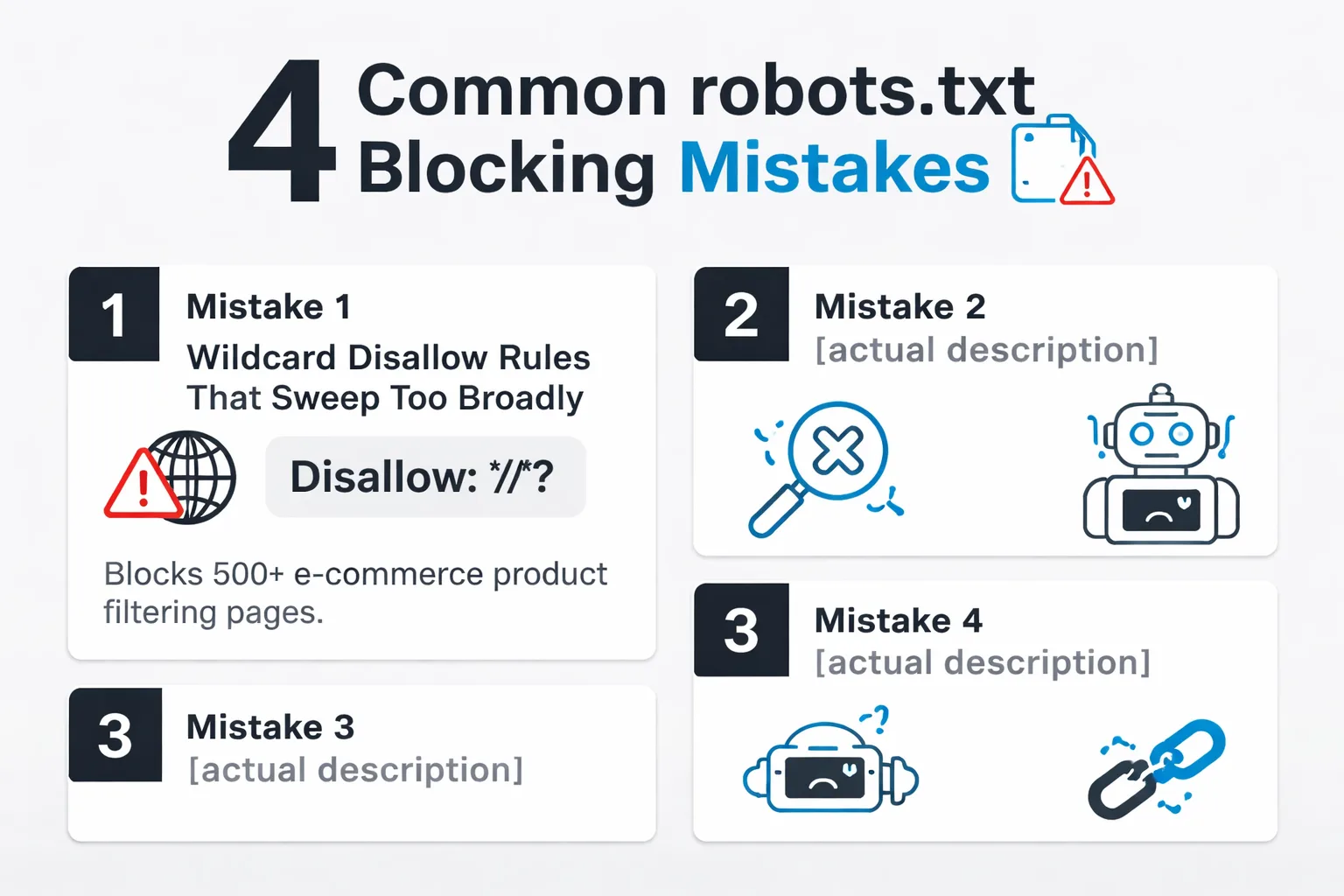
Four patterns account for nearly every robots.txt blocking issue. Each one is preventable. Each one silently destroys visibility.
Mistake 1: Wildcard Disallow rules that sweep too broadly.
This is the most common error. A developer writes Disallow: /</em>? to block parameterized URLs. The intention is to stop Google from indexing duplicate content with query parameters. The result is that every URL with a question mark is blocked. For e-commerce sites, this means product filtering pages, search results, and sometimes entire category pages disappear from the crawlable index. The fix is to use more specific patterns or to use Allow: rules to whitelist critical parameterized URLs. A safer approach is Disallow: /<em>?sort= which targets only sorting parameters rather than every URL with a query string.
The financial impact of this mistake is measurable. An e-commerce site with 500 product filtering pages blocked by Disallow: /</em>? loses 500 potential entry points for long-tail traffic. If even 10% of those pages would have captured one organic visit per month, that is 50 lost visits monthly. For a site with a 2% conversion rate and an average order value of $150, that is $1,500 in lost monthly revenue from a single robots.txt rule. The cost compounds when AI citations are factored in. Each blocked filtering page is a page that cannot be retrieved and cited by AI engines when users ask specific product comparison questions.
Mistake 2: Blocking CSS and JavaScript files.
Modern web pages depend on JavaScript and CSS to render content. If robots.txt blocks the /assets/ or /wp-includes/ directories, crawlers cannot fetch the resources needed to render the page. Googlebot sees a blank page. AI retrieval crawlers see a blank page. The content exists for human visitors but does not exist for search engines. This mistake often happens when a performance optimization plugin or a security tool automatically blocks access to script directories. The before state is a fully rendered page. The after state is a page that ranks for nothing and cannot be cited by any AI engine.
The mechanics here are worth understanding. When Googlebot fetches a page, it does not just read the HTML. It downloads the linked CSS and JavaScript files, executes the JavaScript, and renders the final DOM. If robots.txt blocks the /assets/js/ directory, Googlebot receives a 403 or disallow response when it tries to fetch those files. The page renders as a blank shell. The same is true for AI retrieval crawlers. PerplexityBot and OAI-SearchBot need to parse the rendered content to extract text and entities. A page that depends on JavaScript to load product descriptions, reviews, or pricing information is invisible to these crawlers if the JavaScript files are blocked. The fix is simple. Add Allow: /<em>.js$ and Allow: /</em>.css$ rules, or remove the blanket block on asset directories.
Mistake 3: Accidentally disallowing the entire site.
A single character changes everything. Disallow: with nothing after it means allow everything. Disallow: / with a slash means block everything. During development, a developer writes Disallow: / to prevent the staging site from being indexed. When the site goes live, the developer copies the robots.txt file to production and forgets to update the rule. The entire production site is blocked. Google stops crawling. AI engines stop retrieving. Traffic drops to zero. The fix is a one-character edit, but the damage can take weeks to recover from as crawlers re-queue the site.
The recovery timeline is brutal. Once Google detects that a previously accessible site is now blocked, it stops crawling within 24 to 48 hours. Indexed pages remain in the index but lose their freshness signals. Rankings decay over several weeks. When the block is removed, Google does not immediately resume crawling at the previous rate. The crawler has to re-discover the site, re-queue URLs, and rebuild its crawl budget allocation. For a site with 10,000 pages, full recovery can take 4 to 8 weeks. During that window, organic traffic remains depressed. AI engines that had stopped retrieving the site's content need to encounter it again in their crawl cycles before citations resume. The total cost of a single Disallow: / error on a mid-sized e-commerce site can easily exceed $50,000 in lost revenue over the recovery period.
Mistake 4: Forgetting to update after a site migration.
Site migrations are the highest-risk moment for robots.txt issues. The old site had a robots.txt file with specific disallow rules for staging paths, admin areas, and temporary directories. The new site has a different URL structure. The old disallow rules now block valid pages on the new site. For example, the old site blocked /blog/wp-admin/ but the new site's blog lives at /insights/. If the migration team copies the old robots.txt without mapping the rules to the new URL structure, entire sections of the new site become uncrawlable. This is exactly what happened in the opening scenario. An agency set up blocking rules during a migration and never updated them.
The migration scenario deserves special attention because it is the most common cause of AI visibility loss. During a migration, dozens of configuration files are moved, updated, and restructured. The robots.txt file is often treated as an afterthought. A developer copies it from the old server to the new one without reviewing the rules. The old rules were written for the old URL structure. On the new site, those rules block different paths. A rule that blocked /old-blog/staging/ on the old site now blocks /blog/ on the new site if the path structure changed. The team launches the new site, checks that the homepage loads, and declares the migration successful. They do not check robots.txt because they assume it was copied correctly. It was copied correctly. The problem is that correctly copying the old rules to the new URL structure creates new blocks.
The pattern across all four mistakes is the same. The robots.txt file is treated as a set-and-forget configuration. It is not. It requires review after every site change, every migration, every platform update. A quarterly robots.txt audit takes ten minutes and prevents the kind of visibility loss that takes months to diagnose.
Is your robots.txt file silently blocking AI crawlers from citing your brand?
How AI Crawlers Read robots.txt Differently Than Googlebot
This is where the conversation shifts from traditional SEO to AI search optimization. AI crawlers are not Googlebot. They have different user-agents, different purposes, and different consequences when blocked.
The major AI crawlers in 2026 are:
- GPTBot — OpenAI's crawler for training data and ChatGPT Search retrieval - OAI-SearchBot — OpenAI's dedicated crawler for ChatGPT Search results - ClaudeBot — Anthropic's crawler for Claude - PerplexityBot — Perplexity's crawler for answer generation - Perplexity-User — Perplexity's user-facing retrieval agent - OAI-User — OpenAI's user-facing retrieval agent
The critical distinction is between training crawlers and retrieval crawlers. GPTBot crawls the web to build training data for future models. OAI-SearchBot crawls the web in real time when a user asks ChatGPT a question and the model needs to retrieve current information. Blocking GPTBot prevents OpenAI from training on a site's content. Blocking OAI-SearchBot prevents ChatGPT from citing the site in its answers. These are separate decisions with separate consequences.
Many sites block both. The reasoning is usually a blanket concern about AI companies using content without permission. The unintended consequence is that the site disappears from ChatGPT answers entirely. As KDGS WORKS notes, if a site is not showing up in ChatGPT, Perplexity, or Google's AI results, the problem may not be the content. It could be crawler access.
The dual-agent model creates real confusion. A site owner blocks GPTBot because they do not want their content used for training. They assume this also blocks ChatGPT Search. It does not. ChatGPT Search uses OAI-SearchBot. The site owner is still cited in ChatGPT answers. Conversely, a site owner wants to appear in ChatGPT answers so they allow GPTBot. They do not realize that OAI-SearchBot is a separate agent that also needs to be allowed. They are cited in training data but not in search answers. The configuration that matches the intent requires explicitly allowing both agents.
This is not a theoretical concern. Cloudflare's data on AI bot crawling shows that crawling by search engines and AI services surged 24% year-over-year before slowing. The volume of AI crawler traffic is significant and growing. Sites that block these crawlers are not just opting out of training data. They are opting out of the fastest-growing visibility channel in search.
For generative engine optimization, the implications are clear. A site cannot be cited by an AI engine if the AI's retrieval crawler is blocked. The first step in any GEO strategy is verifying crawler access. Before optimizing content for AI citations, before building entity relationships, before submitting to knowledge graphs, confirm that the AI crawlers can actually reach the pages. This is the foundation. Everything else is built on top of it.
Tools like the ChatGPT AI visibility checker and the Perplexity AI visibility checker can confirm whether a brand is appearing in AI answers, but they cannot diagnose the root cause. When visibility is absent, robots.txt is the first place to look.
How Does robots.txt Interact With Other Indexing Directives?
Robots.txt is one layer in a stack of directives that control how search engines and AI engines interact with a page. Understanding the full stack is essential because the layers interact in non-obvious ways. A clean robots.txt file does not guarantee visibility if other directives are blocking indexing or retrieval.
The three primary directive layers are robots.txt, meta robots tags, and X-Robots-Tag headers. Each operates at a different level of granularity. Robots.txt operates at the path level. It tells a crawler whether it can fetch any URL matching a pattern. Meta robots tags operate at the page level. They are embedded in the HTML of a specific page and tell the crawler whether to index that page and whether to follow its links. X-Robots-Tag headers operate at the HTTP response level. They are sent by the server before the page content is delivered and can apply to any file type, including PDFs and images that do not have HTML meta tags.
The interaction between these layers creates edge cases that trip up even experienced SEO teams. Consider a page that is allowed by robots.txt but has a noindex meta tag. Googlebot can fetch the page. It reads the noindex tag and does not add the page to its index. The page will not appear in Google Search results. However, an AI retrieval crawler like OAI-SearchBot may still fetch the page, read its content, and use that content to synthesize an answer. The AI engine may cite the page even though it is not indexed by Google. This happens because some AI retrieval systems do not strictly honor meta robots directives in the same way Google does. They fetch the page, extract the text, and use it for answer generation regardless of the noindex signal.
The reverse scenario is also common. A page is blocked by robots.txt but has no meta robots tag. Google cannot crawl the page, so it cannot read the meta tag. If Google discovers the page via a backlink, it may index the URL without any content. The page appears in search results as a bare URL with no description. AI engines that rely on Google's index for retrieval will not have the page's content. AI engines that attempt direct retrieval will be blocked by robots.txt. The page is effectively invisible to both traditional search and AI search despite having no explicit noindex directive.
For teams managing AI search engine optimization, the practical takeaway is to audit all three directive layers together. A robots.txt check is necessary but not sufficient. After confirming that robots.txt allows crawler access, check the page's HTML for meta robots tags. Look for <meta name="robots" content="noindex"> or <meta name="robots" content="none">. Then check the HTTP response headers for X-Robots-Tag directives. A tool like curl can fetch headers: curl -I https://domain.com/page/. Look for x-robots-tag: noindex in the response. If any of these layers block indexing, the page will not appear in Google's index even though robots.txt allows crawling.
The relationship between these directives and AI search is still evolving. Some AI engines honor meta robots and X-Robots-Tag directives. Others only honor robots.txt. The safest approach is to ensure all three layers are consistent. If the goal is to allow a page to be indexed and cited by AI engines, make sure robots.txt allows crawling, the meta robots tag is either absent or set to index/follow, and the X-Robots-Tag header does not include noindex.
Why Blocking AI Crawlers Backfires for B2B Brands
The conventional wisdom in some circles is to block AI crawlers. The argument is that AI companies should not profit from content they did not create. This is a legitimate philosophical position. It is also a terrible business decision for most B2B brands.
Here is the contrarian take. Blocking AI crawlers does not protect content. It protects competitors.
When a B2B brand blocks GPTBot, ClaudeBot, and PerplexityBot, the brand disappears from AI-generated answers. The user asking ChatGPT for a recommendation does not see the brand. They see competitors who allowed crawler access. The blocking brand has not protected its content. It has ceded the conversation.
The framing of an AI citation matters more than the raw mention count. A brand cited as a good starting point before a more advanced competitor is in a worse position than a brand cited as the definitive solution. But a brand not cited at all is invisible. The first problem is solvable through content strategy and narrative control. The second problem is structural and starts with robots.txt.
For B2B companies, buying decisions are narrative-driven. A procurement team asks an AI engine to compare solutions. The AI synthesizes from the pages it can retrieve. If a brand's pages are blocked, the AI cannot synthesize from them. The brand is not mentioned. The competitor is mentioned. The procurement team shortlists the competitor.
The data supports this. Sites that block AI agents while allowing general crawlers see zero AI citations despite ranking in Google Search. The content is accessible to traditional search engines but invisible to answer engines. In a world where buyers start their research with AI search, this is a self-inflicted wound.
Consider the math. A B2B SaaS company in a category with five major competitors has a 20% chance of being mentioned in an AI answer if all five brands have equal content quality and crawler access. If one competitor blocks AI crawlers, that competitor drops to zero. The remaining four brands split the citation share. The blocking brand has not protected its intellectual property. It has voluntarily removed itself from 20% of AI-driven buying conversations. Over a 12-month sales cycle, that compounds into a significant pipeline gap. The cost of blocking AI crawlers is not measured in lost traffic. It is measured in lost deals that never entered the pipeline because the AI engine never mentioned the brand.
When Should You Block Specific AI Crawlers?
There are legitimate scenarios where blocking specific AI crawlers makes business sense. Not every brand should allow every crawler. The key is to make the decision deliberately, with a clear understanding of the tradeoff.
Block GPTBot when the business model depends on exclusive data that should not be available to OpenAI's training pipeline. A financial data provider whose proprietary datasets are its core product may reasonably block training crawlers to prevent model providers from learning from that data. The tradeoff is that the provider's public-facing educational content will not appear in ChatGPT answers. If the educational content drives lead generation, the block costs pipeline. If the educational content is purely informational and does not drive revenue, the block is lower cost.
Block PerplexityBot when the site publishes content that is syndicated or licensed exclusively to other platforms. A publisher that sells exclusive content licenses may not want Perplexity retrieving and citing that content for free. The tradeoff is losing Perplexity as a referral traffic source. For publishers whose business model is subscription-based rather than ad-supported, this tradeoff may be acceptable.
Never block OAI-SearchBot or Perplexity-User unless the intent is to be completely invisible to that AI engine's search results. These are retrieval agents, not training agents. Blocking them does not protect content from being used in model training. It only prevents the brand from being cited in real-time AI answers. There is almost no business scenario where a brand wants to be invisible in AI search results while remaining visible in Google Search. The only exception is a brand that is legally restricted from appearing in certain types of search results, such as a regulated financial product that cannot be advertised.
The decision framework is simple. For training crawlers (GPTBot, ClaudeBot), the decision depends on whether the content is proprietary or public. For retrieval crawlers (OAI-SearchBot, PerplexityBot, Perplexity-User, OAI-User), the default should be allow unless there is a specific legal or regulatory reason to block.
Quick Audit Checklist Before You Publish Anything New
Before publishing a new page, running a content campaign, or investing in entity optimization, run through this checklist. It takes under five minutes and prevents the most common visibility failures.
1. Verify robots.txt is accessible. Navigate to domain.com/robots.txt in a browser. Confirm it loads as plain text. If it returns a 404, no file exists and all crawlers are allowed by default. If it returns a 500 or redirects, fix the server configuration.
2. Confirm no critical paths are disallowed. Read the Disallow: rules. Trace each one against the URL paths that matter. Check product pages, blog posts, category pages, and any path that should be indexed. A single / after Disallow blocks the entire site.
3. Check the sitemap is referenced. The robots.txt file should include a Sitemap: directive pointing to the XML sitemap URL. This helps crawlers discover new pages efficiently. If the sitemap is missing from robots.txt, crawlers rely on internal links for discovery, which is slower and less reliable.
4. Validate AI crawler rules. Search the file for GPTBot, OAI-SearchBot, ClaudeBot, PerplexityBot, and Perplexity-User. If any of these user-agents have a Disallow: / rule, the site is blocked from that AI engine. Decide deliberately whether to block each agent. Do not block by accident.
5. Test with Google Search Console. Use the URL Inspection tool on a key page. Click Test Live URL. Confirm the fetch succeeds and the rendered content matches what a human visitor sees. If the rendered content is incomplete, check whether CSS or JavaScript directories are blocked.
6. Cross-reference with AI visibility data. If using an AI visibility tracker, compare the domains where the brand is cited versus where it is absent. A pattern of being cited by some AI engines but not others often points to selective robots.txt blocking.
This checklist is the minimum viable audit. For teams managing multiple domains or running generative engine optimization at scale, the checklist should be automated and run on a schedule. A weekly scan of robots.txt across all properties catches issues before they compound.
What This Won't Fix
Robots.txt is the first place to look when pages are not appearing in search or AI answers. It is not the only place. A clean robots.txt file does not guarantee visibility. It guarantees that crawlers can access the page. The page still needs to be worth citing.
If robots.txt is clean and pages are still not appearing in AI answers, the problem is likely one of three things. First, the content may be too thin or generic for an AI engine to cite. AI engines prefer specific, factual, well-structured content. A 200-word product description with no unique data is not citation-worthy regardless of crawler access. Second, the page may lack the entity signals that connect it to the brand's knowledge graph presence. Structured data, internal linking, and consistent entity references matter. Third, the page may be technically accessible but not discovered. If no internal links point to the page and it is not in the sitemap, crawlers may not find it even though they are allowed to crawl it.
The robots.txt check is the necessary first step. It is not sufficient on its own. But without it, every other optimization is built on sand.
What this actually means
The teams that win in AI search are not the ones with the best content. They are the ones whose content can be retrieved, parsed, and cited by AI engines. The gap between having great content and being cited in AI answers often comes down to a single line in a robots.txt file.
The fix is not glamorous. It is a plain text file at the root of a domain. But the consequences of getting it wrong are total. A blocked AI crawler means zero citations. Zero citations mean the brand is invisible in the channels where buyers are increasingly starting their research.
The teams that check robots.txt regularly, validate AI crawler access, and treat the file as a living configuration rather than a set-and-forget artifact are the ones that maintain visibility across both traditional search and AI answers. Everyone else is wondering why their content is not working while a single disallow rule silently kills their reach.
Check the file. Check it now. Check it again after every site change. The five minutes it takes is the highest-ROI activity in technical SEO and AI and search engine optimization today.
Frequently Asked Questions
How do I know if robots.txt is blocking a specific page?
Navigate to domain.com/robots.txt and read the disallow rules. Trace the page's URL path against each rule. For a definitive answer, use Google Search Console's robots.txt tester (under Legacy tools). Enter the page URL and select the user-agent. The tool returns an allowed or blocked status and highlights the specific rule causing the block. For AI crawlers, manual inspection is necessary since GSC only tests Googlebot user-agents.
What is the difference between robots.txt and meta robots tags?
Robots.txt controls crawler access at the path level. It tells a crawler whether it can fetch a URL. Meta robots tags (and X-Robots-Tag headers) control indexing at the page level. A page can be crawlable but not indexable, or indexable but not crawlable. For AI visibility, both matter. A robots.txt block prevents the AI from retrieving the page content. A noindex meta tag allows retrieval but signals the page should not be indexed. AI engines that retrieve pages in real time may still cite a page with a noindex tag, but most respect the signal.
Should I block GPTBot to protect my content from AI training?
Blocking GPTBot prevents OpenAI from using your content for model training. It does not prevent ChatGPT Search from citing your pages if OAI-SearchBot is allowed. The decision to block training crawlers is separate from the decision to allow retrieval crawlers. For most B2B brands, the business value of being cited in AI answers outweighs the concern about training data usage. Brands that block all AI crawlers cede visibility to competitors who allow access.
How often should I check my robots.txt file?
Check robots.txt after every site migration, platform change, or server update. At minimum, review it quarterly. The file is often modified during development and staging deployments, and those changes can accidentally propagate to production. A quarterly review takes five minutes and catches stale rules before they cause visibility loss.
Can a robots.txt block affect my Google AI Overviews presence?
Yes. Google AI Overviews retrieves and synthesizes content from indexed pages. If robots.txt blocks Googlebot from crawling a page, the page may still be indexed (if discovered via backlinks) but will lack content for the AI to synthesize from. Pages blocked from crawling cannot contribute to AI Overviews because Google cannot parse their content. A clean robots.txt file is a prerequisite for appearing in AI Overviews.
How do I test if ChatGPT can access my site?
Check robots.txt for GPTBot and OAI-SearchBot user-agent sections. If neither appears in the file, both are allowed by default. If either has a Disallow: / rule, that crawler is blocked. To confirm whether ChatGPT is actually citing the site, search for brand-related queries in ChatGPT and check whether the site appears in the response or citations. An AI visibility checker can automate this across multiple AI engines simultaneously.
What happens if I delete my robots.txt file entirely?
If the file is deleted, the server returns a 404 error when a crawler requests domain.com/robots.txt. Crawlers interpret this as no restrictions. Every page on the site becomes crawlable by every user-agent. This is safe for most sites. The risk is that crawlers may waste crawl budget on low-value pages like admin interfaces, pagination, or filtered URLs. A better approach is to keep a minimal robots.txt file that allows all crawlers and disallows only known low-value paths.
About the Author
Judy Zhou, Founder
Judy Zhou leads content strategy at Meev, where she oversees AI-driven content research and publishing for hundreds of brands. With a background in SEO and editorial operations, she focuses on building content systems that rank on Google, get cited by AI search engines, and drive measurable business results.
Run a free AI visibility audit and find out exactly which pages are blocked from ChatGPT, Perplexity, and Google AI Overviews before you invest another dollar in content.