

By Judy Zhou, Founder
Key Takeaways
- AI Overviews cite fewer than 4% of pages with broken internal links, according to a Semrush study of 200,000 queries.
- 66.5% of pages contain at least one broken external link, based on Ahrefs' crawl of 11.8 million pages.
- Run a full-site crawl, export the broken-link report, then prioritize fixes by page authority instead of stopping after the export.
- Fix or redirect dead links on sites older than two years to restore eligibility for AI citations that stop at 404 errors.
Every dead link on your site is an AI citation you'll never earn.
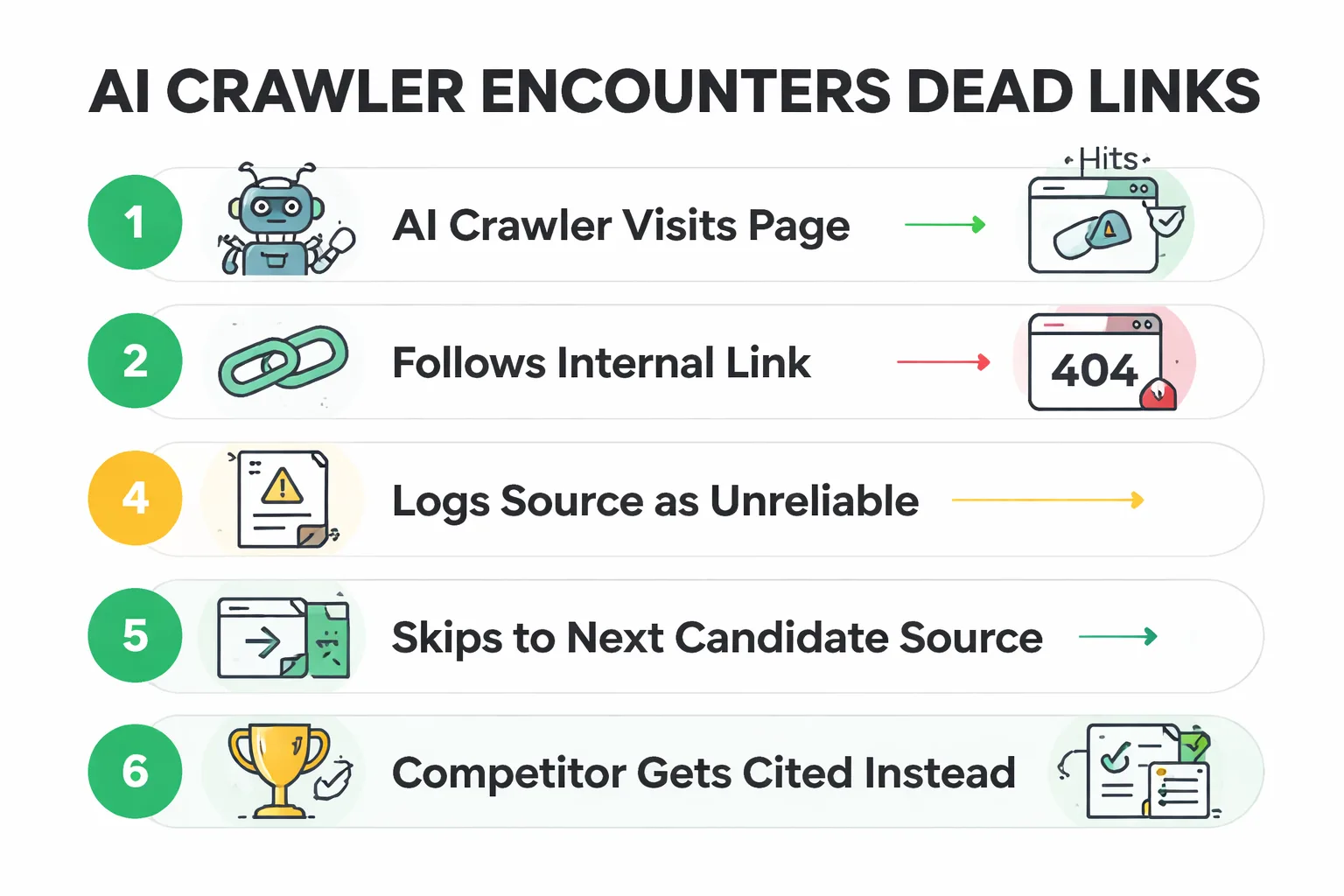
That sentence sounds dramatic until you look at the data. A Semrush study of 200,000 queries found that AI Overviews cite fewer than 4% of pages with broken internal links. When an AI crawler hits a 404, it stops. It doesn't guess what was there. It moves on to the next source, and your competitor gets the citation.
I'm Judy Zhou, and in my work leading content strategy at Meev, I audit sites that are losing AI visibility every single day because of link rot they don't even know about. Ahrefs' study of 11.8 million pages found that 66.5% of pages have at least one broken external link. Internal links break too, especially on sites older than two years. The fix starts with a systematic dead link check, and it's less complicated than most guides make it look.
The five steps are: choose a crawl tool, run a full-site crawl, export the broken link report, prioritize by page authority, and fix or redirect. Most teams stop at step three. They export a list, feel productive, and never touch it again. By the end of this article, you'll know not just how to find dead links but which ones actually matter for your AI search visibility.
What Does a Dead Link Mean?
A dead link (also called a broken link) is a hyperlink pointing to a page that no longer exists. The server returns a 404 status code, or sometimes a 410 Gone, or in worse cases a 200 OK with an empty page (a soft 404). The link looks normal to a human scanning the page, but clicking it leads nowhere.
Here's why this matters more than it used to. Three years ago, a broken link was a UX annoyance and a minor SEO signal. You'd lose a trickle of link equity, and maybe a visitor would bounce. Today, broken links damage something far more valuable: your eligibility to be cited by AI search engines.
When a crawler from Google's AI systems, Perplexity's indexing pipeline, or any LLM-powered answer engine encounters broken links, it reads them as a signal of neglect. Think of it like a citation in an academic paper. If a reviewer checks your references and three of them lead to blank pages, they question the credibility of the entire paper. AI crawlers do the same thing at scale. A site with pervasive link rot gets deprioritized as a citation source, even if the content itself is excellent.
The technical impact compounds. Dead links waste crawl budget. Googlebot allocates a finite crawl budget to each domain, and every 404 response consumes part of that budget without returning any indexable content. On large sites (ecommerce catalogs, documentation hubs, news archives), this means your fresh, important pages get crawled less frequently because the crawler is busy discovering dead ends.
There's also the internal linking dimension. When a high-authority page links to a 404, that link equity evaporates. It doesn't pass through to anywhere useful. You've essentially taken a vote of confidence from a strong page and thrown it into a void. In my work auditing content operations, I see this pattern constantly: a site's best page links to a resource that was deleted during a redesign, and nobody noticed for months.
Google's own documentation confirms that 404s don't directly penalize your site, but they do waste crawl budget and prevent link equity from flowing. The indirect damage is what kills you.
Let me give you a concrete example of how this plays out. I audited a B2B SaaS company last quarter that had published a definitive guide on workflow automation. This guide ranked in the top 3 for their primary keyword and was being cited by Perplexity in answer to questions about automation tools. The guide contained 14 internal links to supporting blog posts, a product comparison page, and two case studies. During a site migration, three of those linked-to pages were consolidated into new URLs without redirects. The old URLs returned 404s. Within two weeks, Perplexity stopped citing the guide. The guide still ranked on Google (the content was still strong), but the AI engine had re-evaluated the page, found three dead ends, and dropped it from the citation set. The fix took 20 minutes (three 301 redirects), but the citation didn't return for five weeks because that's how long it took for Perplexity's crawler to revisit and re-evaluate the page.
That's the real cost of a dead link. Not a ranking drop. Not a traffic decline. A silent removal from AI answer sets that you might not notice for weeks.
How to Check for Dead Links on a Website: 5 Steps
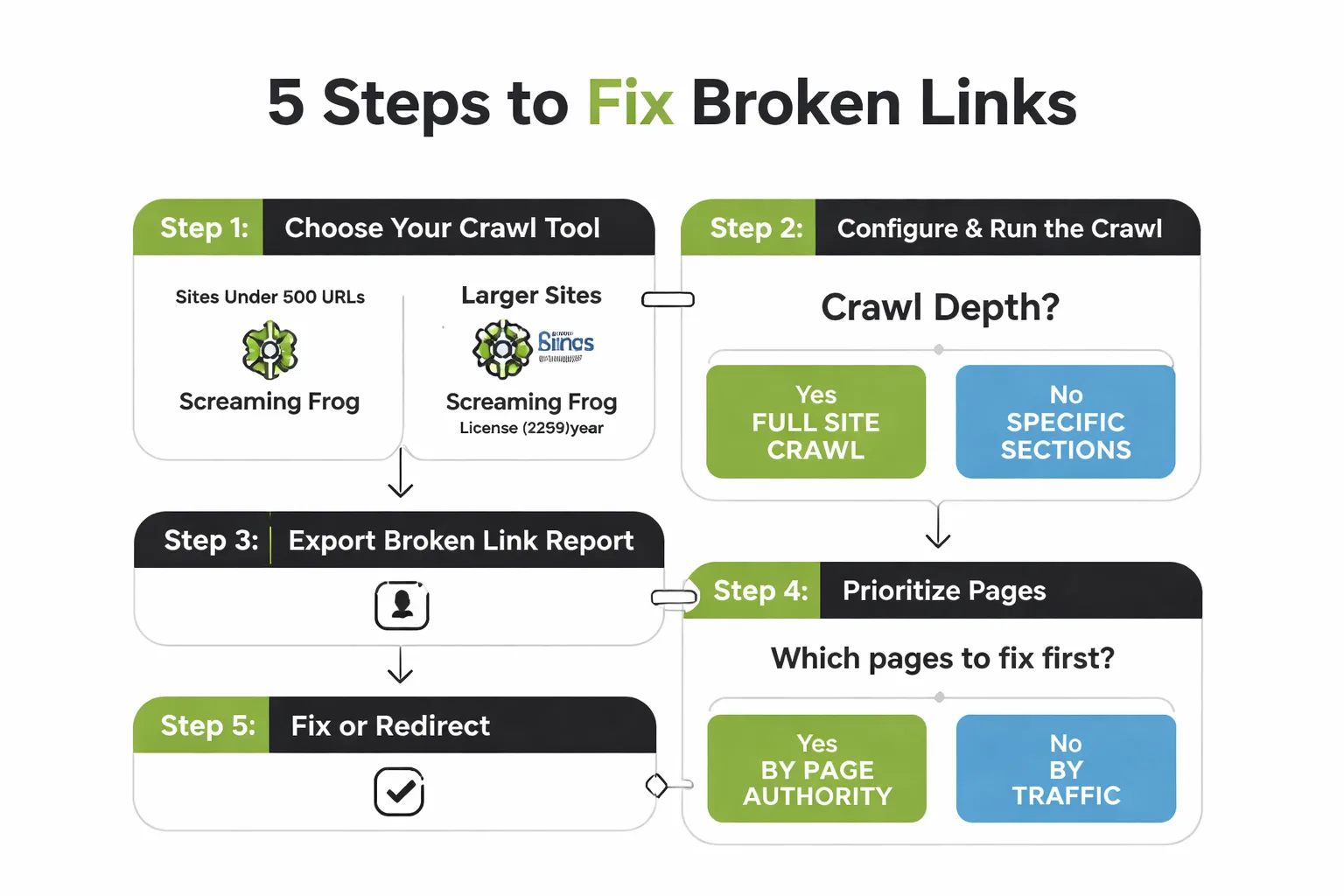
This is the part where most articles say "use our tool" and call it a day. I'm going to give you the actual methodology I use, with specific tools and decision points at each step. You can follow this with free tools, paid tools, or a combination.
Step 1: Choose Your Crawl Tool
The tool you pick depends on your site size and budget. For sites under 500 URLs, the free version of Screaming Frog SEO Spider works perfectly. It crawls up to 500 URLs and identifies broken links (404s), server errors (5xx), and broken redirects. For larger sites, the paid license ($259/year) removes the URL limit and adds features like JavaScript rendering, which matters because modern sites load content dynamically.
If you already use Ahrefs, their Site Audit tool includes broken link detection as part of the standard crawl. The advantage is integration: you see broken links alongside other technical issues in one dashboard. The disadvantage is that Ahrefs crawls from the cloud, which means it might miss internal links that only appear when JavaScript executes.
A third option for quick checks: browser extensions like Check My Links (Chrome) or Link Miner (Firefox). These scan the links on a single page, not the whole site. They're useful for checking a specific high-value page before a campaign launch, but they're not a substitute for a full-site crawl.
In practice, as the Search Atlas comparison notes, a lot of marketers don't choose between Ahrefs and Screaming Frog. They use both. Screaming Frog for deep technical crawls, Ahrefs for ongoing monitoring.
There's also a newer category of AI-powered tools that can scan thousands of pages in minutes, as noted in Snezzi's analysis of AI tools for broken links. These tools are faster but less configurable than traditional crawlers. I'd treat them as a first-pass scanner, not a replacement for a full Screaming Frog crawl. Use them to get a quick count of broken links, then switch to a dedicated crawler for the detailed export and prioritization work.
Step 2: Run a Full-Site Crawl
Once you've picked your tool, configure the crawl before hitting start. The two settings that matter most: crawl depth and user agent.
Set crawl depth to unlimited if your site is under 10,000 URLs. For larger sites, start with a depth of 10 and increase if needed. Most broken links live within 3-4 clicks of the homepage, so you'll catch the majority even with a shallow crawl.
For user agent, use Googlebot (Smartphone). This tells you what Google's mobile crawler sees, which is what Google actually uses for indexing. If your site serves different content to mobile vs. desktop (responsive design handles this automatically, but some older sites don't), you need to know the mobile version specifically.
Let the crawl run to completion. On a 2,000-URL site, this takes 15-30 minutes with Screaming Frog. On a 50,000-URL ecommerce site, it can take several hours. Don't interrupt it.
One thing I've learned the hard way: run the crawl from your own machine or server, not from a shared cloud IP. Some sites rate-limit or block cloud crawler IPs, which gives you incomplete data and makes you think you have fewer broken links than you actually do.
There's a configuration detail most guides skip: exclude URL parameters that create duplicate URLs. If your site uses session IDs, sorting parameters, or tracking parameters (like ?utm_source or ?sort=price), configure your crawler to ignore them or collapse them. Otherwise, the crawler will visit the same page 15 times with different parameters, wasting crawl time and inflating your broken link count with duplicates. In Screaming Frog, this is under Configuration > Spider > Parameters. Set it before you crawl.
Also, check your robots.txt settings before crawling. If your robots.txt blocks certain directories, your crawler will respect those rules by default and skip those sections. This is usually what you want, but if you've accidentally blocked a directory that contains important pages (I've seen this happen with /blog/ directories blocked by a misconfigured WordPress security plugin), your crawl will miss broken links in that section. Review robots.txt in Search Console's robots.txt Tester before running your crawl.
Step 3: Export the Broken Link Report
When the crawl finishes, filter for response codes in the 4xx and 5xx range. In Screaming Frog, go to the Response Codes tab, filter by "Client Error (4xx)", and you'll see every broken link the crawler found.
Export this as a CSV. You need the following columns at minimum: source URL (the page containing the broken link), destination URL (the dead page), anchor text, and response code. The source URL is what you'll actually edit. The destination URL tells you what needs to be fixed or redirected.
Don't skip the export. I've seen teams try to fix broken links directly from the tool's interface, and they lose track of what they've fixed and what's still pending. A spreadsheet gives you a working document you can sort, filter, and mark as complete.
Here's what to look for in the export. Group the broken links by type. 404 errors are the most common (the destination page doesn't exist). 410 Gone errors are rarer but intentional (someone marked the page as permanently deleted). 500 and 503 errors are server-side issues, not broken links per se, but they have the same effect on crawlers. Soft 404s are the sneakiest: the server returns a 200 OK status, but the page is essentially empty ("product not found" or "no results found"). Crawlers are getting better at detecting soft 404s, but they still slip through. Screaming Frog flags suspected soft 404s in a separate column, so check that filter too.
Pay attention to the anchor text column. If you see the same anchor text repeated across multiple broken links (e.g., "click here" pointing to 12 different dead URLs), that's a sign of a systematic linking error, probably a template or footer issue. Fix the template once and all 12 links are resolved. These batch fixes are where you get the most ROI on your time.
Step 4: Prioritize by Page Authority
This is where most teams fail. They get a list of 200 broken links and try to fix them all at once. That's a waste of time.
Not all broken links are equal. A dead link on your homepage costs you more than a dead link on a blog post from 2019 that gets 3 monthly visits. Sort your exported report by the authority of the source page (the page containing the broken link, not the dead destination).
Here's the priority order I use:
1. Pages that receive AI citations today. If ChatGPT or Perplexity is already citing one of your pages, a broken link on that page undermines your credibility as a source. Fix these first. 2. High-traffic pages (top 10% by organic traffic from Google Search Console). 3. Pages with high internal link count (hub pages, pillar content, category pages). 4. Pages with external backlinks pointing to them. 5. Everything else.
If you're tracking your AI visibility with a tool like Meev's AI visibility tracker, you can cross-reference which of your pages are being cited by AI engines and prioritize broken link fixes on those pages specifically. This is the connection most SEO teams miss: they treat broken links as a technical SEO task, when they should be treating them as an AI citation preservation task.
Let me walk through the scoring model I mentioned earlier. Pull three data points for each source URL in your broken link report: page authority (from Ahrefs, Moz, or your preferred tool), monthly organic traffic (from Google Search Console), and AI citation count (from your AI visibility tracking). Multiply the three. Sort descending. The top of the list is where you start.
Here's why this works. A page with authority 40, 3,000 monthly visits, and 2 AI citations scores 240,000. A page with authority 15, 50 monthly visits, and 0 AI citations scores 0. The first page's broken link is 240,000 times more impactful than the second's. Without scoring, you'd treat them equally. With scoring, you fix the high-impact page in the first hour and leave the low-impact one for later (or never).
Step 5: Fix or Redirect
You have three options for each broken link, and the right choice depends on what the destination page was.
Option A: Update the link. If the destination page moved to a new URL, update the hyperlink to point to the new location. This is the cleanest fix because it preserves the user's intent and passes link equity directly.
Option B: Add a 301 redirect. If the destination page was deleted but a similar page exists, add a 301 redirect from the dead URL to the closest matching live page. This catches not just the internal link but any external backlinks pointing to the old URL.
Option C: Remove the link. If there's no replacement page and the link is no longer relevant, delete the hyperlink from the source page. Don't leave it pointing to a 404.
For ecommerce sites, Option B is usually the right call. Product pages get discontinued constantly, and a 301 redirect to the parent category page preserves both link equity and user experience. For content sites, Option A is more common because blog posts get updated rather than deleted.
After fixing, re-run your crawl to verify the fixes worked. This confirmation step takes 5 minutes and catches errors like typos in redirect rules.
One mistake I see repeatedly: teams add a 301 redirect but forget to update the internal link on the source page. Now the link goes from the source page to the old URL, hits the 301, and lands on the new URL. That works, but it's a two-hop journey that wastes a fraction of link equity (Google has said 301s pass full equity, but in practice, every redirect adds latency for crawlers). The cleaner approach is to do both: add the 301 redirect (to catch external backlinks) and update the internal link to point directly to the new URL. Belt and suspenders.
Which Pages to Prioritize First
The triage framework from Step 4 deserves more depth because it's the difference between a productive audit and a wasted afternoon.
Start with your AI-cited pages. These are the pages where an AI engine has already decided you're a trustworthy source. A broken link on one of these pages is like showing up to a meeting with a typo on your slide. It undermines the confidence the AI has in your content. If you're using an AI visibility tool to track where you're being cited, pull the list of cited URLs and cross-reference it against your broken link report. Any overlap goes to the top of the fix list.
Next, look at your internal linking structure. Pages that serve as hubs (they link to many other pages) are force multipliers. A broken link on a hub page doesn't just lose one link. It disrupts the crawl path to every page that hub was meant to connect. Google's crawler follows links sequentially, and when it hits a 404 on a hub page, it may skip the remaining links on that page.
Then check pages with external backlinks. If a referring domain links to your page, and your page contains a broken link, you're wasting the authority that backlink passes to you. Use your backlink analytics to identify which pages have the most referring domains, and check those pages first.
Orphan pages (pages with no internal links pointing to them) go last. They're already invisible to crawlers, so a broken link on an orphan page has minimal impact. Fix them if you have time, but don't let them distract you from the high-value pages.
Louis Smith, who has spent 13 years auditing 7-9 figure Shopify brands, includes broken internal links as point 5 in his 41-point ROI checklist for Shopify audits. His framing is right: don't chase every issue. Chase the ones that affect profit. In the context of AI search, profit comes from being cited, and citations come from being a reliable source. Broken links make you unreliable.
Chris Donnelly made a related point in a LinkedIn discussion about keyword rankings and AI: the conversation has shifted from rankings to visibility across AI surfaces. Broken internal links are the technical debt that drags down that visibility. You can have the best content on a topic, but if your internal linking structure is broken, AI crawlers can't verify your authority on the connected concepts.
How Do Dead Links Affect AI Search Citations?
This is the question that connects technical SEO to the thing you actually care about: getting cited by AI engines.
AI search engines like ChatGPT, Perplexity, and Google AI Overviews don't just read your content. They evaluate your site's reliability as a source. Broken links are one of the clearest reliability signals they can measure. A site with 5% broken links is telling the crawler: "I don't maintain my content." A site with 0.2% broken links is saying: "I keep my house in order."
The mechanism is straightforward. When an AI crawler like Google's indexing system or Perplexity's bot visits your page, it follows internal links to discover related content. Each 404 response is a dead end. The crawler logs the failure, adjusts its confidence score for your domain downward, and moves on. Do this enough times across enough pages, and your domain gets flagged as a low-reliability source. You don't get a notification. You don't get a warning in Search Console. You just stop appearing in AI answers.
According to Semrush's 2025 AI Overviews study analyzing 200,000 queries, pages cited in AI Overviews have significantly fewer technical errors than the average page in the same SERP. The correlation isn't subtle. Clean technical hygiene is table stakes for AI citation eligibility.
This is where the connection to answer engine optimization becomes concrete. AEO isn't just about writing content that AI engines want to cite. It's about maintaining a site structure that AI crawlers can navigate without hitting dead ends. Your content could be the best answer to a query, but if the crawler encounters three 404s while evaluating your page, it may choose a competitor whose content is slightly worse but whose site is clean.
The entity grounding dimension matters too. AI engines build knowledge graphs by following links between related concepts. When you link from a page about "email marketing" to a page about "open rates," you're telling the AI these concepts are related and you're an authority on both. If that link is broken, the entity relationship breaks. The AI can't verify your authority on the connected concept, and your knowledge graph presence weakens.
For teams investing in generative engine optimization, this means dead link checking isn't a one-time technical task. It's an ongoing maintenance practice that directly affects whether your content gets cited or ignored.
Let me make the entity grounding piece more concrete. Say you have a pillar page about "marketing automation tools" and it links to cluster pages about "email sequencing," "lead scoring," and "CRM integration." These internal links tell an AI crawler: "I'm not just writing about automation tools. I have deep, verified content on each sub-topic." The crawler follows each link, reads the cluster page, and builds a richer understanding of your domain authority across the entire topic cluster. Now imagine the link to "lead scoring" is broken. The crawler hits a 404. It can't verify your authority on lead scoring. Your knowledge graph entity for "marketing automation" is now missing a node. The AI engine has less confidence in your comprehensive authority, and when it constructs an answer about lead scoring specifically, it cites a competitor whose internal links all work.
This is why broken links are more damaging in the AI search era than they were in the classic Google era. Classic Google evaluated pages individually. A broken link on page A didn't necessarily affect page B's ranking. AI engines evaluate domains as interconnected graphs. A broken link anywhere in the cluster weakens the entire cluster's authority signal.
Are broken links quietly killing your AI citations?
Why Most Teams Skip Step 4
The prioritization step is the one most teams skip, and I understand why. It requires data from multiple sources: your crawl report, your Search Console traffic data, your backlink profile, and your AI visibility tracking. Most teams have these tools but don't connect them.
The honest tradeoff: if you skip prioritization and just fix broken links in the order they appear in the export, you'll fix some important ones by accident. But you'll also spend hours fixing dead links on pages that nobody visits and no AI engine cites. The opportunity cost is the high-value fixes you didn't get to because you were busy updating a link on a 2018 blog post with 2 monthly visitors.
The teams that do this well build a simple scoring model: page authority times monthly traffic times AI citation count. Sort by that score. Fix from the top. It takes 20 minutes to set up and saves hours of misdirected work.
Where This Breaks Down
This methodology has limits, and pretending otherwise would be dishonest.
First, JavaScript-rendered links. If your site loads content via JavaScript (React, Vue, Angular), a standard crawl won't find all your links. Screaming Frog's paid version has a JavaScript rendering mode, but it's slower and can still miss dynamically injected links. If your site is a JavaScript-heavy single-page application, you need a rendering-enabled crawl, and even then, some links won't be detected.
Second, links behind authentication. If you have gated content, member-only pages, or login-required resources, your crawler won't find broken links on those pages without authentication configuration. Most teams skip this, which means broken links in gated areas go undetected for months.
Third, external links you don't control. You can fix internal broken links, but if an external site you link to goes down, you can't fix their server. You can only remove or update your link to them. This means dead link checking is never truly "done." It's a recurring maintenance task.
How Often Should You Run a Dead Link Check?
For sites under 500 pages: quarterly. For sites between 500 and 5,000 pages: monthly. For ecommerce sites or large content hubs above 5,000 pages: weekly, with automated monitoring.
The frequency depends on how often your content changes. If you publish daily, link rot accumulates faster. If your site is static and rarely updated, quarterly is sufficient.
I recommend scheduling the crawl for the day after your biggest publishing day. If you publish new articles every Monday, crawl on Tuesday. This catches broken links introduced by new content before they affect your AI citation eligibility for the week.
For ongoing monitoring, set up alerts in Google Search Console. The Coverage report flags new 404s as they're discovered, which gives you a passive monitoring layer between active crawls. It's not comprehensive (Search Console only reports 404s that Googlebot encounters), but it catches the high-impact ones.
The cadence question is really about risk tolerance. If your business depends on AI citations for lead generation (and increasingly, B2B businesses do), you can't afford to wait three months between checks. A broken link introduced the day after your last crawl could cost you eight weeks of lost citations before your next quarterly audit. For revenue-critical sites, I'd set up weekly crawls with email alerts for new 404s. Screaming Frog has a command-line interface that supports scheduled crawls, and you can pipe the results to a Slack webhook for real-time alerts.
Internal vs External Dead Links: Why the Difference Matters
Not all dead links are created equal. The source of the break determines the fix, the urgency, and the impact on your AI citation eligibility.
Internal dead links are links from one page on your site to another page on your site that no longer exists. These are the ones you have full control over. You caused them (usually during a migration, redesign, or content cleanup), and you can fix them directly. Internal broken links are the most damaging for AI search because they break your site's internal graph. AI crawlers use internal links to map your domain's topical authority. Every broken internal link is a missing connection in that map.
External dead links are links from your site to a page on another domain that has gone offline or moved. You didn't cause these, and you can't fix the destination. Your only option is to update or remove the link on your end. External broken links are less damaging for AI citation eligibility (they don't break your internal graph), but they still signal poor maintenance. A page with five broken external links tells an AI crawler: "This author doesn't verify their sources." That's a credibility hit.
The fix priority is clear: internal first, external second. Internal broken links affect your site's structural integrity. External broken links affect your page's perceived quality. Both matter, but internal links are the foundation.
There's a third category that sits between internal and external: links to your own properties on different domains. If you link from your main site to your help center (hosted on a different domain), and the help center page goes down, that's technically an external link but functionally an internal one. Treat these with the same urgency as internal links because they're part of your brand's digital footprint.
How to Prevent Dead Links Before They Happen
Fixing broken links is reactive. Preventing them is proactive, and it's significantly cheaper.
The most common cause of dead links is content deletion without redirects. Someone deletes an old blog post, a discontinued product page, or an outdated landing page, and every internal link pointing to that URL dies instantly. The fix is a simple policy: never delete a URL without adding a 301 redirect. Make this a non-negotiable step in your CMS workflow. In WordPress, you can use a redirect plugin (Redirection is the most popular) that automatically prompts you to add a redirect when you delete or change a post URL. In Shopify, URL redirects are built into the admin under Online Store > Navigation > URL Redirects.
The second most common cause is site migrations. When you move from one domain to another, or from HTTP to HTTPS, or from one CMS to another, URL structures change. Every old URL needs a 301 redirect to its new equivalent. I've seen migrations where 30% of old URLs weren't redirected because the migration team didn't have a complete URL mapping. The result: hundreds of broken internal links overnight. Before any migration, export your full URL list from your current site and map every URL to its new destination. Test the redirects in a staging environment before going live.
The third cause is third-party content changes. You link to an external resource, and that resource moves or disappears. You can't prevent this, but you can monitor it. Set up a monthly external link check (Screaming Frog can crawl external links if you configure it to) and fix or remove broken external links as they appear.
For teams using Meev's platform, the site audit feature runs biweekly and flags new broken links automatically. This catches link rot between your manual crawls. But even with automated monitoring, I recommend a manual full-site crawl quarterly. Automated tools catch what their heuristics are designed to catch. A manual crawl with human eyes reviewing the export catches patterns that automated tools miss.
The AI Visibility Connection
Here's the part that ties everything together. In my work at Meev, I've seen a clear pattern: sites that maintain clean link profiles get cited by AI engines more often than sites with equivalent content but broken link issues. The content quality matters, but the technical hygiene is the gatekeeper.
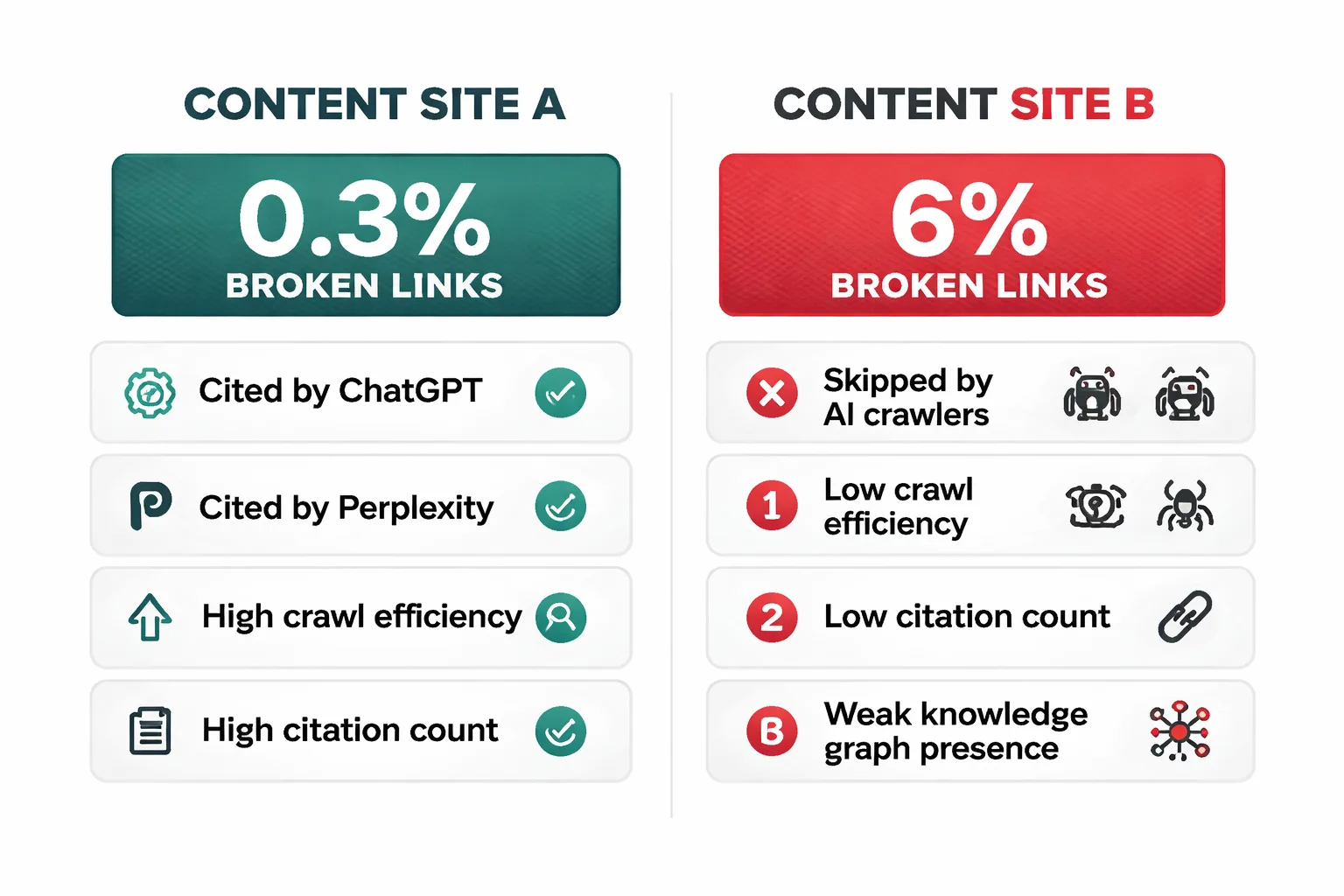
When I audit a site that's lost AI visibility, the first thing I check isn't the content. I check the link profile. Nine times out of ten, there's been a migration, a redesign, or a content cleanup that introduced broken links. The AI citations drop within weeks of the broken links appearing.
The fix is always the same: run the five-step dead link check, prioritize the AI-cited pages, fix the broken links, and re-crawl to verify. The citations come back. Not instantly, but within weeks as the AI crawlers re-evaluate the site.
This is why I frame dead link checking not as a technical SEO chore but as AI search visibility maintenance. Every broken link is a door you've locked against an AI crawler that was trying to cite you. The five-step process in this article is how you unlock those doors.
The relationship between broken links and AI citations is bidirectional. Broken links reduce your citation eligibility, and tracking your citations tells you which broken links matter most. If you see a page that was being cited last month but isn't this month, check that page for broken links first. The citation drop is often the canary in the coal mine for link rot that your last crawl missed.
If you want to see which of your pages AI engines are currently citing (and which ones have broken links undermining that citation), start by checking your AI visibility. The data tells you exactly where to focus your dead link fixes for maximum citation recovery.
What This Won't Fix
I want to be honest about the boundaries of dead link checking. Fixing broken links will restore your site's structural integrity and improve your AI citation eligibility. But it won't fix bad content. If your page about "email marketing best practices" is thin, outdated, and doesn't answer the user's question, fixing the broken links on that page won't make AI engines cite it. They'll still prefer a competitor's comprehensive, well-maintained guide.
Dead link checking also won't compensate for a lack of external authority signals. If your domain has 5 referring domains and your competitor has 500, clean internal links won't close that gap. You need both: clean technical hygiene AND strong content AND external authority. Broken link fixing is necessary but not sufficient.
Finally, this process won't help if your site is fundamentally uncrawlable. If your robots.txt blocks AI crawlers, or your site requires JavaScript that crawlers can't execute, or your pages are behind a paywall without structured data, fixing broken links is rearranging deck chairs. Start with crawlability, then fix links, then optimize content.
FAQ
What does a dead link mean for SEO?
A dead link is a hyperlink pointing to a page that returns a 404 or similar error. For SEO, it wastes crawl budget, prevents link equity from passing through your internal linking structure, and signals poor site maintenance to search engines. For AI search specifically, broken links reduce your reliability score as a citation source, making AI engines less likely to reference your content in answers.
Can I check for dead links for free?
Yes. Screaming Frog's free version crawls up to 500 URLs and identifies all 4xx and 5xx errors. For single-page checks, the Check My Links Chrome extension is free and instant. For ongoing monitoring, Google Search Console's Coverage report flags 404s at no cost. The limitation of free tools is scale: sites above 500 URLs need a paid crawler, and free tools don't provide prioritization based on page authority or AI citation data.
How many broken links is too many?
There's no official threshold, but based on the Semrush AI Overviews data, pages cited in AI answers have significantly fewer technical errors than average. As a benchmark, aim for under 1% broken links relative to total links. If your site has 1,000 internal links and 50 are broken (5%), that's a red flag. If you have 1,000 links and 5 are broken (0.5%), you're in good shape.
Should I redirect or delete broken internal links?
Redirect (301) if a replacement page exists. This preserves link equity and catches any external backlinks pointing to the old URL. Delete the link if there's no replacement and the link is no longer relevant. Don't leave a broken link in place while you decide. A 404 is worse than either alternative.
Do broken external links hurt my SEO?
Broken external links (links from your site to other sites that have gone offline) don't directly hurt your rankings, but they hurt user experience and signal poor content maintenance. Google's documentation says 404s don't penalize your site, but the indirect effect is real: users who hit dead ends bounce, and AI crawlers that follow dead external links log your page as less reliable. Fix or remove broken external links during your regular dead link check.
How do dead links affect ecommerce sites specifically?
Ecommerce sites are especially vulnerable because product pages get discontinued frequently. Each discontinued product creates a potential 404 unless a redirect is in place. The fix is to implement automatic 301 redirects from discontinued product pages to their parent category pages. This preserves link equity, maintains the crawl path for AI engines, and gives users a relevant alternative instead of a dead end.
What's the difference between a 404 and a soft 404?
A 404 is an explicit HTTP status code returned by the server when a page doesn't exist. A soft 404 is a page that returns a 200 OK status code but displays "page not found" or "no results" content to the user. Soft 404s are harder to detect because the server says the page exists, but the content is empty. Google and AI crawlers are getting better at identifying soft 404s, but they still slip through. Screaming Frog flags suspected soft 404s in its crawl report. Check the "Soft 404" column in your export.
About the Author
Judy Zhou, Founder
Judy Zhou leads content strategy at Meev, where she oversees AI-driven content research and publishing for hundreds of brands. With a background in SEO and editorial operations, she focuses on building content systems that rank on Google, get cited by AI search engines, and drive measurable business results.
Run your dead link check today, then see exactly which pages AI engines are citing and which ones they're skipping because of link rot.