

By Judy Zhou, Founder
Key Takeaways
- Pages excluded from the web index remain invisible to AI engines like Perplexity and Google AI Overviews, regardless of content quality or entity optimization.
- Organic click-through rates for queries with Google AI Overviews fell 61% since mid-2024, dropping from 1.76% to 0.61%.
- Only 8% of users click traditional results when AI Overviews appear, and 60% of searches now end without any click, making index inclusion essential.
- Run technical audits to confirm key pages stay indexed, as exclusion blocks all retrieval paths before any ranking or synthesis occurs.
A product manager at a mid-sized e-commerce brand spent three months refining her company's content for AI search. The writing was tight, the entities were structured, the Wikidata entries were updated. Yet when her team queried Perplexity and Google's AI Overviews for their core category terms, competitors kept appearing and their brand did not. The culprit, buried in a technical audit weeks later, had nothing to do with content quality. Their key product pages had quietly fallen out of the web index. Invisible to every AI system before a single ranking decision was ever made.
A web index is the database that search engines and AI systems build by crawling, parsing, and storing page content so it can be retrieved when a user asks a question. Without index inclusion, no AI engine can cite, reference, or synthesize from a page. Organic click-through rates for queries with Google AI Overviews have fallen 61% since mid-2024, dropping from 1.76% to 0.61%, which means the zero-click search era makes index presence even more critical. Only 8% of users click traditional results when AI Overviews are present, a 47% reduction compared to searches without them. Roughly 60% of all searches now end without a click to any destination site. If a page is not in the index, it does not exist for any of these retrieval paths.
What Is a Web Index?
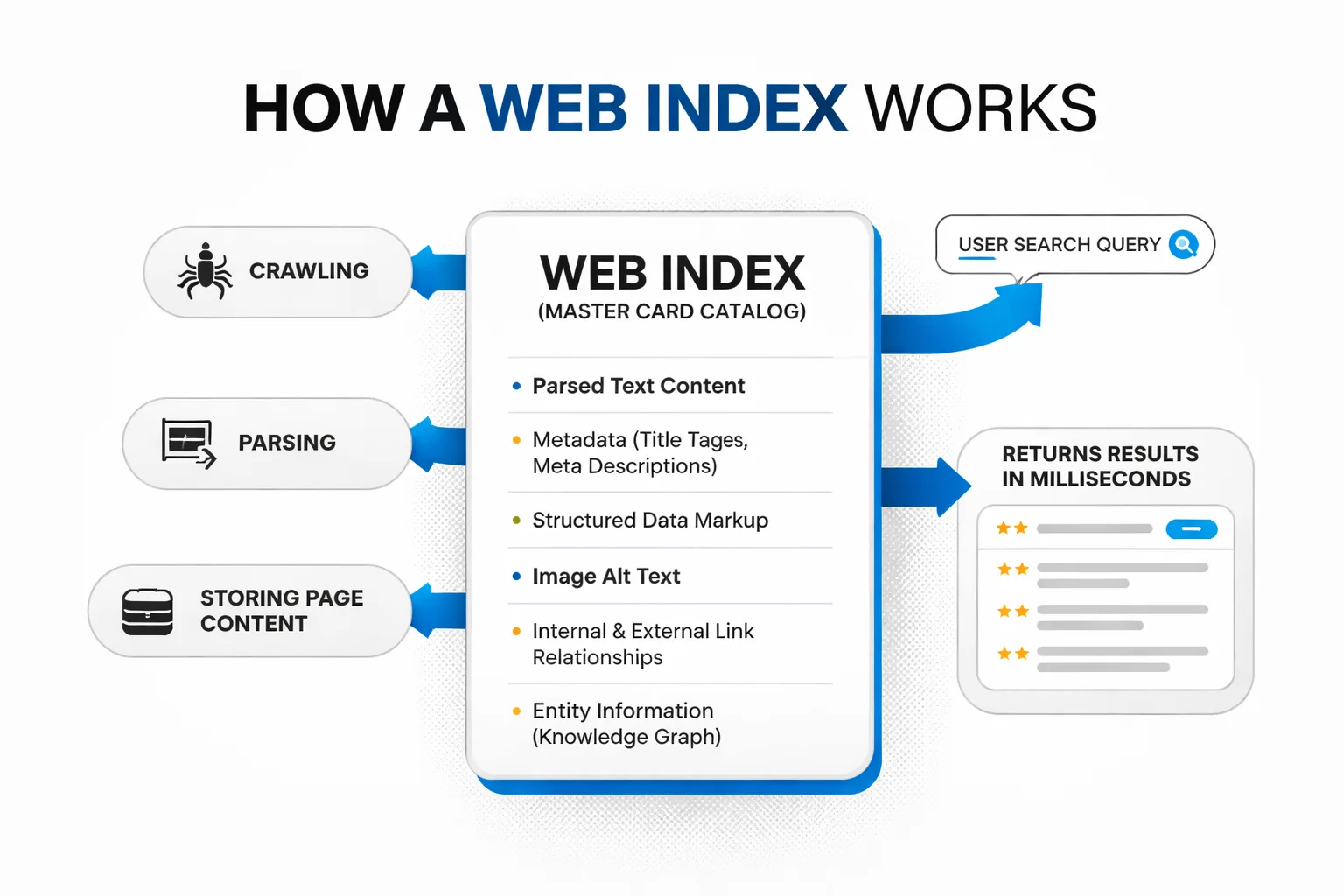
A web index is a massive, structured database that search engines and AI systems build by crawling, parsing, and storing page content so it can be retrieved when a user asks a question. Think of it as the master card catalog at a library. The books on the shelves are the internet. The card catalog is the index. When someone searches, the system does not scan every page on the web in real time. It consults the index, finds the relevant entries, and returns results in milliseconds.
The index stores far more than the raw HTML of a page. It contains the parsed text content, metadata like title tags and meta descriptions, structured data markup, image alt text, internal and external link relationships, and entity information that connects the page to a broader knowledge graph. The index is what makes search fast. Without it, every query would require a fresh crawl of billions of pages.
There is a distinction worth making. "The Web Index" was also the name of a specific project run by the World Wide Web Foundation, which ranked countries on web accessibility and openness. That project ended in 2015. This article is concerned with the general concept of web indexing as practiced by Google, Bing, and AI search systems.
The index also stores an inverted index structure. Instead of mapping pages to words, an inverted index maps words to pages. When a user searches "running shoes," the system looks up the terms "running" and "shoes" in the inverted index, finds the set of pages containing both, and ranks those pages. This is the core data structure that makes sub-second search possible.
A forward index works in the opposite direction. It maps each page ID to the list of terms contained in that page, along with positional information (where on the page each term appears) and frequency counts. The forward index is useful for tasks like snippet generation and duplicate detection. Together, the inverted index and forward index form the backbone of retrieval.
Metadata layers sit on top of these structures. PageRank scores, freshness signals, language detection results, canonical URL designations, and structured data entities are all stored as metadata attached to each indexed page. When a search engine decides whether to include a page in an AI Overview, it consults these metadata layers to assess authority, relevance, and freshness.
How Web Indexing Actually Works
Web indexing happens in four stages: crawling, parsing, storing, and ranking. Each stage filters the web down to a usable set of retrievable content.
Crawling. Search engine crawlers (Googlebot, Bingbot) follow links from known pages to discover new ones. The crawl is guided by a budget. Sites with low authority, slow response times, or shallow internal linking get fewer crawl visits. A page that is not crawled is never indexed.
Parsing. Once a crawler fetches a page, the rendering engine extracts the meaningful content. It strips out boilerplate navigation, ad code, and script blocks. It identifies the primary text, images, structured data, and outbound links. Google uses a mobile-first rendering pipeline, which means the mobile version of a page is the one that gets parsed and indexed.
Storing. The parsed content is broken into tokens and added to the inverted index. Metadata goes into a forward index. The page's URL, canonical status, internal link graph, and entity associations are stored alongside the content. A page can be crawled but not indexed if the system decides the content is thin, duplicative, or low-value.
Ranking. When a query arrives, the search system retrieves matching pages from the index and applies hundreds of ranking signals. Page speed, content depth, link authority, and user intent all factor in. This is the stage most SEO teams focus on. But ranking only happens after indexing. A page that is not in the index cannot rank.
Here is where AI search surfaces change the equation. Classic Google SERPs retrieve and rank pages from the index. AI systems like ChatGPT, Perplexity, and Google AI Overviews retrieve from the index too, but they add a synthesis layer. They pull content from multiple indexed sources, generate a natural language answer, and cite the sources they used.
The critical difference is in what gets retrieved. A classic SERP returns ten blue links. An AI answer returns a synthesized paragraph with citations. Both depend on the same underlying index. If a page is not indexed, it cannot appear in the SERP, and it cannot be cited in an AI answer.
This is why answer engine optimization starts with indexing health. Teams that focus on generative engine optimization without first confirming their pages are indexed are building on sand.
Consider a concrete example. A B2B SaaS company publishes a deep guide on "agentic commerce infrastructure." The guide is 3,000 words, cites three primary research papers, and includes structured data for the Article schema. The team publishes it and waits. Three weeks later, the page has not been indexed. The reason: the page was published on a subdirectory that the robots.txt file disallowed during a staging migration. The content was excellent. The technical gate was closed. No search engine ever saw it.
That same page, once the robots.txt block is fixed and the URL is submitted via IndexNow and Google Search Console, gets crawled within 48 hours and indexed within a week. Now it is eligible for retrieval. Whether it gets cited in an AI answer depends on content quality, entity structure, and authority signals. But none of that matters until the indexing gate is open.
Why Your Pages May Not Be Indexed
Pages fail to index for a handful of common reasons. Most are fixable.
Robots.txt blocks. A robots.txt file tells crawlers which parts of a site they may access. A misconfigured rule can block an entire subdirectory or the whole site. A single line like Disallow: / in the wrong context blocks everything.
Noindex tags. A <meta name="robots" content="noindex"> tag in a page's head section tells the search engine not to add the page to the index. This is useful for staging pages or thin utility pages, but it is easy to leave on a production page by mistake.
Thin or duplicate content. Google's indexing system filters out pages it considers low-value. A page with 50 words of boilerplate text and no unique value may be crawled but not indexed. Pages that duplicate content from other URLs on the same site often get filtered out as canonicalized to a primary version.
Crawl budget waste. Large sites with thousands of low-quality URLs can exhaust their crawl budget before Googlebot reaches the important pages. Faceted navigation URLs, parameter strings, and auto-generated filter pages are common culprits.
Slow server response times. If a server takes five seconds to respond to a crawl request, the crawler moves on. Pages that are consistently slow to load get fewer crawl visits and may fall out of the index over time.
Orphan pages. A page with no internal links pointing to it is hard for crawlers to discover. Even if it is in the XML sitemap, Google's crawlers rely heavily on internal link discovery.
Canonical conflicts. A canonical tag tells Google which version of a URL is the primary one. If multiple pages point to the same canonical URL, Google may index only the canonical version and drop the others. This is useful for consolidating duplicate content, but it can backfire when a canonical tag points to the wrong URL, accidentally de-indexing a page that should be indexed.
JavaScript rendering gaps. Googlebot can render JavaScript, but the process is deferred to a second rendering queue. If a page's content is loaded entirely via client-side JavaScript and the rendering queue is delayed, the indexed version of the page may be empty or incomplete. This is a common problem for single-page applications built with React, Vue, or Angular.
Redirect chains and loops. If a URL redirects multiple times before reaching its destination, crawlers may abandon the crawl. Redirect loops (where a URL redirects to itself or a chain that circles back) cause the crawler to give up entirely. Both scenarios prevent indexing.
How do I check if Google can crawl my site? Use Google Search Console's URL Inspection tool. Enter any URL and the tool reports whether the page is indexed, when it was last crawled, and what blocking issues exist. Check the Coverage report for site-wide indexing status. Review the robots.txt file in the robots.txt Tester to confirm no blocking rules are interfering.
How to Check If Your Site Is Indexed
Three methods cover the full picture. Use all three.
Method 1: The site: operator. Type site:yourdomain.com into Google search. Google returns every page from your domain that it has indexed. The total result count is a rough indicator of index coverage. If the number is far lower than the number of pages on your site, there is an indexing gap.
The site: operator is fast but imprecise. It does not show why pages are missing. It also has a result cap and may undercount for very large sites.
Method 2: Google Search Console Coverage report. This is the authoritative source. The Coverage report breaks down every submitted URL into four categories: Error, Valid with warnings, Valid, and Excluded. The Excluded category is where the diagnostic value lives. It shows pages that were crawled but not indexed, pages blocked by robots.txt, and pages flagged as duplicates.
The report also shows the specific reason for each exclusion. "Crawled, currently not indexed" means Google found the page but chose not to add it to the index. "Discovered, currently not indexed" means Google knows the URL exists but has not crawled it yet. Each reason has a different fix.
Method 3: Third-party crawl tools. Tools like Screaming Frog or Sitebulb simulate a crawler visit. They report server response codes, robots.txt blocks, noindex tags, canonical issues, and broken links. A crawl tool will surface problems before Google's crawlers reach them.
How to check the robots.txt file? Navigate to yourdomain.com/robots.txt in a browser. The file is plain text and lists rules for crawlers. Look for Disallow rules that block important directories. Use Google Search Console's robots.txt Tester to validate that Google interprets the rules as intended. The tester shows whether Googlebot can access a specific URL under the current rules.
Reviewing robots.txt is a prerequisite before any deeper indexing work. If the file blocks a path, no amount of content quality or internal linking will get those pages indexed.
Are your pages indexed but still missing from AI answers?
What Good Indexing Means for AI Citation
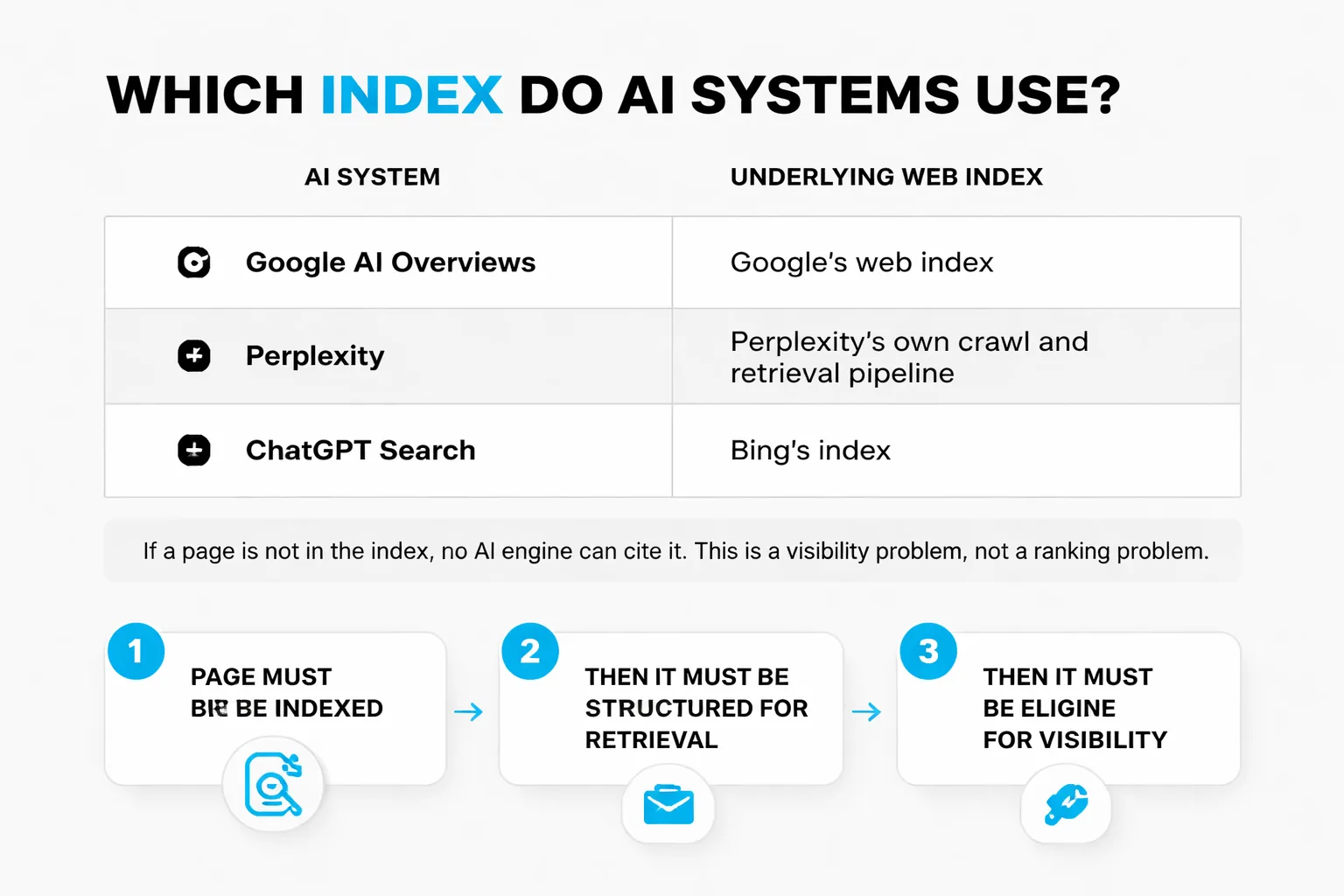
Here is the part that most teams miss. AI search engines do not have their own separate index of the web. ChatGPT, Perplexity, Google AI Overviews, and Claude all draw from content that has been crawled and indexed by underlying systems. Google AI Overviews draws from Google's web index. Perplexity uses its own crawl and retrieval pipeline. ChatGPT Search uses Bing's index for real-time results.
If a page is not in the index, no AI engine can cite it. This is not a ranking problem. It is a visibility problem that exists one layer below ranking.
The connection between indexing and AI citation is direct. Research from Search Engine Journal frames it clearly: the gap between appearing in an AI answer and being retrieved by an AI system is where AI search strategy lives. Eligibility alone does not win visibility. A page must first be indexed, then it must be structured for retrieval, then it must be cited.
The Department of Energy's SEO best practices guide notes that AI overviews synthesize answers and cite sources, making citation in AI answers as important as ranking in search results. This is a shift from clicks to citations. When only 8% of users click traditional results with AI Overviews present, the citation itself becomes the outcome.
Organic CTR for queries with AI Overviews has dropped 61%, from 1.76% to 0.61%. That number should change how content teams prioritize. Ranking position one still matters, but the AI summary sits above it. Being cited in that summary is now the higher-value outcome.
This is where indexing health meets answer engine optimization. A page that is indexed but not structured for retrieval will not be cited. A page that is structured for retrieval but not indexed will not be cited either. Both layers must work.
Meev's diagnosis layer surfaces both gaps in one view. It tracks whether a brand is cited across every major AI search surface and shows which pages and entity sources are driving those citations. When a brand is absent from AI answers, the first diagnostic question is whether the source pages are actually indexed. If they are not, no amount of content optimization will fix the citation gap.
The teams that win in AI search are the ones that treat indexing as a prerequisite, not an afterthought. They check robots.txt before they write content. They confirm Coverage report status before they optimize for entities. They submit sitemaps via IndexNow and Google Search Console on every publish. They understand that the web index is the foundation of all search visibility, classic and AI alike.
How Does AI Change Web Indexing?
The rise of generative AI has not replaced the web index. It has added new layers of processing on top of it. Understanding these layers is essential for any team investing in ai search engine optimization tools or building an AI SEO strategy.
Entity extraction and knowledge graph integration. Modern indexing pipelines do not just store text tokens. They extract entities (people, places, organizations, concepts) from page content and connect them to a knowledge graph. Google's Knowledge Graph, Microsoft's Bing Entity Search API, and Wikidata all serve as entity repositories. When a page mentions "Stripe" and the indexing system recognizes Stripe as a financial technology company headquartered in San Francisco, it creates an entity association. These associations determine whether a page gets cited when a user asks an AI system "what are the best payment processors for SaaS companies."
Embedding-based retrieval. Traditional indexing relies on keyword matching. AI-era indexing adds semantic embeddings. Each indexed page is converted into a high-dimensional vector representation that captures its meaning. When a user asks ChatGPT or Perplexity a question, the query is also converted into a vector. The system retrieves pages whose vectors are closest to the query vector, even if the exact keywords do not match. This means a page about "subscription billing software" can be retrieved for a query about "recurring payment platforms" even if the word "recurring" never appears on the page.
Freshness weighting for AI retrieval. AI systems prioritize recent information for queries where freshness matters (news, product launches, pricing changes). The index stores crawl timestamps and content update signals. Pages that are crawled frequently and updated regularly get higher freshness scores. A page that was last crawled six months ago may be indexed but ranked lower for time-sensitive AI queries than a page crawled last week.
Structured data as a retrieval signal. Schema markup (Article, FAQPage, HowTo, Product, Organization) provides explicit entity and relationship information to the indexing pipeline. Pages with well-structured schema are easier for AI systems to parse, understand, and cite. A product page with Product schema (name, price, availability, brand) is more likely to be cited in an AI answer about product recommendations than a page with the same content but no structured data.
The retrieval-augmented generation (RAG) pipeline. When a user asks Perplexity or ChatGPT a question, the system does not generate an answer from memory alone. It runs a retrieval step first, querying the web index for relevant pages. It then feeds the retrieved content into the language model, which synthesizes an answer and cites the sources. The quality of the retrieval step depends entirely on the quality of the index. If the index does not contain the right pages, the RAG pipeline cannot retrieve them.
This is why generative engine optimization is not a separate discipline from traditional SEO. It is a layer on top. The foundation is the same: pages must be crawled, parsed, stored, and retrievable. The difference is that AI systems add semantic understanding, entity recognition, and synthesis on top of the raw index.
What Should Content Creators Do Differently?
The shift from classic search to AI search changes what content teams should prioritize. Here is what the data says.
Prioritize entity clarity over keyword density. AI systems do not match keywords. They match meaning. A page that clearly identifies what entity it is about (using structured data, consistent naming, and internal links to related entity pages) is more likely to be retrieved than a page that stuffs keywords without clear entity signals. Use schema markup to declare entity types. Use internal linking to connect related entities. Use consistent naming conventions across the site.
Write for retrieval, not just ranking. Classic SEO optimizes for ranking position. AI search optimizes for retrieval and citation. A page that ranks position three but is structured for retrieval (clear headings, concise answers, sourced claims) may be cited in an AI answer more often than a page that ranks position one but is structured poorly. Structure matters because the RAG pipeline extracts passages, not entire pages.
Monitor AI visibility separately from Google rankings. A page can rank well in Google and be absent from AI answers. A page can be cited in AI answers and rank poorly in Google. These are different surfaces with different retrieval logic. Teams that only track Google rankings are blind to their AI citation presence. Tools that track AI visibility across every major AI search surface surface gaps that Google Search Console does not show.
Submit new content immediately. The faster a page is crawled and indexed, the faster it becomes eligible for AI citation. Use IndexNow (supported by Bing) and Google Search Console's URL Inspection tool to request indexing on every publish. Do not wait for Google to discover the page organically.
Fix indexing issues before optimizing content. It is tempting to jump straight to content optimization when AI visibility is low. But if the underlying pages are not indexed, content optimization is wasted effort. Run a Coverage report audit first. Fix robots.txt blocks, noindex tags, and canonical conflicts. Then optimize content.
FAQ
What is the difference between crawling and indexing?
Crawling is the process of a search engine bot visiting a URL and fetching its content. Indexing is the process of storing that content in the search engine's database so it can be retrieved for search results. A page can be crawled but not indexed if the search engine decides the content is low-value or duplicative.
How long does it take Google to index a new page?
There is no fixed timeline. A page on a high-authority site with strong internal linking may be indexed within hours. A page on a new or low-authority domain may take weeks or months. Pages stuck in "Crawled, currently not indexed" can remain there indefinitely unless the underlying quality issue is addressed.
Does submitting a sitemap guarantee indexing?
No. A sitemap tells Google which URLs exist. It does not guarantee that Google will crawl or index them. Sitemaps are a discovery signal, not an indexing command. Google still applies its own quality and value assessments before adding a page to the index.
Can a page be indexed but not appear in AI answers?
Yes. Indexing is a prerequisite for AI citation, not a guarantee. A page must be indexed, then it must be retrieved by the AI system's pipeline, then it must be selected for citation. Many indexed pages are never cited because they lack the entity structure, content depth, or authority signals that AI systems use to select sources.
How does Bing's indexing differ from Google's?
Bing tends to be more responsive to direct URL submission and IndexNow pings. Google places more weight on content quality, internal linking, and mobile-first rendering. Both maintain separate indexes, and a page indexed in one may not be indexed in the other.
What is the connection between web indexing and knowledge graphs?
Web indexes store page content and metadata. Knowledge graphs store entities and their relationships. Search engines use both. A page in the web index contributes entity information to the knowledge graph. The knowledge graph, in turn, helps the search engine understand what a page is about and how it relates to other pages and entities.
How do I fix a page stuck in "Crawled, currently not indexed"?
This status means Google has fetched the page but decided not to add it to the index. Common fixes: improve content depth and uniqueness, add internal links from high-authority pages on the same domain, ensure the page is not canonicalized to another URL, and remove any thin or duplicative content. Resubmit the URL in Google Search Console after making changes.
Does Google index JavaScript-rendered content?
Yes, but with a delay. Googlebot uses a two-pass rendering system. The first pass fetches the raw HTML. The second pass (deferred to a rendering queue) executes JavaScript and indexes the rendered content. If the rendering queue is delayed, the indexed version may be incomplete. Server-side rendering or pre-rendering mitigates this issue.
About the Author
Judy Zhou, Founder
Judy Zhou leads content strategy at Meev, where she oversees AI-driven content research and publishing for hundreds of brands. With a background in SEO and editorial operations, she focuses on building content systems that rank on Google, get cited by AI search engines, and drive measurable business results.
Run a free AI visibility audit to see which pages are indexed, which are cited, and where the gaps are.