

Before you read any further, answer this honestly: when did you last audit your site for AI crawler access, JavaScript rendering failures, or structured data syntax errors — not just broken links and missing meta descriptions? If the answer is "never" or "I'm not sure what half of those mean," you're not alone. But you are leaving significant ranking potential on the table.
Most technical SEO audit guides were written for 2019. They'll tell you to check your XML sitemap, fix 404s, and compress your images. That's fine — but it's table stakes. The sites outranking you right now have solved those basics AND addressed a second layer of technical debt that most checklists don't even mention: AI crawler configuration, JavaScript rendering gaps, log file analysis at scale, and AEO (Answer Engine Optimization) readiness. As Head of Content Strategy at Meev, I've run audits across dozens of sites and watched teams fix every "standard" technical issue and still see flat or declining organic performance. This framework is built around what actually moves the needle in 2025 and beyond.
Key Takeaways
- Most technical SEO audit guides ignore AI crawler configuration, JavaScript rendering, and AEO readiness — fixing these is where the real ranking gains are hiding.
- Structured data syntax errors are more common than teams realize; Google Search Console's dedicated structured data report is your fastest diagnostic tool.
- Crawl budget mismanagement on large sites — especially those running automated content pipelines — silently kills indexation at scale; log file analysis is the only reliable fix.
- Page speed optimization for SEO now means passing Core Web Vitals on real mobile devices using field data, not just scoring well in PageSpeed Insights lab tests.
TLDR: - Most technical SEO audit guides ignore AI crawler configuration, JavaScript rendering, and AEO readiness — fixing these is where the real ranking gains are hiding. - Structured data syntax errors are more common than teams realize; Google Search Console's dedicated report is your fastest diagnostic tool. - Crawl budget mismanagement on large sites — especially those running automated content pipelines — silently kills indexation at scale. - Page speed optimization for SEO now means passing Core Web Vitals on real mobile devices, not just scoring well in lab tests.
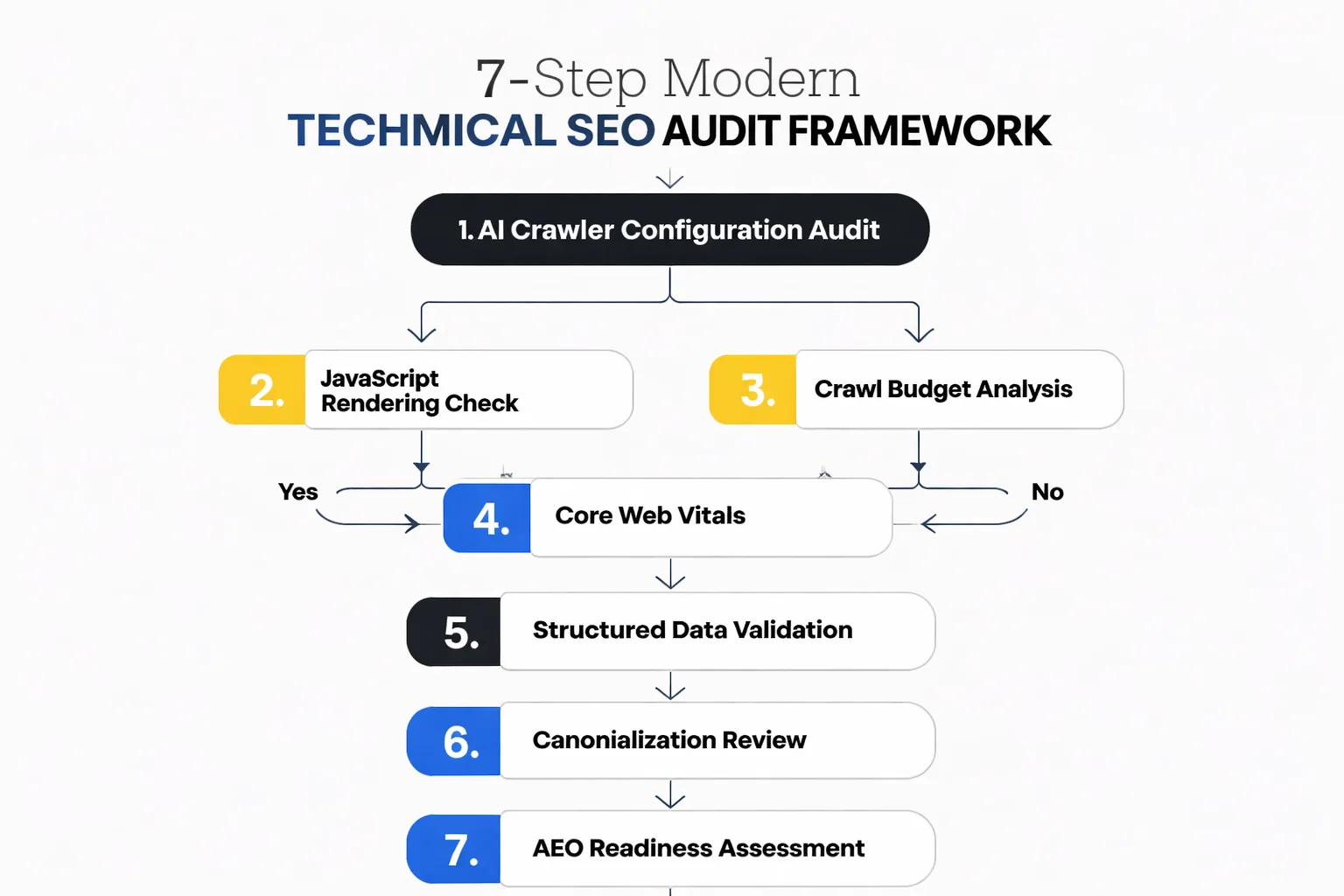
Step 1: How to Diagnose Your AI Crawler Access in a Technical SEO Audit?
The first question in any modern technical SEO audit isn't "are your pages indexed?" — it's "which crawlers can actually access your content, and which ones are you accidentally blocking?"
This matters more than most teams realize. Google-Extended blocking — the robots.txt directive that controls whether Google's AI training crawlers can access your content — is now a real strategic decision, not just a checkbox. But here's where I see teams make a costly mistake: they add blanket Disallow rules to robots.txt trying to block AI scrapers, and they accidentally block Googlebot or other legitimate crawlers in the process. I've seen this happen on three separate sites in the last six months, and in each case, the team had no idea until organic impressions started dropping 4-6 weeks later.
The diagnostic is straightforward. Pull your robots.txt file and cross-reference every Disallow rule against Google's official crawler list. Then go into Google Search Console and check the Coverage report for any "Excluded by robots.txt" URLs that shouldn't be excluded. If you're running an automated content pipeline — publishing at scale with AI assistance — this is especially critical, because those pipelines often generate URL patterns that weren't anticipated when the original robots.txt was written.
Your next action: Run site:yourdomain.com in Google Search and compare the indexed page count against your actual published page count. A gap of more than 15% warrants an immediate crawl audit.
Step 2: Is JavaScript Rendering the Silent Indexation Killer?
JavaScript rendering is the most technically misunderstood issue in SEO right now, and the gap between "works in a browser" and "works for Googlebot" is wider than most developers want to admit.
Here's the core problem: Googlebot renders JavaScript, but it does so in a two-wave process. The first wave crawls the raw HTML. The second wave — where JS-dependent content actually renders — can be delayed by days or weeks for lower-priority pages. If your navigation, internal links, or body content is injected via JavaScript (common in React, Vue, Next.js, and other modern frameworks), Googlebot may be seeing a shell of your page on first crawl. Static Site Generators like Jekyll or Hugo sidestep this entirely by pre-rendering HTML at build time, which is one reason they tend to perform well technically — but most enterprise sites aren't running on Jekyll.
The test I run on every audit: fetch the page using Google Search Console's URL Inspection tool and compare the "page as Googlebot sees it" screenshot against what a user sees in Chrome. Then do the same with a curl request that strips JavaScript entirely. Any content that disappears in the curl version but exists in the browser is JavaScript-dependent and invisible to crawlers on first pass. For sites using client-side rendering heavily, the fix is server-side rendering (SSR) or static generation for critical pages — not a quick patch, but a structural fix that pays dividends across every future crawl.
Your next action: Use GSC's URL Inspection on your 5 highest-traffic pages. If the rendered screenshot looks different from what you see in Chrome, you have a rendering problem that's suppressing your rankings.
Step 3: How to Manage Crawl Budget at Scale?
Crawl budget is one of those concepts that sounds abstract until you're running a site with 50,000+ pages and wondering why 30% of your content has never been indexed. Then it becomes very concrete, very fast.
The issue is especially acute for sites that have deployed automated content pipelines. I've worked with teams that used AI content creation tools to scale from 500 to 8,000 published pages in under a year — and then discovered that Googlebot was spending most of its crawl allocation on faceted navigation URLs, session ID parameters, and low-value tag pages, leaving thousands of their best articles uncrawled for months. The content existed. The technical debt buried it.
Log file analysis is the only reliable way to diagnose this, and it's the step that almost every standard checklist skips entirely. Your server logs show exactly which URLs Googlebot is crawling, how frequently, and which ones it's ignoring. Tools like Screaming Frog Log File Analyser or Botify can process these logs at scale. What you're looking for: high crawl frequency on low-value URLs (parameter-driven pages, duplicate content variants) and low or zero crawl frequency on your priority content. Once you have that map, the fix involves a combination of noindex tags on low-value pages, parameter handling in Google Search Console, and — critically — tightening your XML sitemap to include only canonicalized, indexable URLs. Your sitemap should be a curated list of your best content, not an exhaustive dump of every URL your CMS has ever generated.
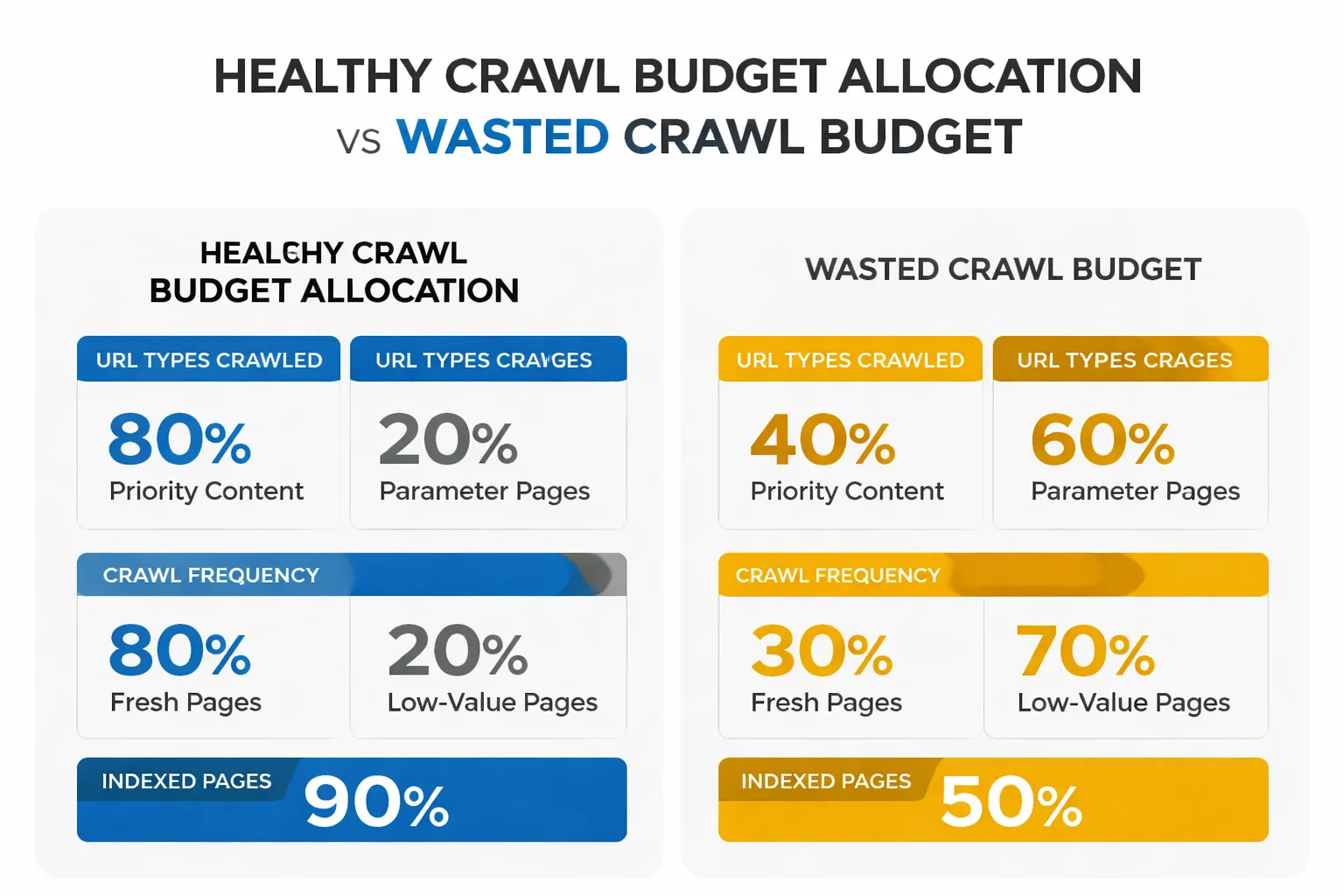
Your next action: Request 30 days of server logs from your hosting provider or CDN. Filter for Googlebot user-agent strings and identify the top 50 most-crawled URLs. If more than 20% are parameter pages, tag pages, or near-duplicate content, you have a crawl budget problem.
Step 4: Google Search Console Structured Data
Structured data validation is one of the highest-ROI fixes in a technical SEO audit, and it's also one of the most neglected — because the errors are invisible to users and easy to miss in a standard crawl.
Google Search Console's structured data report — which Google Search Central introduced specifically because syntax errors were common enough to warrant a dedicated diagnostic tool — is your starting point. The report aggregates errors by schema type, so you can see at a glance whether your Article, Product, FAQ, or HowTo markup is throwing errors across your site. What I find most often: teams implement schema markup correctly on their template, then update their CMS or redesign their site, and the structured data breaks silently. The pages still render fine. The schema just stops working. And because rich results don't disappear overnight, teams don't notice for months.
The deeper issue I've started flagging in audits is what I call structured data technical debt from AI content pipelines. When you're publishing at scale with AI assistance, schema markup often gets applied via template rather than validated per-page. That means a single template error propagates across thousands of pages simultaneously. I've seen sites lose sitewide FAQ rich results because one field in their HowTo schema template was formatted incorrectly — and that error existed on 4,200 pages before anyone caught it. The fix isn't just correcting the error; it's building validation into the publishing workflow so errors get caught before they go live, not after.
Your next action: Open Google Search Console → Enhancements → check every structured data type your site uses. Any type showing errors on more than 5% of pages needs immediate attention. Use Google's Rich Results Test on your top 10 pages to validate markup individually.
Is your site's technical foundation actually ready for AI search engines — or just ticking the standard checklist boxes?
Step 5: Page Speed Optimization for SEO — Core Web Vitals on Real Devices, Not Lab Scores
Page speed optimization for SEO has evolved, and if you're still optimizing for PageSpeed Insights lab scores, you're optimizing for the wrong thing.
Core Web Vitals are measured using field data — real user interactions on real devices — not simulated lab conditions. A page can score 95 in PageSpeed Insights and still fail Core Web Vitals in the field if your actual users are on mid-range Android devices on 4G connections. The metric that trips up most sites right now is Interaction to Next Paint (INP), which replaced First Input Delay in March 2024. INP measures responsiveness throughout the entire page lifecycle, not just on first load — and it's far harder to optimize than FID was.
The diagnostic I run: pull the Core Web Vitals report in Google Search Console (under Experience → Core Web Vitals) and filter by "Poor" URLs. Cross-reference those URLs against your highest-traffic pages. If your poor-performing URLs overlap significantly with your top organic traffic pages, you have a direct ranking impact happening right now. For page speed optimization for SEO at the page level, the top fixes I've found are: eliminating render-blocking third-party scripts (especially chat widgets and analytics tags that load synchronously), implementing proper image lazy loading with explicit width and height attributes to prevent layout shift, and moving to a CDN if you're not already on one. The last one alone can cut LCP by 40-60% for geographically distributed audiences.
Your next action: In GSC, go to Experience → Core Web Vitals → Mobile. Sort by "Poor" status. If any of your top 20 traffic pages appear there, prioritize those fixes above everything else on this list.
Step 6: How to Fix Canonicalization and AI Content Debt?
Duplicate content is the technical SEO problem that teams think they've solved but usually haven't — especially once AI content creation enters the picture.
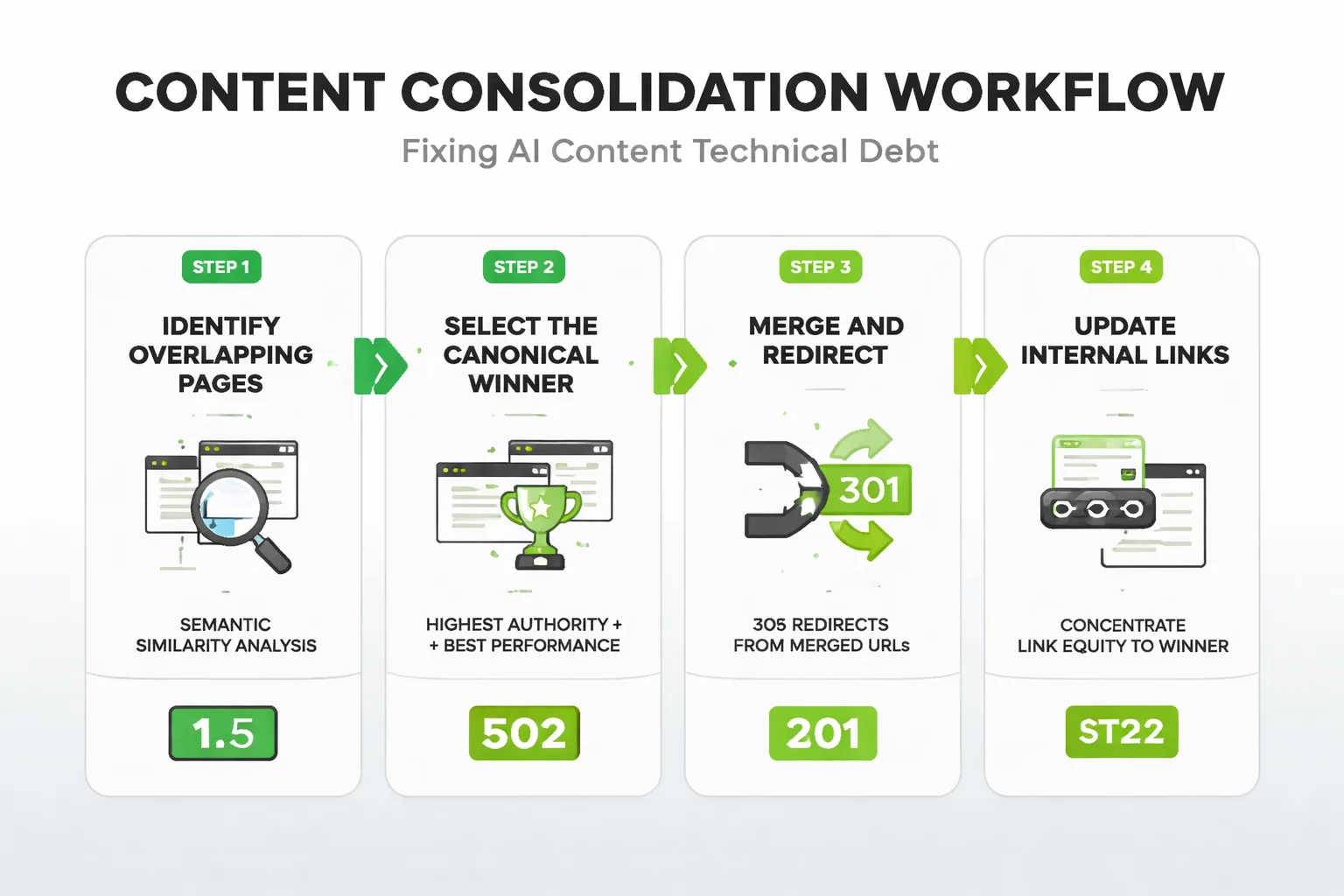
Here's what I mean by AI content technical debt: when teams scale content production with AI tools, they often produce topically similar articles that target adjacent keywords. Each individual piece may be unique enough to pass a plagiarism check, but from Google's perspective, three articles that all answer "what is X" with 70% semantic overlap are functionally duplicate content. Ranking signals get diluted across all three, Google picks one to surface (often not the one you'd choose), and the other two underperform indefinitely. I've seen this pattern across content audits covering sites that scaled aggressively with AI — the symptom is a cluster of pages all ranking in positions 8-15 for the same keyword family, none of them breaking into the top 5.
The fix has two parts. First, canonical tags: every page needs a self-referencing canonical, and any near-duplicate content needs to point its canonical to the definitive version. Second — and this is the part most guides skip — you need a content consolidation strategy. That means identifying topically overlapping articles, merging the best content from each into a single authoritative piece, 301-redirecting the merged URLs to the winner, and updating your internal linking to concentrate authority on that page. This is also where building topical authority with AI content becomes a structural advantage: a deliberate topical architecture prevents the duplicate content problem from emerging in the first place, rather than requiring you to clean it up after the fact.
Your next action: Export all your URLs into Screaming Frog. Filter for pages with missing or non-self-referencing canonical tags. Any page without a canonical is a potential duplicate content risk — fix those first, then audit for semantic overlap in your content clusters.
Step 7: AEO Readiness — The Audit Nobody Runs
AEO — Answer Engine Optimization — is the technical layer that determines whether your content gets cited by AI search engines like ChatGPT, Perplexity, Google AI Overviews, and Gemini. Most technical SEO audits don't touch this at all. That's a significant gap, because AI Overviews now appear in nearly half of all Google searches, reaching around 2 billion users monthly — and if your content isn't structured to be extracted and cited, you're invisible in that channel regardless of your rankings.
AEO readiness has a technical component that goes beyond just "write clear answers." The structural requirements are specific: your key answers need to appear in the first 40-60 words after a question-style heading, in self-contained sentences that make sense without surrounding context. Your schema markup needs to include FAQ, HowTo, or Speakable schema where applicable. Your page load speed needs to be fast enough that AI crawlers don't time out before rendering your content — and yes, this is a real issue for JavaScript-heavy pages. The diagnostic I run: take your 10 most important pages and ask ChatGPT or Perplexity a question that your page should answer. If your site isn't cited in the response, check whether your content structure matches the extraction patterns those engines prefer: direct answers, numbered lists for sequential processes, and clear entity relationships in your schema.
One more technical element that's becoming increasingly relevant: Google's SynthID technology for watermarking AI-generated content is evolving, and while Google hasn't confirmed it's used as a ranking signal, the direction of travel is clear. Sites that can demonstrate human editorial oversight — through author schema, bylines, and E-E-A-T signals baked into their technical markup — are better positioned as search evolves.
Your next action: Run your top 5 pages through Google's Rich Results Test and verify that FAQ or HowTo schema is implemented correctly. Then test each page with a direct question in Perplexity. If you're not cited, restructure the opening paragraph of each section to lead with a direct, self-contained answer.
The One Thing You Should Do Today
If you do nothing else from this framework today, open Google Search Console and run two reports back-to-back: the Coverage report (to identify pages excluded by robots.txt or marked noindex that shouldn't be) and the Core Web Vitals report filtered by "Poor" on mobile. Cross-reference the results. Any page that's both accessible to Googlebot AND performing poorly on Core Web Vitals is a page where you're paying the crawl cost without capturing the ranking benefit. Fix those pages first — they're your biggest technical SEO wins, and they're almost always hiding in plain sight.
The modern technical SEO audit isn't a checklist you run once a year. It's a diagnostic system you run continuously — because your content pipeline, your CMS updates, and Google's own algorithm changes are introducing new technical debt faster than a static checklist can catch it. The seven steps above are your framework for staying ahead of that debt, not just cleaning it up after the damage is done.
FAQ
What are the 7 technical SEO audit steps most guides skip?
The 7 steps include AI Crawler Configuration Audit, JavaScript Rendering Check, Crawl Budget Analysis, Core Web Vitals validation on real mobile devices, Structured Data Validation, Canonicalization Review, and AEO readiness assessment. These go beyond basics like fixing 404s or XML sitemaps to address modern issues driving rankings in 2025. Following this flowchart-based framework uncovers hidden technical debt affecting indexation and performance.Why is AI crawler configuration important for SEO?
AI crawlers from tools like ChatGPT and Perplexity are increasingly indexing content for answer engines, but misconfigured robots.txt or meta tags can block them, limiting visibility. Auditing this ensures your site is accessible to these emerging engines without compromising Google crawling. It's a skipped step that prevents leaving ranking potential on the table as AI drives search.How do I check for JavaScript rendering failures?
Use tools like Google's Mobile-Friendly Test or URL Inspection in Search Console to simulate rendering, and compare server-side vs. client-side HTML outputs. Log file analysis reveals if crawlers are hitting JS-heavy pages without fully rendering them, causing indexation gaps. Fixing these ensures dynamic content is crawlable, boosting organic performance on modern sites.What is AEO readiness and why audit for it?
AEO (Answer Engine Optimization) prepares your site for direct answers in AI search interfaces like Google AI Overviews or ChatGPT, focusing on structured data and concise, authoritative content. Most audits ignore it, but it's crucial as users shift from clicks to instant answers, silently impacting traffic. Audit by validating schema markup and testing snippet eligibility in tools like Search Console.How common are structured data syntax errors and how to fix them?
They're far more prevalent than broken links, often causing rich results to fail without alerts. Use Google Search Console's dedicated Structured Data report for quick diagnostics and validation. Correct syntax errors to get featured snippets and improve AEO performance.Run a technical SEO audit that covers what the standard guides miss — and start capturing the rankings your content has already earned.