
How to Add llms.txt to a Shopify Store, Step by Step
By Judy Zhou, Founder
Key Takeaways
- Stores with a well-structured llms.txt file get cited by AI engines like Perplexity while identical products without one are ignored.
- Crystal Carter's audit of over 1,400 llms.txt files found they surface across multiple AI and search platforms.
- As of May 2026 Shopify redirects every /llms.txt endpoint to agents.md, requiring updated implementation for all stores.
- Allbirds' current llms.txt scores only 64/100, showing even major Shopify Plus brands still need optimization work.
Marcus runs a mid-sized Shopify store selling specialty coffee equipment. Last November, a friend texted him a screenshot: Perplexity had just recommended his top competitor's burr grinder in a detailed AI-generated buying guide. Complete with a citation link, a product summary, and a price. Marcus's store carried a nearly identical product at a lower price point. He'd never appeared. After two hours of digging, he traced the gap to one thing his competitor had that he didn't: a single, well-structured llms.txt file sitting quietly at their domain root.
I've spent the last year helping brands understand how AI search engines discover, cite, and recommend products. In my work auditing content operations and AI visibility at Meev, I've seen the same pattern Marcus discovered: stores that structure their data for AI agents get cited. Stores that don't get ignored. Crystal Carter reviewed over 1,400 llms.txt files and found evidence that these files surface across multiple AI and search platforms, contradicting the myth that llms.txt does nothing for generative engine optimization. Ahrefs notes that while llms.txt lacks universal commitment from LLM providers, it functions as a direct discovery signal for AI crawlers. Allbirds currently has an llms.txt file graded C at 64/100, which means even major Shopify Plus brands are still iterating on this. And as of May 2026, Shopify claimed the /llms.txt endpoint platform-wide and redirected it to agents.md, changing the implementation game entirely.
That last point should stop you cold. If you're reading outdated guides about adding llms.txt to Shopify, you're probably following instructions that no longer work. Let me walk you through what actually works in August 2026.
What is the llms.txt standard?
llms.txt is a proposed standard, similar in spirit to robots.txt, but designed for large language models and AI agents instead of traditional search crawlers. It lives at your domain root and provides a structured, markdown-formatted summary of your site's content, product catalog, and key pages. The goal is simple: when an AI model like ChatGPT, Perplexity, or Claude visits your domain to research a query, llms.txt gives it a clean, authoritative map of what you sell, what you stand for, and where to find detailed information.
Think of it as a concierge note for AI agents. Instead of letting crawlers guess which pages matter, you hand them a curated list. The file uses a specific markdown structure with sections, links, and descriptions. It's not a sitemap replacement. It's a context layer that helps AI models understand your brand entity, product relationships, and content hierarchy in a format they parse natively.
The standard gained traction in 2025 as brands realized AI search engines don't read websites the way Googlebot does. They synthesize answers from multiple sources, and the sources that provide clean, structured context win the citation. If you want to understand how this fits into the broader picture of answer engine optimization, the llms.txt file is one of several foundational signals that help AI engines ground their answers in your content.
The format itself is straightforward but specific. The file must be served as plain text or markdown (not HTML), it must live at the root path of your domain, and it follows a hierarchical structure with H1 for the brand name, blockquotes for summaries, and H2 sections for categories like Products, About, and Content. Each link includes a brief description so the AI model understands what it will find before it follows the URL. This structure mirrors how LLMs process and retrieve information, which is why markdown (rather than XML or JSON) was chosen as the format.
Why Shopify Changed Everything in May 2026
Here's where this gets complicated. On May 24, 2026, Shopify unilaterally claimed the /llms.txt endpoint for all stores on the platform. If you had previously set up a custom llms.txt file using a proxy, redirect, or liquid template, your file was overwritten. Shopify now redirects /llms.txt to agents.md across all stores.
This wasn't a subtle change buried in a changelog. It was a platform-level decision that affects every Shopify merchant. Ryan Katsnel, writing in the Shopify community forums, advised merchants to check what's actually being served at their /llms.txt URL before assuming their file is live. Many store owners who invested hours implementing custom files discovered their work had been silently replaced.
The redirect to agents.md isn't necessarily bad news. The agents.md standard serves a similar purpose: it tells AI agents what they can and cannot do on your site, and it can include structured information about your store. But it means the old tutorial you found from early 2025 about adding a templates/llms.txt.liquid file to your theme is likely outdated. The file you create may not actually be served at the /llms.txt path anymore.
I want to be direct about what this means for your AI search optimization strategy. The specific filename matters less than the underlying principle: you need structured, machine-readable information about your store accessible to AI crawlers. Whether that's llms.txt, agents.md, or both, the goal is the same. The merchants who adapt fastest to this platform change will maintain their AI discovery advantage. Those who don't will lose ground while wondering why their implementation stopped working.
The broader context here matters. Shopify's decision to claim the /llms.txt endpoint signals that the platform sees AI discovery as important enough to control at the infrastructure level. That's actually a positive signal for the standard itself. If Shopify didn't think AI crawlers would use these files, they wouldn't have bothered claiming the endpoint. The platform wants to manage how AI agents interact with Shopify stores, and that management layer includes structured discovery files. Your job as a merchant is to work within that framework to ensure your store's information is accurate, complete, and useful to AI models.
How to Add llms.txt to Shopify Today
Despite the platform change, there are still three viable paths to get structured AI discovery information live on your Shopify store. The right method depends on your technical comfort level and how much control you want.
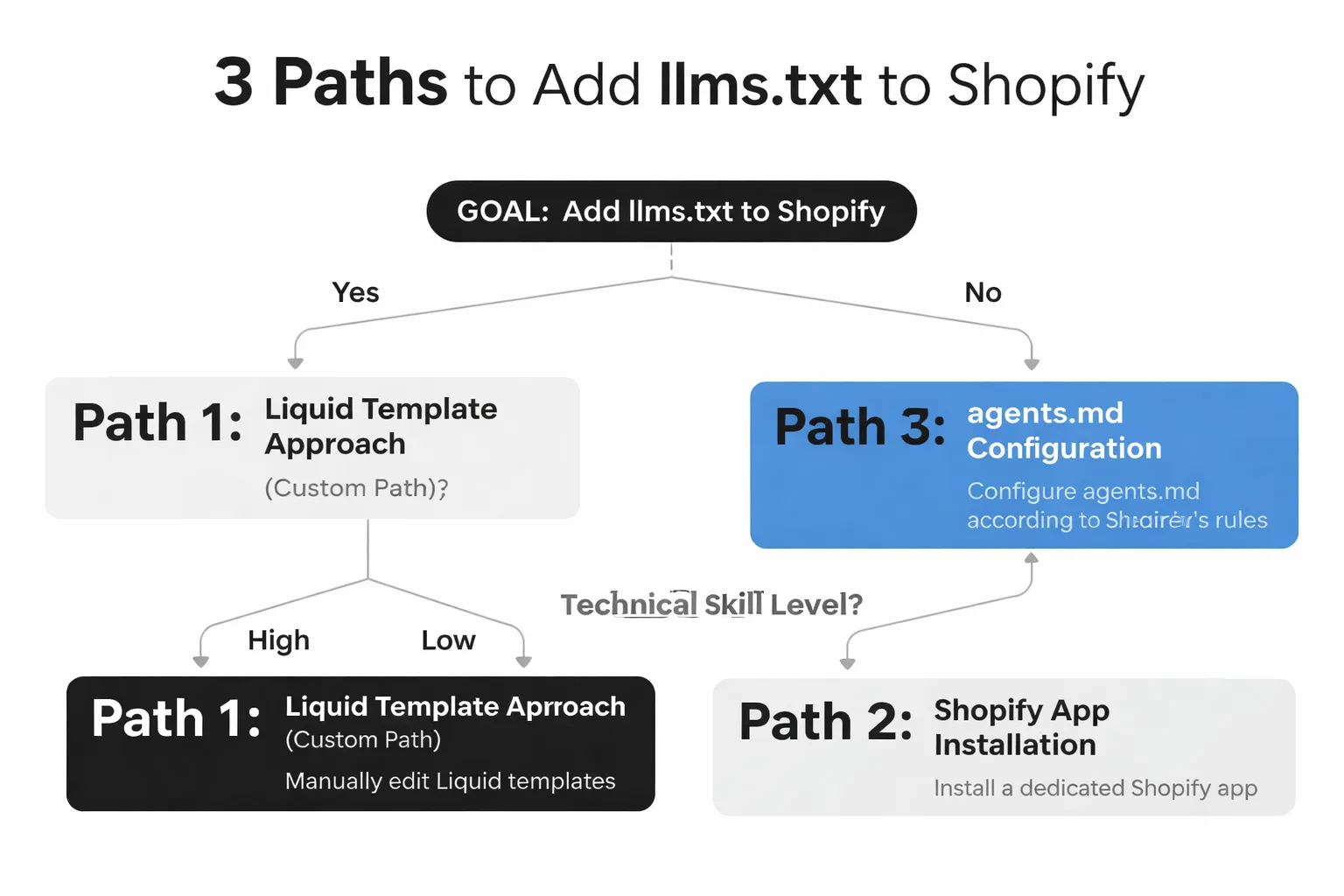
Method 1: The Liquid Template Approach (Custom Path)
The original method of adding llms.txt to Shopify involved creating a liquid template file in your theme. Here's the updated approach that works around Shopify's platform-level redirect.
Step 1: Access your theme code. Go to your Shopify admin, navigate to Online Store > Themes, click the three dots on your active theme, and select Edit code. This opens the theme code editor where you can create new files.
Step 2: Create a new template. In the Templates section, click Add a new template. Choose the page type and create a file named llms-txt.liquid or llms-txt-custom.liquid. The key insight here is that you should NOT name it llms.txt.liquid at the root path, because Shopify now controls that endpoint. Instead, serve it from a custom page path like /pages/llms-txt or use a page template assigned to a specific page.
Step 3: Write your llms.txt content in markdown. Inside the template file, write your structured content. Here's a basic structure for a Shopify store:
markdown
[Your Store Name]
[One-sentence brand description]
Products. Product Category 1: [Brief description]
- Product Category 2: [Brief description]About. About Us: [Brief description]
- Shipping Policy: [Brief description] - Return Policy: [Brief description]Content. Blog: [Brief description]
- Buying Guides: [Brief description]Step 4: Set the content type. This is critical. By default, Shopify serves pages as HTML. For AI crawlers to parse the file correctly, you need to set the content type to text/plain or text/markdown. Add this liquid tag at the top of your template:
liquid {% layout none %} {{ content | strip }}
You may need to use a proxy or custom route to serve the file with the correct MIME type. This is where the process gets technically demanding. Some merchants use Shopify's URL redirects feature to point a custom path to their template. Others use a reverse proxy through a service like Cloudflare Workers to intercept requests and serve the file with the correct headers. The approach you choose depends on your infrastructure and budget.
Step 5: Create a page in Shopify admin. Go to Pages > Add page. Title it "llms-txt," assign your custom template, and paste your markdown content into the page body. Publish it.
Step 6: Verify the file is accessible. Navigate to https://yourstore.com/pages/llms-txt and confirm the content loads as plain text. Use our LLMs.txt Validator to check the file structure and get a readiness grade.
This method gives you full control over content and structure. The tradeoff is that it requires comfort with liquid templating, and you need to work around Shopify's redirect to ensure your file is actually served at a discoverable path.
Method 2: Using a Shopify App
If editing theme code sounds like a nightmare, apps are your path. Several Shopify apps now handle llms.txt and agents.md generation automatically.
Step 1: Search the Shopify App Store. Go to the Shopify App Store and search for "llms.txt" or "AI search" or "agents.md." Look for apps that specifically mention AI discovery, LLM optimization, or answer engine optimization.
Step 2: Evaluate the app. Before installing, check three things: when the app was last updated (it needs to be post-May 2026 to account for Shopify's platform change), whether it handles the agents.md redirect, and what content it generates. A good app should let you customize the file content, not just auto-generate a generic template.
Step 3: Install and configure. Most apps will scan your store's product catalog, collections, and pages, then generate a structured file. Review the generated content carefully. Make sure it includes your brand description, product categories with links, key policies, and content pages.
Step 4: Verify. Same as the manual method. Check the live URL and run it through a validator.
The advantage of apps is simplicity. The disadvantage is less control. Some apps generate thin files that list your homepage and a few collections. That's not enough for meaningful AI visibility. You want a file that provides genuine context about what your store sells, who it's for, and why an AI engine should recommend your products. When evaluating apps, ask whether the generated file includes product-level detail (not just collection links), whether it updates automatically when you add new products, and whether it supports custom content sections for buying guides and editorial content.
Method 3: Configure agents.md (The Current Default)
Since Shopify now redirects /llms.txt to agents.md platform-wide, the most future-proof approach is to configure your agents.md file directly. This is the path Shopify has chosen, and it's where the platform is investing.
Step 1: Check what's currently served. Visit https://yourstore.com/llms.txt in your browser. You'll likely be redirected to https://yourstore.com/agents.md. Note what content is there. Shopify's default agents.md file may include basic store information automatically pulled from your shop settings, but it may not include the depth of content needed for optimal AI discovery.
Step 2: Determine if you can customize agents.md. As of August 2026, Shopify's handling of agents.md customization is still evolving. Some merchants report being able to add custom content through their theme settings or via app. Others find that Shopify generates a default file automatically. Check your theme settings for any AI discovery or agent configuration options. If you're on Shopify Plus, contact your merchant success manager to ask about agents.md customization options, as Plus stores sometimes get early access to platform features.
Step 3: Add structured content. Whether through theme customization or an app, ensure your agents.md file includes the same structured information you'd put in an llms.txt file: brand description, product links, policies, and content pages. The format may differ slightly from llms.txt (agents.md uses YAML-like frontmatter in some implementations), but the principle is the same: give AI agents a clear, structured map of your store.
Step 4: Verify and monitor. Check the file regularly. Platform updates can overwrite custom configurations without warning. Set a calendar reminder to check your agents.md file monthly, especially after Shopify platform updates.
This is the method I'd recommend for most merchants in 2026. It aligns with Shopify's platform direction, and it ensures your structured data is served at the path AI crawlers actually find when they visit your domain.
What Belongs in Your llms.txt File
The content of your file matters more than the filename. I've reviewed dozens of these files, and the difference between a good one and a bad one is enormous. A bad file lists a homepage and three product links. A good file gives an AI model everything it needs to understand and recommend your store.
Here's what to include:
Brand identity block. Start with your store name, a one-sentence value proposition, and your primary product categories. This helps AI models build an entity association between your brand and what you sell. If you sell specialty coffee equipment, say so explicitly. Don't make the AI guess.
Product catalog with descriptions. List your main collections with full URLs and one-sentence descriptions. Include pricing context if relevant (e.g., "premium espresso machines ranging from $500-$2,000"). This is where entity grounding for AI search happens. You're telling the AI model, "These are my products, this is what they cost, and this is who they're for."
Policy pages. Shipping, returns, warranties, and FAQ pages. AI models that power shopping recommendations need this information to answer user questions about your store. If an AI can't find your return policy, it won't recommend your product in a buying guide.
Content pages. Blog posts, buying guides, comparison articles, and educational content. These pages are where AI engines source the detailed information they synthesize into answers. If you've published a guide on "How to Choose a Burr Grinder," link to it. That's the page that gets cited when someone asks an AI for grinder recommendations.
Structured data references. Mention your schema markup. If you use Product schema, FAQ schema, or Organization schema, reference it. This reinforces the connection between your structured data and your content.
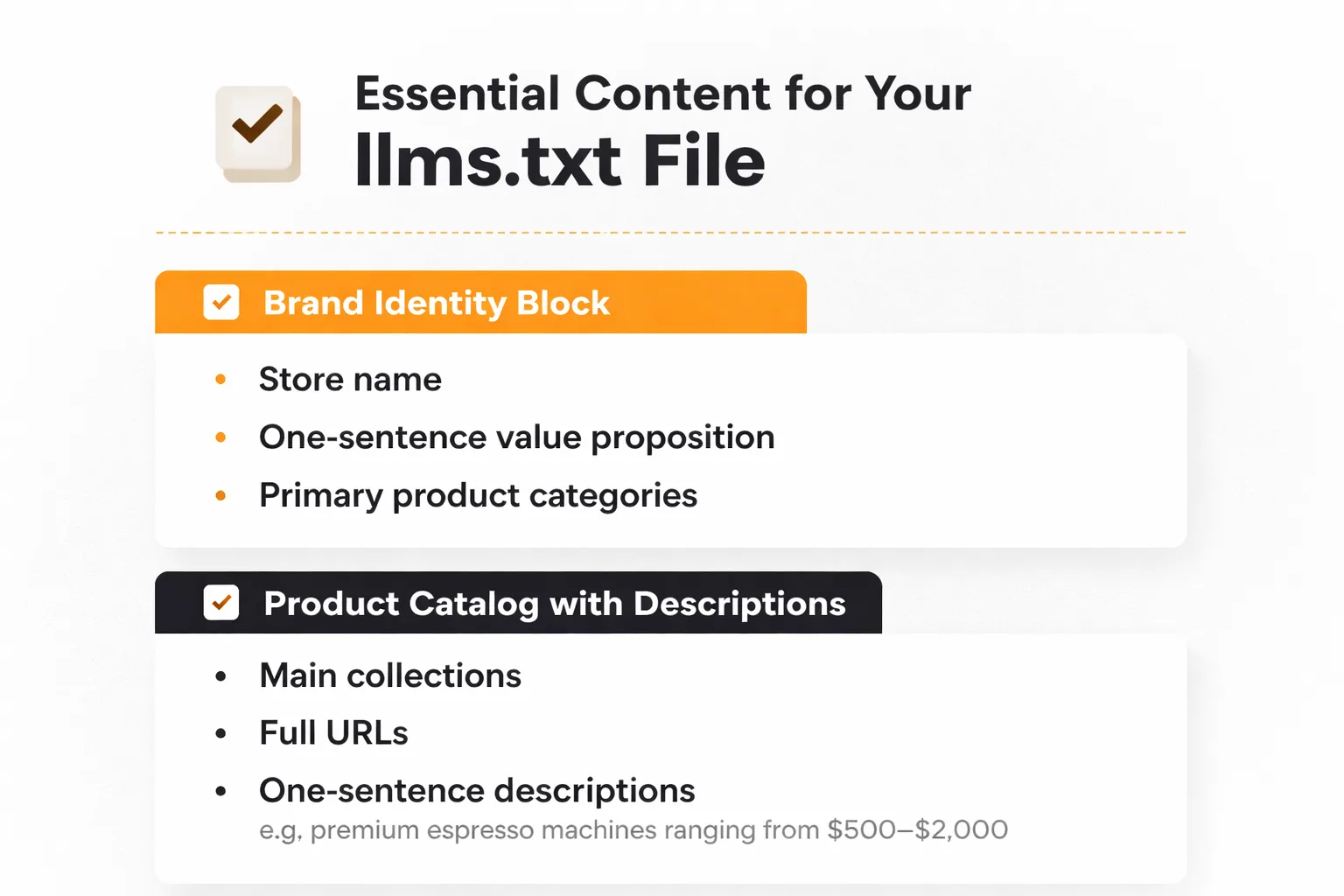
Let me give you a concrete example. Say you run a store called "BrewCraft" that sells pour-over coffee gear. Your brand identity block should read: "# BrewCraft > Specialty pour-over coffee equipment for home baristas. Hand-selected grinders, kettles, and brewers from top brands." Your product section should list collections like "- Pour-Over Brewers: Hario V60, Chemex, and Fellow brewers ranging from $25-$80" and "- Burr Grinders: Baratza and Fellow electric grinders from $150-$700." Notice the specificity. The AI model now knows your price range, your brand positioning, and your product categories. That's the level of detail that earns citations.
Contrast that with a poor entry: "# BrewCraft > Coffee stuff. - Products" This tells the AI model nothing useful. It can't determine whether you sell espresso machines or paper filters. It can't assess whether your products match a user's budget. It can't distinguish you from any other coffee store on the internet. The file exists, but it adds zero value to the AI's understanding of your brand.
Are AI search engines citing your competitors instead of you?
How Does llms.txt Influence AI Citations?
The connection between llms.txt and AI citations works through a chain of signals. When an AI search engine like Perplexity or ChatGPT receives a product query, it doesn't just crawl the web randomly. It looks for authoritative, structured sources that match the query intent. Your llms.txt file serves as a directory that helps AI crawlers find and understand your most important pages.
The citation chain works like this: AI crawler discovers your domain. It finds your llms.txt or agents.md file. It reads the structured content and follows links to your product pages, blog posts, and policy pages. It indexes this information. When a user asks a question related to your products, the AI model synthesizes an answer using the pages it has indexed. If your content was well-structured and relevant, you get cited.
But here's the nuance most guides miss. llms.txt is a discovery signal, not a ranking signal. It helps AI models find your content. It doesn't guarantee they'll cite it. Citation depends on content quality, relevance, authority, and how well your pages answer the specific question being asked. Think of llms.txt as the table of contents. The actual chapters need to be worth reading.
In my experience, stores that combine a well-structured llms.txt file with deep, genuinely useful content see the best results. The file gets AI crawlers to your door. Your content is what gets you cited. If you want to track whether you're actually being cited, an AI visibility tracker can show you which AI engines are mentioning your brand and which sources they're citing.
The distinction between discovery and citation is where most merchants waste time. They obsess over the file format, the exact markdown structure, the number of links included. Meanwhile, their product pages have 50-word descriptions, no specifications, no comparison content, and no reviews. The llms.txt file is doing its job: it's sending AI crawlers to those pages. But when the crawler arrives and finds thin content, it moves on to a competitor whose page actually answers the question. The file gets you discovered. Content gets you cited. Authority gets you recommended. Each layer builds on the one before it, and skipping any layer breaks the chain.
When Should You Use Each Method?
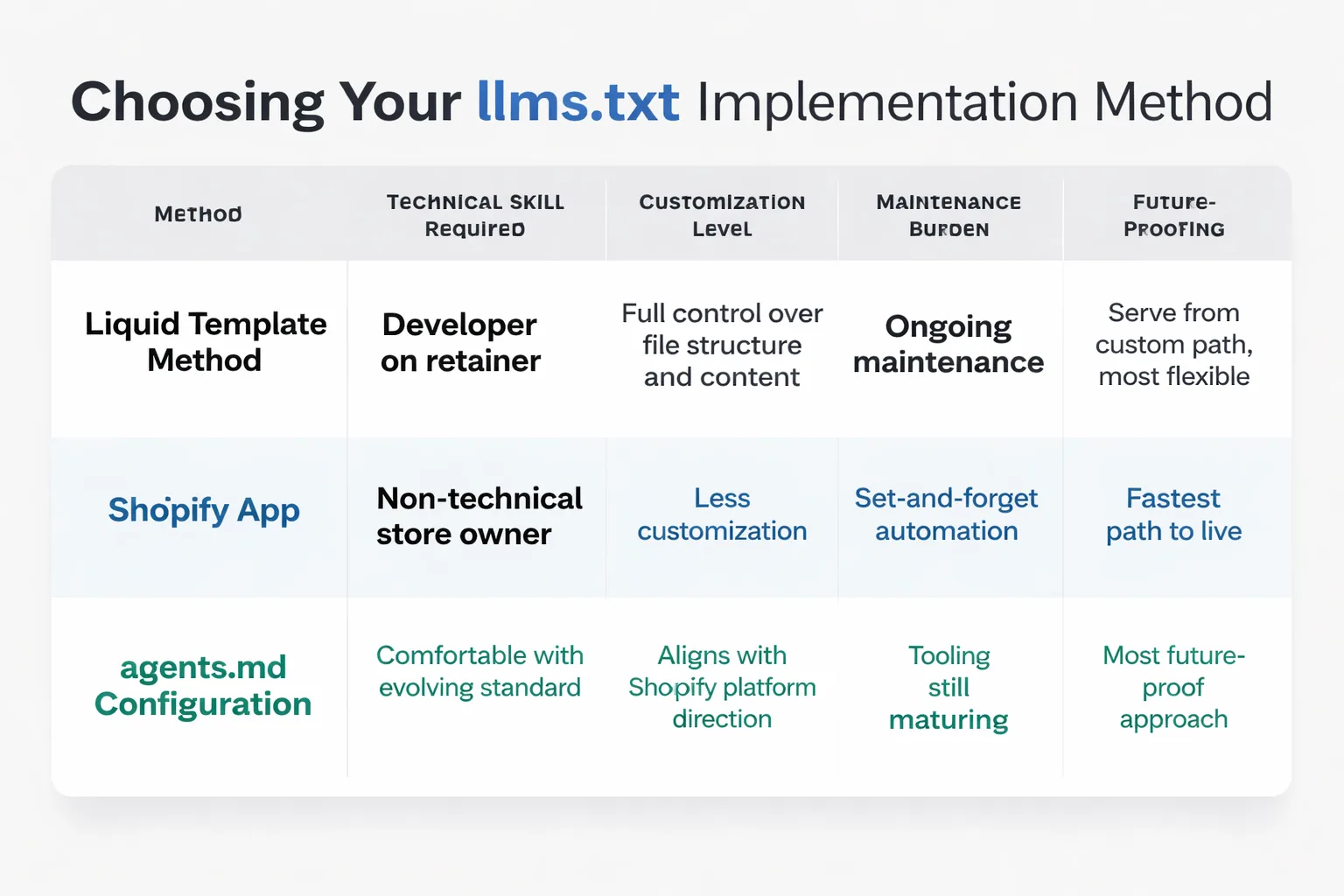
The right implementation method depends on your situation. Here's how I'd decide:
Use the liquid template method if you have a developer on retainer, you need full control over file structure and content, and you want to serve the file from a custom path that you control. This is the most flexible approach but requires ongoing maintenance.
Use a Shopify app if you're a non-technical store owner, you want set-and-forget automation, and you're okay with less customization. This is the fastest path to getting something live.
Use agents.md configuration if you want to align with Shopify's platform direction and you're comfortable with the evolving standard. This is the most future-proof approach, but the tooling is still maturing.
There's also a hybrid approach worth mentioning. Some merchants I've talked to use an app to generate the base agents.md file, then manually edit the file to add custom content sections. This gives you the automation of an app (product catalog auto-generation, link checking) with the control of manual editing (custom brand descriptions, editorial content links). The downside is that you need to re-apply your manual edits whenever the app regenerates the file. If you go this route, keep a backup of your custom content so you can quickly re-apply it after app updates.
Verifying Your Implementation
Adding the file is half the job. Verifying it works is the other half. Here's what to check:
Check the live URL. Visit https://yourstore.com/llms.txt (or your custom path) in a browser. Confirm the content loads as plain text or markdown, not HTML. If you see a Shopify 404 page or an HTML-rendered page, something's wrong.
Check the content type. Use curl or a browser developer tool to inspect the response headers. The content type should be text/plain or text/markdown. If it's text/html, AI crawlers may not parse it correctly.
Run it through a validator. Our free LLMs.txt Validator checks file structure, link integrity, and AI-search readiness. It grades your file on a 100-point scale and flags missing elements.
Monitor AI visibility. The ultimate test is whether AI engines actually discover and cite your content. Use an AI visibility checker to track whether your brand starts appearing in AI-generated answers after implementation. This is where you connect the technical implementation to business outcomes. If you implemented the file three months ago and still aren't being cited, the file alone isn't enough. You need better content, more authority signals, or both.
Let me walk you through a verification workflow I use. First, I open a terminal and run curl -I https://yourstore.com/llms.txt to check the HTTP status code and content type headers. A 200 status with text/plain or text/markdown content type means the file is being served correctly. A 301 redirect to /agents.md means Shopify's platform redirect is active, and you need to check what's served at the redirect destination. Next, I run curl https://yourstore.com/llms.txt (without the -I flag) to see the actual content. I check that the markdown structure is intact, that all links resolve to live pages (not 404s), and that the brand description and product sections are populated. Finally, I run the file through our validator tool to get a quantitative grade and specific improvement recommendations.
Connecting llms.txt to Broader AI SEO Strategy
llms.txt is one piece of a larger AI search visibility strategy. In my work at Meev, I've seen too many teams treat it as a silver bullet. It's not. It's a foundation layer. Here's how it fits into the broader picture.
Entity grounding. Your llms.txt file helps AI models understand what your brand is and what it sells. But entity grounding also requires consistent information across the web. Your Wikidata entry, your Google Business Profile, your structured data, and your llms.txt file should all tell the same story. If your llms.txt says you sell "specialty coffee equipment" but your Wikidata entry says you're a "kitchen appliance retailer," AI models get confused. Consistency wins.
Content depth. AI engines cite pages that thoroughly answer questions. Your llms.txt file points AI crawlers to your content. But if that content is thin, generic, or duplicated, you won't get cited. The AEO vs SEO distinction matters here. Traditional SEO rewards keyword-optimized pages. Answer engine optimization rewards pages that directly answer questions with specificity and authority.
Citation tracking. You can't improve what you don't measure. After implementing llms.txt, track whether your brand visibility changes across AI search surfaces. Use a ChatGPT AI visibility checker or a Perplexity AI visibility checker to monitor specific prompts and queries. If you're a multi-location or enterprise brand, an enterprise AI rank tracker can scale this across hundreds of queries.
Agentic commerce readiness. This is the forward-looking piece. AI agents are increasingly making purchasing decisions on behalf of users. When someone asks ChatGPT to "find me a good burr grinder under $200 and order it," the AI agent needs to discover your product, understand its specifications, verify the price, and complete the transaction. Your llms.txt file is the entry point for that discovery. If AI agents can't find structured information about your products, you're invisible to agentic commerce.
The relationship between llms.txt and structured data is worth emphasizing. Your file should reference and reinforce your existing schema markup. If your product pages use Product schema with price, availability, and review data, your llms.txt file should link to those same product pages. This creates a consistency loop: the AI crawler finds your llms.txt, follows links to product pages, reads the structured data on those pages, and builds a comprehensive understanding of your catalog. When a user asks about a specific product type, the AI model can confidently cite your store because it has both the discovery signal (llms.txt) and the structured data (schema) to support the citation.
How Does llms.txt Compare to Other AI Discovery Signals?
llms.txt doesn't exist in isolation. It's part of a stack of signals that AI search engines use to discover, understand, and cite your content. Understanding how these signals interact helps you prioritize implementation efforts.
llms.txt vs robots.txt. Robots.txt tells crawlers what they can and cannot access. llms.txt tells AI models what your site is about and which pages matter most. They serve complementary purposes. Your robots.txt might allow all crawlers, but without llms.txt, AI models have no structured context for what they find. Think of robots.txt as the bouncer and llms.txt as the host who introduces you to every guest.
llms.txt vs sitemap.xml. Sitemaps list every URL on your site for search engines. llms.txt curates the most important URLs with descriptions and context. A sitemap says "here are 500 pages." llms.txt says "here are the 15 pages that matter most, and here's why." AI models benefit from both, but the curation and context in llms.txt is what helps them understand your brand's positioning.
llms.txt vs schema markup. Schema markup provides structured data about individual page elements (product price, review count, FAQ answers). llms.txt provides site-level context. Schema tells the AI "this page is about a product that costs $199." llms.txt tells the AI "this store sells coffee equipment and this page is one of their product collections." Both signals feed into the AI's understanding, but at different levels of granularity.
llms.txt vs agents.md. This is the comparison that matters most for Shopify merchants right now. llms.txt is a markdown-formatted content directory. agents.md is a newer standard that can include both permissions (what AI agents can do) and content discovery (what your site contains). Shopify has chosen agents.md as its platform standard. For most merchants, the practical difference is minimal: both standards serve the same underlying purpose of helping AI models understand your store. The AEO vs GEO framework helps clarify where each signal fits in your broader strategy.
What This Won't Fix
I want to be honest about the boundaries here. A well-structured llms.txt file will not fix thin product descriptions, poor site architecture, or a lack of brand authority. It won't make up for missing structured data or a nonexistent content strategy. If your product pages are 50 words of generic copy with no specifications, reviews, or unique value, no amount of llms.txt optimization will get you cited by AI engines. The file is a discovery and context layer. It amplifies what's already there. If there's nothing worth amplifying, it does nothing.
The stores winning in AI search right now have three things: structured data (schema markup, llms.txt, clean URL architecture), genuinely useful content (buying guides, comparisons, educational resources), and authority signals (reviews, third-party coverage, consistent entity information across the web). llms.txt is the easiest of these to implement. It's also the least impactful on its own.
The Forward View on AI Discovery Standards
The llms.txt standard is still evolving. The Ahrefs analysis raises a valid point: there's no universal commitment from LLM providers to read or prioritize llms.txt files. Some do. Some ignore them. The Shopify platform redirect to agents.md suggests the ecosystem is still figuring out which standard will win.
My contrarian take: most teams are obsessing over the wrong thing. They're spending hours debating llms.txt vs agents.md vs schema markup when they should be creating content that AI engines actually want to cite. I've seen stores with perfect llms.txt files and zero AI citations. I've seen stores with no llms.txt file that get cited constantly because their content is exceptional. The file is a signal. Content is the substance.
That said, the cost of implementing llms.txt correctly is low. The potential upside, if the standard gains broader adoption, is real. It's a bet with asymmetric upside. You spend a few hours setting it up, and if it helps even one AI engine discover and cite your products, it pays for itself.
Looking ahead, I expect the ecosystem to consolidate around a hybrid approach. Shopify's agents.md redirect is a signal that platforms want to control AI discovery at the infrastructure level. Other ecommerce platforms will likely follow. The merchants who invest in understanding these standards now, who build the muscle for structured data implementation, will be positioned to adapt as the standards evolve. Those who wait for a clear winner will be months behind when the dust settles.
For Shopify merchants specifically, the path forward is clear: configure agents.md, verify it's live, create genuinely useful content, and track your AI visibility over time. The merchants who do all four will be the ones showing up in AI-generated buying guides while their competitors wonder what happened.
If you want to see where your brand stands today across every major AI search surface before you start, run a baseline check. Knowing your starting point tells you whether llms.txt implementation actually moves the needle.
FAQ
Can I still use the old liquid template method for llms.txt on Shopify?
Technically yes, but with a major caveat. Shopify now redirects the /llms.txt path to agents.md platform-wide. If you create a liquid template, you need to serve it from a custom path (like /pages/llms-txt) rather than the root /llms.txt URL. Always verify the live URL to confirm your file is actually being served to AI crawlers.
What's the difference between llms.txt and agents.md?
llms.txt is a markdown-formatted file that provides AI models with a structured summary of your site's content. agents.md is a newer standard that tells AI agents what they can and cannot do on your site, and it can include similar structured information. Shopify has chosen agents.md as its platform standard, redirecting /llms.txt to agents.md for all stores.
How long does it take for AI engines to discover and use my llms.txt file?
There's no guaranteed timeline. AI crawlers discover and index content on their own schedules. In my experience, you should allow 4-8 weeks after implementation before expecting any change in AI visibility. Use an AI visibility tracker to monitor whether your brand starts appearing in AI-generated answers after implementation.
Do I need llms.txt if I already have schema markup?
They serve different purposes. Schema markup provides structured data about individual pages (product details, reviews, FAQs). llms.txt provides a site-level directory that helps AI crawlers understand your store's overall structure and content hierarchy. Both are useful. They complement each other rather than replacing each other.
Is llms.txt worth implementing for a small Shopify store?
Yes, if you have the technical resources or use an app. The implementation cost is low, and the potential upside is real if AI discovery standards continue to gain adoption. However, prioritize content quality first. A small store with exceptional buying guides and product content will outperform a large store with a perfect llms.txt file and thin content.
What happens if Shopify changes the platform again?
This is a real risk. Shopify's May 2026 redirect caught many merchants off guard. The best mitigation is to stay informed through the Shopify community forums, verify your file regularly, and treat any platform-dependent optimization as something that may need adjustment when the platform updates.
About the Author
Judy Zhou, Founder
Judy Zhou leads content strategy at Meev, where she oversees AI-driven content research and publishing for hundreds of brands. With a background in SEO and editorial operations, she focuses on building content systems that rank on Google, get cited by AI search engines, and drive measurable business results.
See exactly where your brand appears across every major AI search surface and close the citation gaps that are costing you sales.