
Anthropic just quietly adjusted their Anthropic Cache TTL for prompt caching, and for content teams relying on automated Claude API content workflows, this isn't just a technical footnote—it's a direct hit to your operational costs. Here is why the change matters and how to adjust your architecture before your next billing cycle.
Key Takeaways
- Anthropic's default Cache TTL is 5 minutes — short enough to miss cache hits entirely if your pipeline has any processing lag between requests.
- Extended 1-hour TTL is now available via API parameter, but it costs more per cached token — the ROI depends entirely on your request volume and system prompt size.
- For a team generating 500 blog briefs/month with a 2,000-token system prompt, caching can reduce token costs by up to 90% on repeated prompt prefixes — but only if requests are batched correctly.
- The practitioner literature on how Claude Cache TTL interacts with GEO optimization and content freshness signals is essentially nonexistent right now — teams are working from first principles.
Who this is for: Content teams, AI workflow architects, and SEO operators running high-volume blog automation through Claude's API. By the end of this guide, you'll know exactly when to pay for extended Cache TTL, when the 5-minute default is enough, and how to restructure your API calls to stop burning tokens unnecessarily.
TLDR
- Anthropic's default Cache TTL is 5 minutes — short enough to miss cache hits entirely if your pipeline has any processing lag between requests.
- Extended 1-hour TTL is now available via API parameter, but it costs more per cached token — the ROI depends entirely on your request volume and system prompt size.
- For a team generating 500 blog briefs/month with a 2,000-token system prompt, caching cuts token costs by 60-80% on repeated prompt prefixes — but only if requests are batched correctly.
- The practitioner literature on how Claude Cache TTL interacts with GEO optimization and content freshness signals is nonexistent — teams are working from first principles.
What is Anthropic Cache TTL and What Does It Actually Do?
Prompt caching in the Claude API is the mechanism that lets Anthropic reuse previously processed prompt prefixes instead of recomputing them from scratch on every request. TTL — time-to-live — is the window during which that cached prefix stays valid. If your next API call arrives before the TTL expires, Claude skips the recomputation and charges you a reduced rate on those cached tokens. If you miss the window, you pay full input token prices again.
Most content teams miss: every conversation turn gets reprocessed from scratch without caching — system prompt, prior messages, new input, all of it. That's compute-heavy and it directly eats into subscription limits for teams running workflows through third-party integrations. When you're generating hundreds of blog briefs a month, each one hitting the same 2,000-word brand voice document and editorial style guide as part of the system prompt, the redundancy is staggering. Prompt caching is the lever that eliminates that redundancy — but only if your TTL window is wide enough to actually capture it.
Think of it like a coffee shop that pre-grinds beans for the morning rush. If the rush arrives on schedule, everyone gets fast service at lower cost. If the rush is delayed by 10 minutes and the grounds go stale, you grind again from scratch. TTL is your freshness window. The question is whether your workflow's cadence fits inside it.
What Changed in Anthropic Cache TTL and When?
Anthropically quietly updated its caching architecture in late 2024 and into early 2025, expanding the TTL options available to API users. The original default was — and remains — 5 minutes. That's the window you get unless you explicitly request otherwise.
The significant change: Anthropic now supports a 1-hour TTL option, configurable via an API parameter in your cache control settings. This is not automatic and it's not free. Extended TTL incurs a higher per-token storage cost compared to the base caching rate. The tradeoff is straightforward in theory — pay slightly more per cached token, but hold that cache long enough to actually hit it across a realistic workflow where requests don't arrive in sub-5-minute bursts.
Which model tiers are affected? The extended TTL option is available on Claude 3.5 Sonnet and Claude 3 Opus — the models most commonly used for substantive content generation work. Claude Haiku, which teams often use for lighter classification or tagging tasks, also supports caching but is less likely to be the bottleneck where TTL matters most, simply because Haiku's base token costs are already low enough that savings are marginal.
Practitioner documentation on this change is thin. When I went looking for hard evidence connecting Anthropic's Cache TTL changes to downstream effects on content freshness signals or GEO optimization outcomes, the research simply doesn't exist in published form yet. If you're building content automation workflows that depend on Claude and care about how caching interacts with AI search citation signals, you're working from first principles right now. That's not a reason to ignore the change — it's a reason to instrument your own workflows carefully.
How Does Anthropic Cache TTL Affect Claude API Content Workflows?
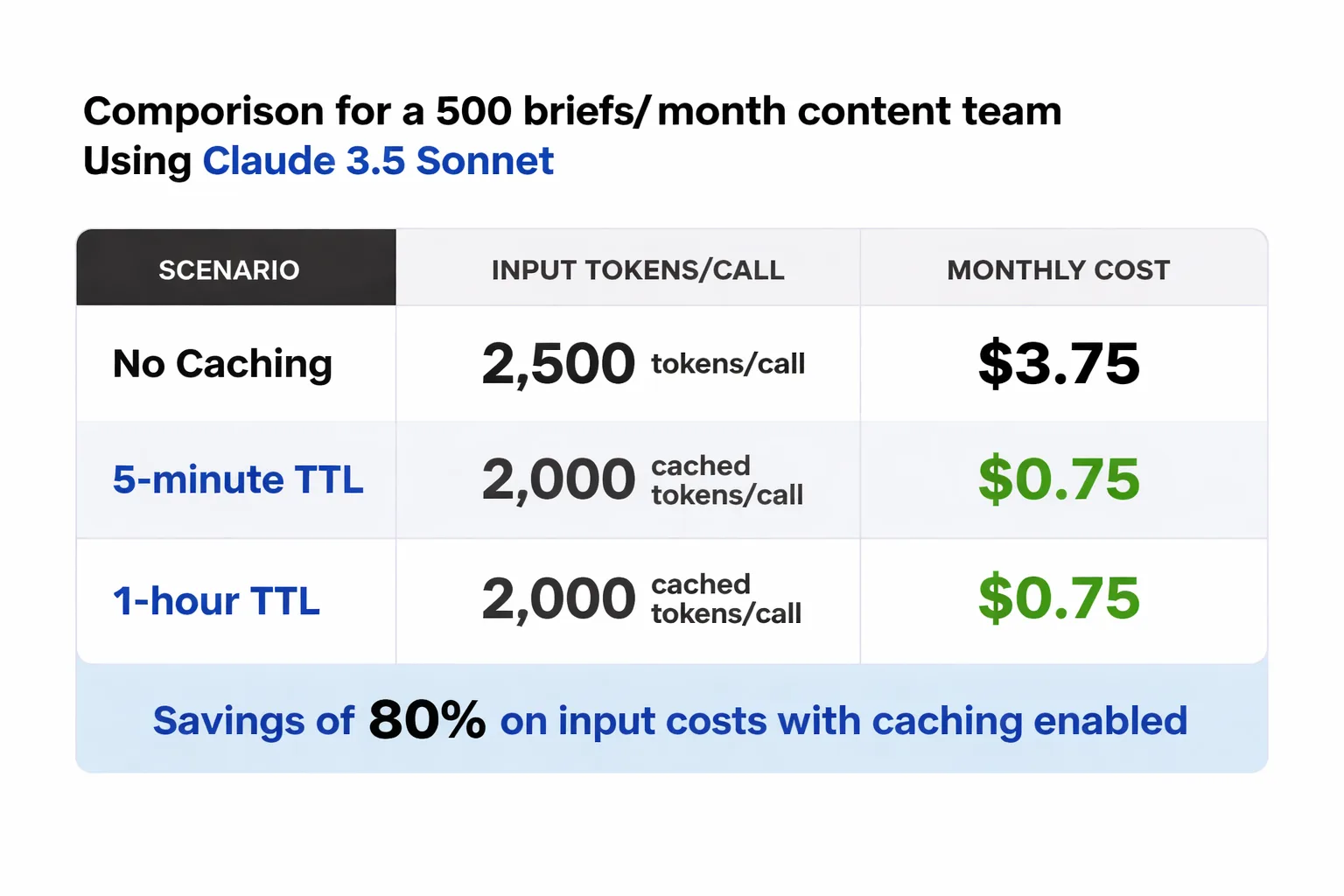
Typical scenario: a content team generating 500 blog briefs per month.
Assume a content team generating 500 blog briefs per month through the Claude API. Each API call includes a system prompt containing brand voice guidelines, editorial standards, and SEO instructions — roughly 2,000 tokens. The variable part (the specific brief topic, target keyword, audience notes) adds another 300-500 tokens per request. Output averages 800 tokens per brief.
Without caching, every one of those 500 calls processes the full 2,000-token system prompt at the standard input rate. On Claude 3.5 Sonnet, that's approximately $3 per million input tokens (pricing as of early 2025 — always verify current rates on Anthropic's pricing page). That 2,000-token system prompt costs $0.006 per call, or $3.00 across 500 calls — just for the repeated static content.
With prompt caching and a cache hit, those 2,000 tokens are charged at the cached input rate, which Anthropic prices at approximately 10% of the standard input rate for cache reads. That drops the repeated system prompt cost to roughly $0.30 for the same 500 calls — a 90% reduction on that token segment alone.
Here's where the 5-minute vs. 1-hour TTL decision actually bites you. If your pipeline queues briefs in batches — say, 20 briefs processed in sequence over 15-20 minutes — the 5-minute TTL will expire mid-batch. You'll get cache hits on the first few requests and then revert to full pricing for the rest. With 1-hour TTL, the entire batch runs cached. For a team running daily batch jobs, the 1-hour TTL pays for itself almost immediately. For a team making sporadic one-off API calls throughout the day, the 5-minute default suffices — or the extended TTL cost doesn't pay off.
The break-even calculation is simple: if your batches consistently take longer than 5 minutes to process, extended TTL will save you money. If they don't, you're paying for insurance you don't need.
For teams evaluating the broader economics of AI-powered content pipelines, the OpenAI ecosystem guide on Meev covers how these cost dynamics play out across different model providers — worth reading alongside this analysis.
Is your content pipeline structured to actually hit Claude's cache — or are you paying full token prices on every request?
How to Make Practical Adjustments for Anthropic Cache TTL?
The mechanics of maximizing cache hits are more deliberate than most teams realize. It's not just about enabling caching — it's about structuring your API calls so the cacheable prefix is as large and as stable as possible.
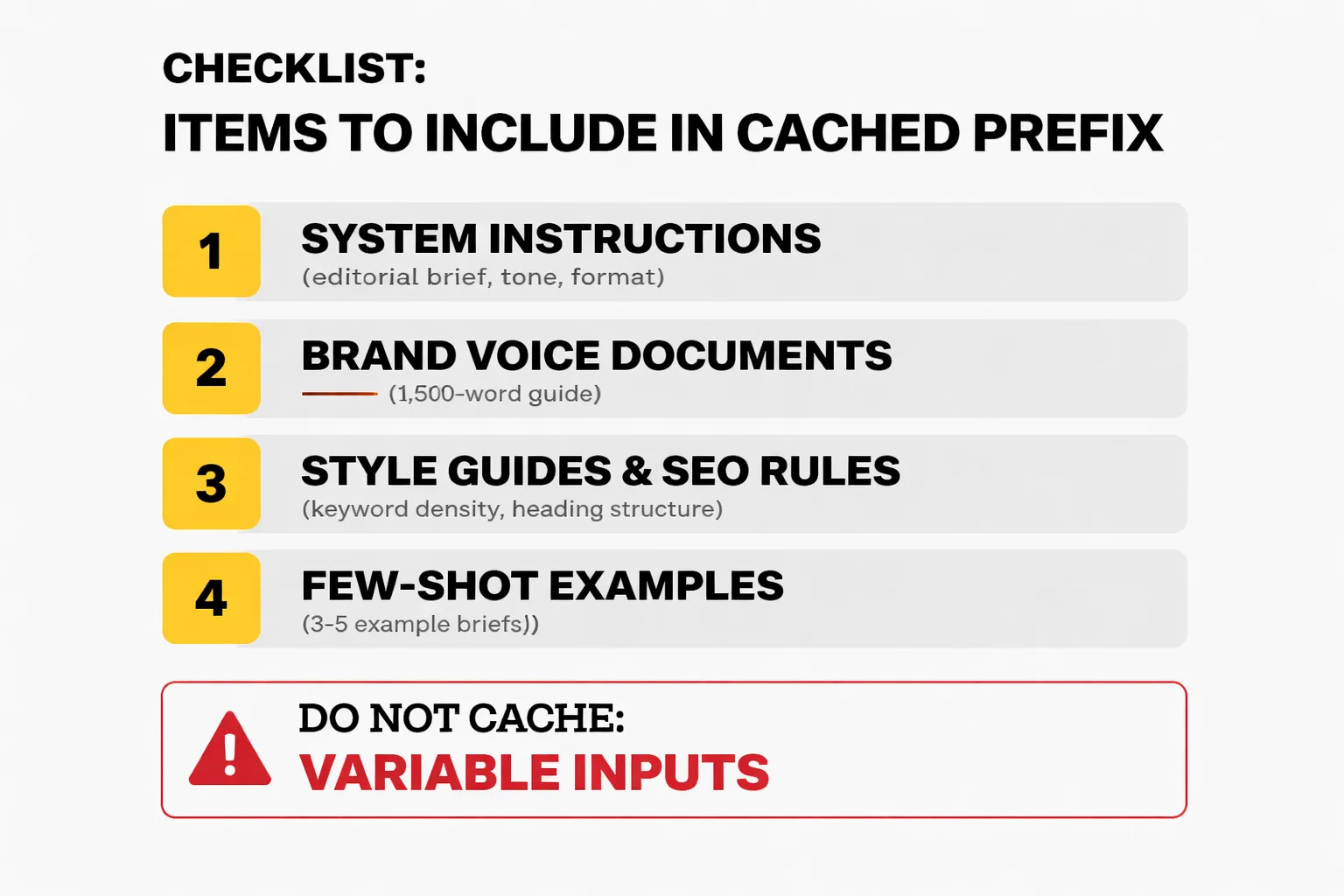
Here's what to put in the cached prefix, in order of impact:
1. System instructions — your full editorial brief, tone guidelines, output format specifications. These should never change between calls in the same workflow run. 2. Brand voice documents — if you're feeding Claude a 1,500-word brand voice guide, this belongs at the top of the system prompt, before any variable content. 3. Style guides and SEO rules — keyword density targets, heading structure requirements, internal linking instructions. Static, cacheable, high token count. 4. Few-shot examples — if you're using 3-5 example briefs to anchor Claude's output format, these should live in the cached prefix, not the per-request user message.
What you should NOT cache: the variable inputs. Topic, target keyword, audience segment, competitor URLs — these change per request and belong in the user message, after the cached prefix. The cache only applies to the prefix; anything after the cache breakpoint is processed fresh every time.
Structuring your API calls correctly means placing your cache_control parameter at the end of the last static content block, not at the end of the entire message. A common mistake I see is teams caching the entire prompt including the variable section, which defeats the purpose — the cache won't hit if the content after the breakpoint changes.
When NOT to cache: short-lived workflows where you're making fewer than 10-15 API calls per session, or workflows where your system prompt changes frequently (A/B testing different editorial voices, for example). In those cases, the cache setup overhead and extended TTL cost won't recover in savings. Also skip caching for Haiku-based classification tasks where the per-token cost is already minimal — the math rarely pencils out.
One workflow pattern that works well: run your batch brief generation as a single session, front-loaded with the full static system prompt, and queue all variable inputs as sequential user messages within that session. This maximizes cache hits across the entire batch and keeps your TTL window relevant.
For high-potential keyword research workflows specifically — where you're feeding Claude a large keyword dataset as context and then querying it repeatedly — caching the dataset in the prefix and varying only the query is a significant cost lever. The high-potential keyword research guide on Meev covers how these research workflows are evolving, which is directly relevant if you're building automated keyword-to-brief pipelines.
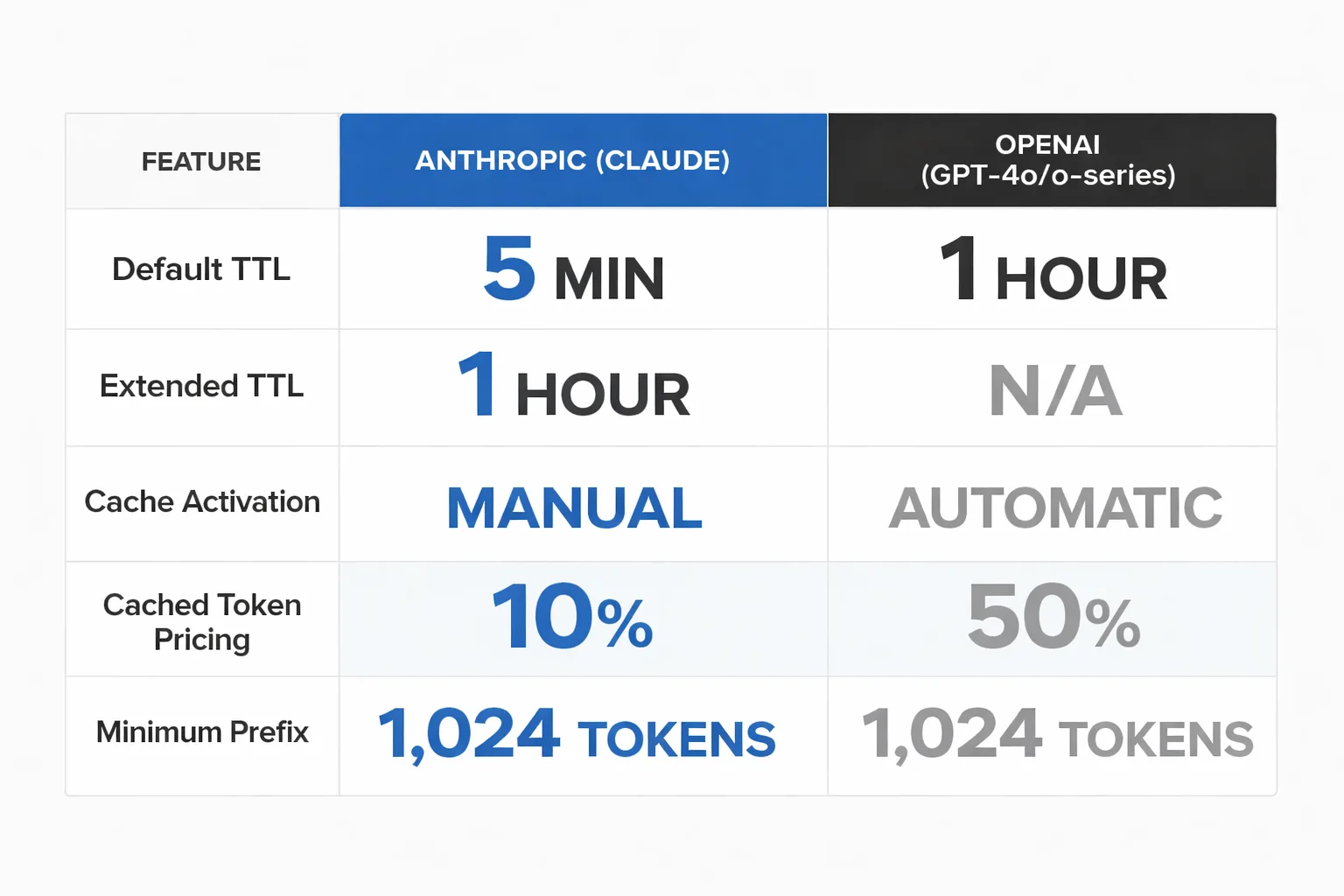
How Does Anthropic Cache TTL Compare to OpenAI Caching?
OpenAI introduced automatic prompt caching in late 2024, and the architectural difference from Anthropic's approach is meaningful for workflow design decisions.
| Feature | Anthropic (Claude) | OpenAI (GPT-4o, o-series) |
| Default TTL | 5 minutes | 1 hour (automatic) |
| Extended TTL | 1 hour (explicit API param) | Not separately configurable |
| Cache activation | Manual — requires cache_control param | Automatic — no configuration needed |
| Cached token pricing | ~10% of standard input rate | ~50% of standard input rate |
| Minimum cacheable prefix | 1,024 tokens | 1,024 tokens |
| Models supported | Claude 3 Opus, 3.5 Sonnet, Haiku | GPT-4o, GPT-4o-mini, o1, o3-mini |
The headline difference: OpenAI's caching is automatic and defaults to 1 hour, while Anthropic's requires explicit configuration but offers cheaper cached token pricing. If your team is already on OpenAI and hasn't thought about caching, you may already be benefiting from it without knowing — OpenAI applies it automatically when the prefix exceeds 1,024 tokens.
For Anthropic, the lower cached token rate (10% vs. OpenAI's 50%) means the savings ceiling is higher — but you have to earn it through deliberate prompt architecture. Teams that are disciplined about separating static and variable prompt content will see better economics on Claude. Teams that want caching to "just work" without configuration overhead may find OpenAI's automatic approach less friction-intensive.
My honest take: if you're running a high-volume content automation pipeline and you're willing to invest in prompt architecture, Claude's caching economics are better. If you're a smaller team running occasional batch jobs and you don't want to manage cache parameters, OpenAI's automatic 1-hour TTL is the lower-effort option. Neither is universally superior — it depends on your volume, your prompt structure discipline, and how much engineering time you have to optimize the pipeline.
One thing I'm watching closely: how caching behavior interacts with AI content creation for social media and multi-format workflows where the same research context feeds different output types (blog post, LinkedIn summary, email newsletter). The potential to cache a shared research context and vary only the format instruction is significant — but it requires prompt architecture that most teams haven't built yet.
The bottom line on the Anthropic Cache TTL change: it's not a crisis, and it's not a windfall. It's a configuration lever that rewards teams who understand their own workflow cadence. Know your batch timing, structure your prompts deliberately, and the economics work in your favor. Ignore it, and you're leaving meaningful cost savings on the table at scale.
FAQ
What is Claude API prompt caching?
Prompt caching lets Claude reuse previously processed prompt prefixes instead of recomputing them on every API call. When a request arrives within the TTL window with a matching prefix, Claude charges a reduced cached token rate rather than the full input rate.What is the default Cache TTL for Claude?
The default Cache TTL is 5 minutes. This means if your next API call with the same prompt prefix arrives more than 5 minutes after the first, the cache has expired and you pay full input token prices again.How do I enable the 1-hour Cache TTL in Claude's API?
You enable extended TTL by including acache_control parameter in your API request, set to the appropriate TTL value. This is a manual configuration — it's not applied automatically. Anthropic's API documentation covers the exact parameter syntax.Is extended Cache TTL worth the extra cost?
It depends on your batch timing. If your workflow processes requests in batches that take longer than 5 minutes to complete, extended TTL pays for itself through reduced input token costs. If your requests are sporadic or your batches finish quickly, the 5-minute default suffices.What should I put in the cached prompt prefix?
Prioritize static, high-token content: system instructions, brand voice guides, editorial standards, SEO rules, and few-shot examples. Variable content — specific topics, keywords, audience notes — should go in the user message after the cache breakpoint.How does Anthropic's caching compare to OpenAI's?
OpenAI applies caching automatically with a 1-hour default TTL and charges ~50% of the standard input rate for cached tokens. Anthropic requires manual configuration but offers ~10% of the standard input rate for cached tokens — better economics for disciplined teams, more setup overhead for everyone else.Does Cache TTL affect content quality or output freshness?
No — TTL controls how long the cached prompt prefix stays valid, not the freshness of Claude's knowledge or the quality of its outputs. Cached and uncached requests produce equivalent output quality. The only variable is cost and latency.Can I cache prompts on Claude Haiku?
Yes, Haiku supports prompt caching. However, because Haiku's base token costs are already low, the savings from caching are proportionally smaller. For most teams, the caching ROI is most significant on Sonnet and Opus where token costs are higher.Meev is built for content teams who want AI-powered blog automation without the prompt engineering overhead. See how it handles caching, batching, and publishing automatically.