
You've been paying $20/month per seat for ChatGPT Plus, another $18 for Claude, and somewhere in your Slack there's a thread about whether the team should also test Gemini. The bills are stacking up, your content strategy involves proprietary keyword research you'd rather not feed to OpenAI's training pipeline, and someone in the last all-hands mentioned "running models locally" like it was obvious. Now you're wondering if a local LLM is actually the move — or just a rabbit hole that eats a weekend and produces nothing.
I've been down that rabbit hole — multiple iterations of it. What follows is the honest version, not the tech-bro hype.
The real question isn't "can you run a local LLM?" — it's "should your content team run one, and for what specifically?"
TLDR
- Local LLMs eliminate per-token API costs and keep sensitive content strategy data off cloud servers — but require $800–$2,000+ in hardware investment upfront. - LM Studio is the right starting point for non-technical content teams; Ollama is better if you need programmatic pipeline integration. - The highest-ROI use cases are bulk metadata generation, internal style guide enforcement, and content repurposing — not primary long-form drafting. - Teams producing fewer than 30 pieces per month with no data sensitivity concerns should stick with SaaS tools; the math doesn't work otherwise.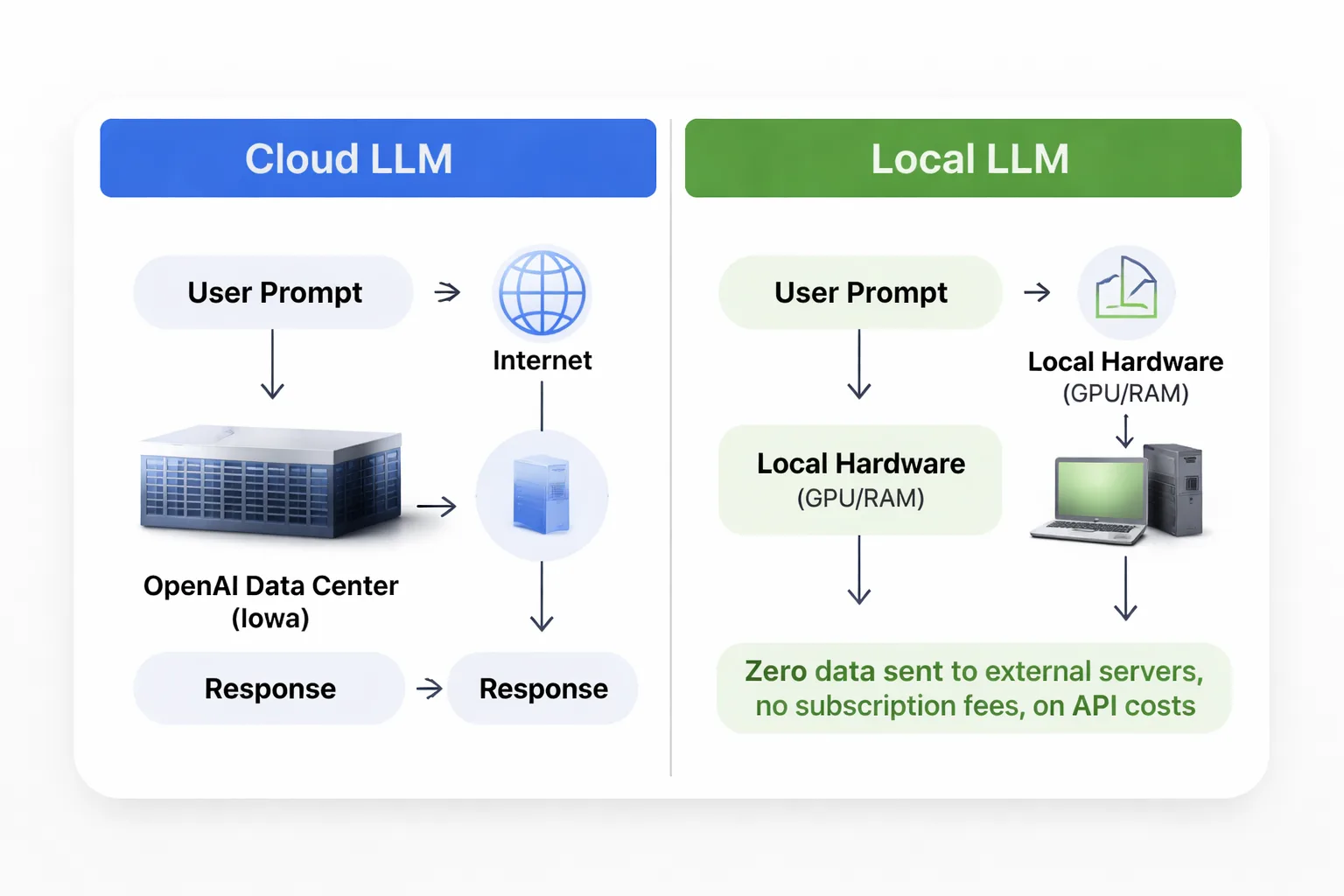
What 'Local LLM' Means for Non-Engineers
A local LLM is an AI language model that runs entirely on your own hardware — your laptop, desktop, or an on-premise server — with zero data sent to external servers. No cloud. No API calls. No subscription fees per token.
The models themselves are the same families you've heard of: Meta's Llama 3, Google's Gemma 4, Mistral, Phi-3. The difference is WHERE they run. Instead of your prompt traveling to OpenAI's data center in Iowa, it gets processed by your own GPU and RAM, and the response comes back in seconds (or minutes, depending on your hardware).
Tools like LM Studio make this accessible without a computer science degree. You download the app, browse a model library that looks like an app store, click download on something like Llama 3.1 8B, and you're running inference locally within 20 minutes. LM Studio even provides a local API endpoint that mimics OpenAI's format — meaning any tool that connects to ChatGPT can theoretically connect to your local model instead, just by swapping the endpoint URL.
This matters enormously for content teams working on competitive SEO strategies. When building a content cluster around proprietary keyword research — the kind of high-potential keyword research that took months to develop — that data simply shouldn't be sitting in a training pipeline somewhere. In my work leading content strategy at Meev, running locally means that data never leaves the building.
The Real Costs: Hardware and Gaps
Here's where most "run your own LLM" guides gloss over the details — and where I want to give you a more direct assessment.
The minimum viable setup for content work is a machine with at least 16GB of RAM (32GB preferred) and ideally a dedicated GPU with 8GB+ VRAM. An NVIDIA RTX 3060 12GB runs around $300–$400 used. A new RTX 4070 is $550–$600. If you're on a Mac, an M2 or M3 with 16GB unified memory performs well — Apple Silicon handles local inference better than I expected, and I've tested Llama 3.1 8B running at usable speed on an M2 MacBook Pro.
So the hardware investment ranges from roughly $800 (used GPU + existing machine) to $2,000+ for a dedicated workstation. That's a one-time cost, but it's real money.
Setup time is honestly about 2–4 hours for someone comfortable with software installation. For a non-technical content manager? Budget a full day, including troubleshooting.
Now the capability gap — and this is the part nobody wants to say out loud. Local models at the 7B–13B parameter range (what most consumer hardware can run) are noticeably behind GPT-4o and Claude Sonnet on complex reasoning, tone matching, and long-form coherence. I've tested this consistently. For a 2,500-word thought leadership piece that needs to sound like a specific executive? Local models struggle. For generating 200 meta descriptions from a spreadsheet of page titles? They're excellent — and free after the hardware cost.
The 70B parameter models (like Llama 3.1 70B) close the gap significantly, but they require either very high-end consumer hardware (RTX 4090, 24GB VRAM) or a small server setup. That's a different budget conversation.
Where Local LLMs Actually Earn Their Keep
I want to be specific here, because vague "use cases" are useless. These are the workflows where I've found local LLMs delivering real ROI for content operations.
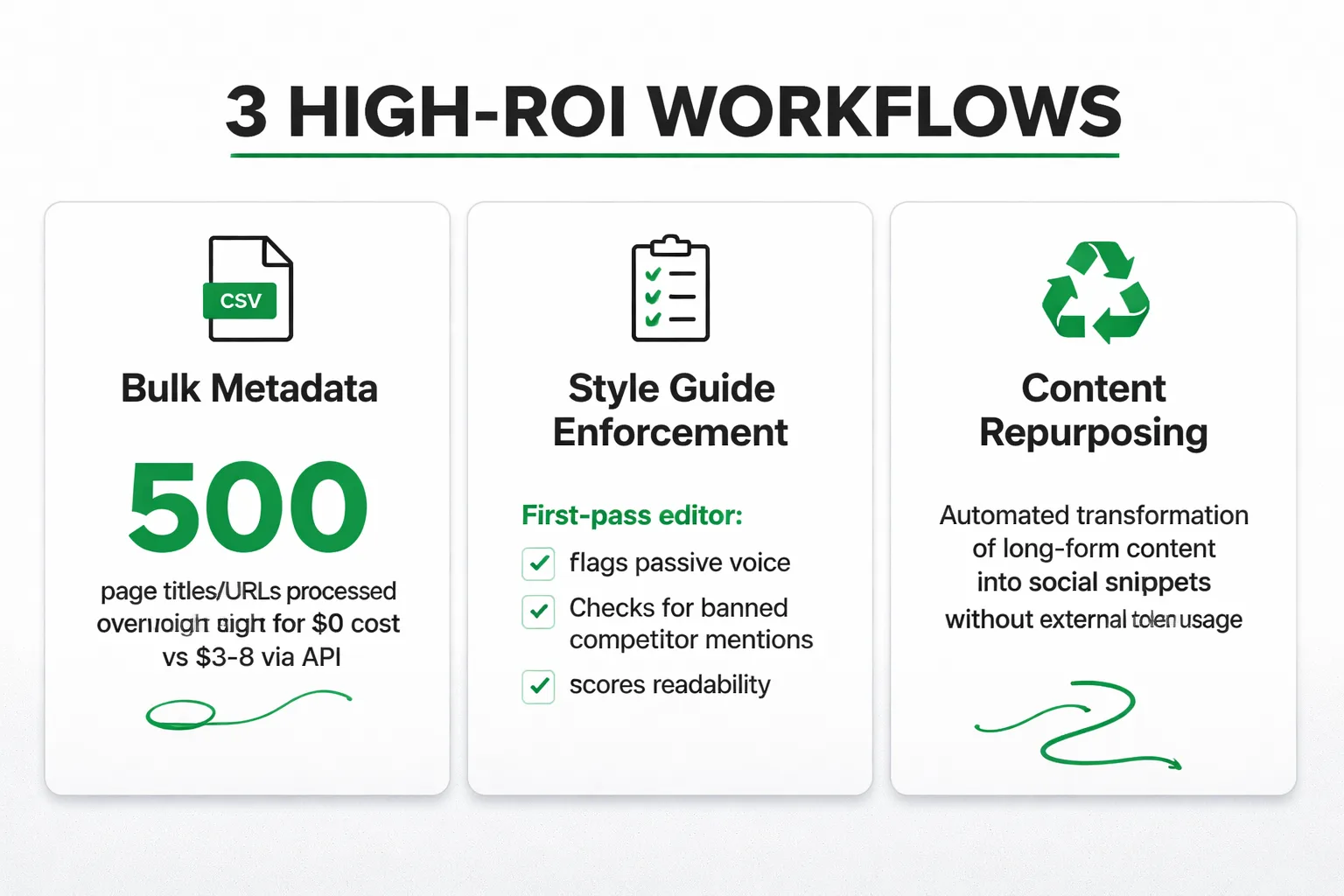
Bulk metadata generation is the clearest win. Feed a local model a CSV of 500 page titles and URLs, prompt it with your meta description formula, and let it run overnight. At GPT-4o API rates, that's roughly $3–$8 depending on token count. Sounds cheap — until you're doing it weekly across multiple clients. A local model does the same job for $0 per run after hardware.
Internal style guide enforcement is underrated. Fine-tune or heavily prompt a local model with your brand voice guidelines, forbidden phrases, and tone examples. Use it as a first-pass editor before human review. In my work with content pipelines, this approach works well — the local model flags passive voice overuse, checks for banned competitor mentions, and scores readability, all without a single token hitting an external API.
Content repurposing pipelines are another strong fit. Taking a 3,000-word blog post and generating LinkedIn post variations, email newsletter summaries, and social snippets is exactly the kind of repetitive, structured task where a 13B model performs at 90% of GPT-4o quality. The remaining 10% gap? A human editor catches it in five minutes.
Sensitive client data workflows are where local LLMs go from "nice to have" to genuinely necessary. In my experience, if you're doing content strategy for healthcare, legal, or financial clients, feeding their internal data to a cloud API creates real compliance exposure. Running locally eliminates that risk entirely. This is also relevant for competitive intelligence work — keyword gap analysis and content audit data stays on the machine.
One more thing worth mentioning: as AI Overviews continue driving zero-click search rates toward 65–69%, the economics of content production are shifting. At Meev, we've seen that teams which can produce more content at lower marginal cost — without sacrificing quality on the pieces that matter — have a structural advantage. Local LLMs are one lever for that.
LM Studio vs. Ollama: Which Wins for Content Teams
This comparison gets nerdy fast in most write-ups. Here's the practical version.
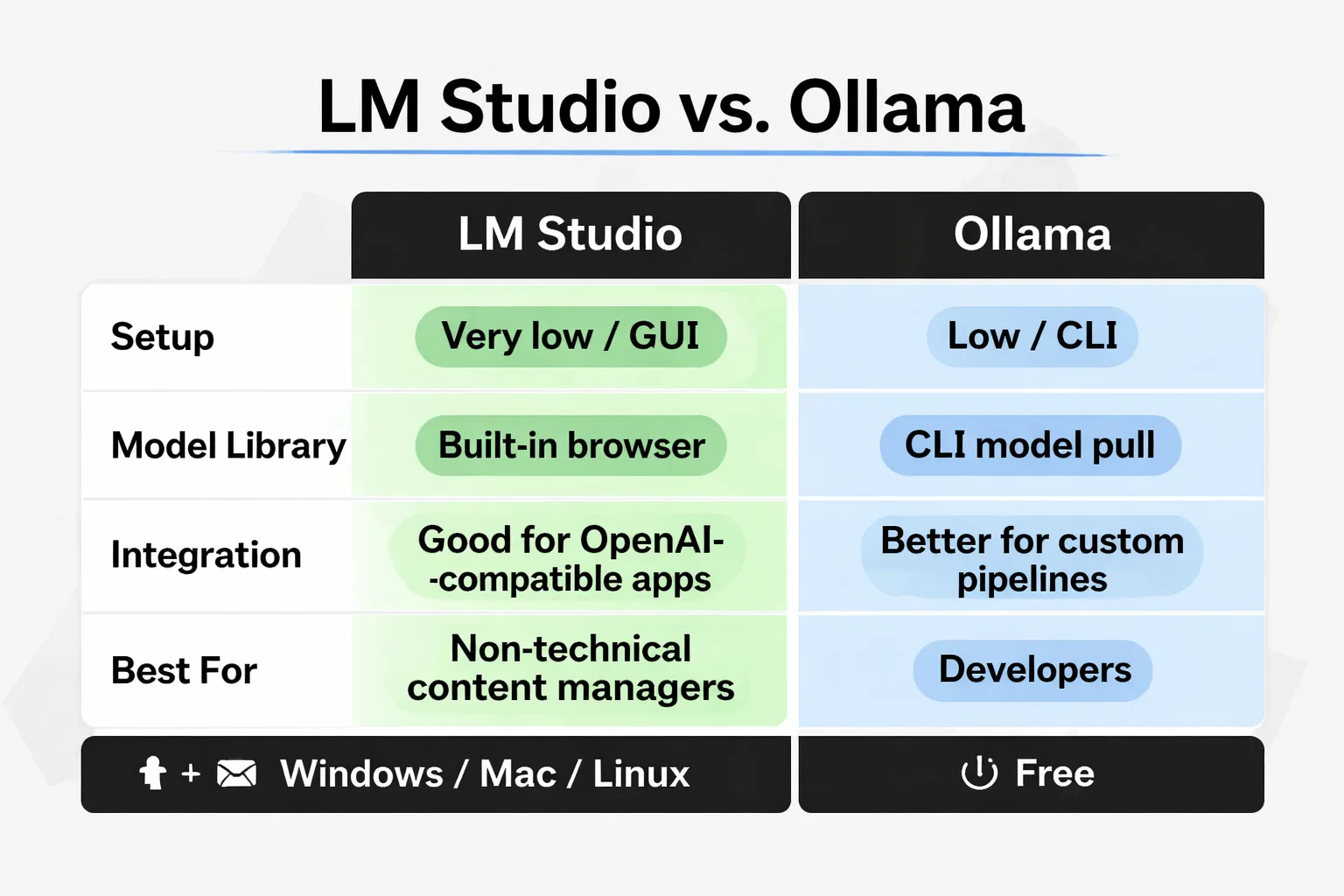
| Factor | LM Studio | Ollama |
| Setup difficulty | Very low — GUI-based | Low — command line |
| Model library | Built-in browser (Hugging Face) | CLI model pull |
| API compatibility | OpenAI-compatible local server | OpenAI-compatible local server |
| Integration with tools | Good (works with most OpenAI-compatible apps) | Better for custom pipelines |
| Best for | Non-technical content managers | Developers building workflows |
| Windows/Mac/Linux | All three | All three |
| Cost | Free | Free |
For a content team where the primary users are writers and strategists — not engineers — I recommend LM Studio. The interface is clean, model switching is point-and-click, and the built-in chat interface means the team can start using it immediately without writing a single line of code.
Ollama is the better choice if there's a developer on the team who wants to build programmatic pipelines — say, a Python script that automatically generates content briefs from a keyword list and pushes them to your CMS. Ollama's API is slightly more flexible for that kind of integration work.
My recommended approach: start with LM Studio. If you hit its limits after a month, the developer on the team will know exactly why Ollama is needed. Don't over-engineer the setup before validating the use case.
One integration note that matters for SEO teams: both tools can connect to n8n or Zapier via their local API endpoints, which means you can build automated workflows that trigger local model inference as part of a larger content production pipeline. In practice, I've found this works well for teams that have already built out their content cluster strategy and want to automate the supporting content generation without paying per-token rates on high-volume tasks.
Also worth noting: Gemma 4, Google's latest open-weight model, is available through both LM Studio and Ollama. My testing shows Gemma 4 at the 12B parameter size punches above its weight for structured content tasks — particularly anything involving lists, tables, or templated outputs. It's become my default recommendation for teams starting out.
Decision Framework: Should Your Team Go Local?
Stop reading think-pieces and answer these four questions. The answers determine whether local LLM makes sense for your operation right now.
Question 1: Do you have data sensitivity requirements? If yes — healthcare, legal, financial, or competitive strategy data you can't expose to cloud APIs — local LLM is worth the setup cost regardless of volume. This is a compliance decision, not a cost decision.
Question 2: What's your monthly content volume? Under 30 pieces per month: the math probably doesn't work. SaaS tools are cheaper when you factor in setup time and hardware amortization. Over 50 pieces per month, especially with significant metadata and repurposing work: local LLM starts paying for itself within 6–9 months.
Question 3: Do you have someone who can own the setup? This doesn't need to be a developer. A technically comfortable content manager can handle LM Studio. But someone needs to own model updates, troubleshoot inference issues, and manage the local API connection. If nobody on the team wants to touch this, the tool will collect dust.
Question 4: What's your hardware situation? If the team is on modern Macs (M2/M3 with 16GB+), you can start immediately with zero additional hardware spend. If everyone's on older Windows laptops with integrated graphics, a hardware purchase is required before even testing the workflow.
Here's the framework distilled:
- Go local if: Data sensitivity + volume over 30/month + someone to own it + adequate hardware - Stay SaaS if: No data concerns + low volume + no technical owner + older hardware - Hybrid approach: Use local LLM for bulk/sensitive tasks, keep SaaS for complex long-form drafting
The hybrid approach is honestly where most content teams I've worked with land, and it's the right call. LLM visitors convert at 4.4x the rate of organic search visitors, which means the quality bar on primary content still needs to be high — and for that, GPT-4o and Claude still have an edge. But for the operational scaffolding around that content? Local models are more than capable.
The world of AI search is shifting fast, and the teams that figure out how to produce more content at lower marginal cost — while keeping quality high on the pieces that actually drive citations and traffic — are going to have a real structural advantage. Local LLMs are one piece of that puzzle, not the whole picture.
The Maintenance Reality Nobody Mentions
Most guides skip this entirely: maintenance overhead.
Local LLMs aren't set-and-forget. Models update. LM Studio updates. Sometimes a new model version breaks prompt templates because the instruction format changed. Sometimes a macOS update affects GPU acceleration and inference speed drops 40% until someone figures out why.
For a technical team, this is a minor annoyance. For a content team where the primary users are writers on deadline, it can become a real problem. I've seen teams adopt local LLM setups enthusiastically in month one, then quietly abandon them by month three because nobody had time to troubleshoot when things broke.
The solution is simple but requires discipline: designate one person as the local LLM owner. They handle updates, test new models before rolling them out to the team, and maintain the prompt library. Budget roughly 2–3 hours per month for this. If that time isn't available, the maintenance burden will eventually kill the adoption.
Done right, though, a local LLM setup is genuinely liberating. No rate limits at 2am when running a bulk generation job. No privacy anxiety when processing a client's internal content audit. No per-token bill that makes you think twice before running an experiment. I've experienced that freedom firsthand — you just have to be honest about what it costs to maintain it.