
Claude Code SEO: How I Build Custom Automation Tools Without a Developer
The bottleneck in modern SEO isn't a lack of data — it's the gap between identifying a technical fix and having the engineering resources to execute it. For years, I watched that gap get filled by expensive agency retainers or stalled Jira tickets. But with the emergence of agentic coding tools like Claude Code, the barrier to entry for custom SEO tooling has effectively collapsed.
That's the situation I kept running into before adopting Claude Code SEO workflows seriously. Not as a chatbot. Not as a content generator. As an actual coding partner that builds the tools I need, when I need them.
Claude Code SEO automation isn't about replacing SEO expertise — it's about finally giving SEOs the engineering resources they've always needed but couldn't access without a developer.
What is Claude Code SEO?
Claude Code is Anthropic's agentic coding tool — a terminal-based environment where Claude doesn't just suggest code, it writes, runs, debugs, and iterates on it autonomously. Unlike dropping a question into a chat interface and copying the output into a script editor, Claude Code operates directly in your file system. It reads your actual data files, writes working scripts, catches its own errors, and loops until the output is correct.
For SEOs, this distinction matters enormously. General AI assistants give you code snippets you still have to assemble, debug, and run yourself. Claude Code gives you a finished, working tool. The difference between those two things is the difference between a recipe and a meal.
In my work leading content strategy at Meev, I've tested Claude Code across technical audits, content gap analysis, and Google Search Console structured data pulls, and I've found it compresses what used to be multi-day projects into a few focused hours. According to research from Stormy.ai, marketing teams using agentic tools like Claude Code report a 75% reduction in time spent on repetitive strategic analysis including SEO. That tracks with what I've seen in practice.
What SEO tasks can you automate?
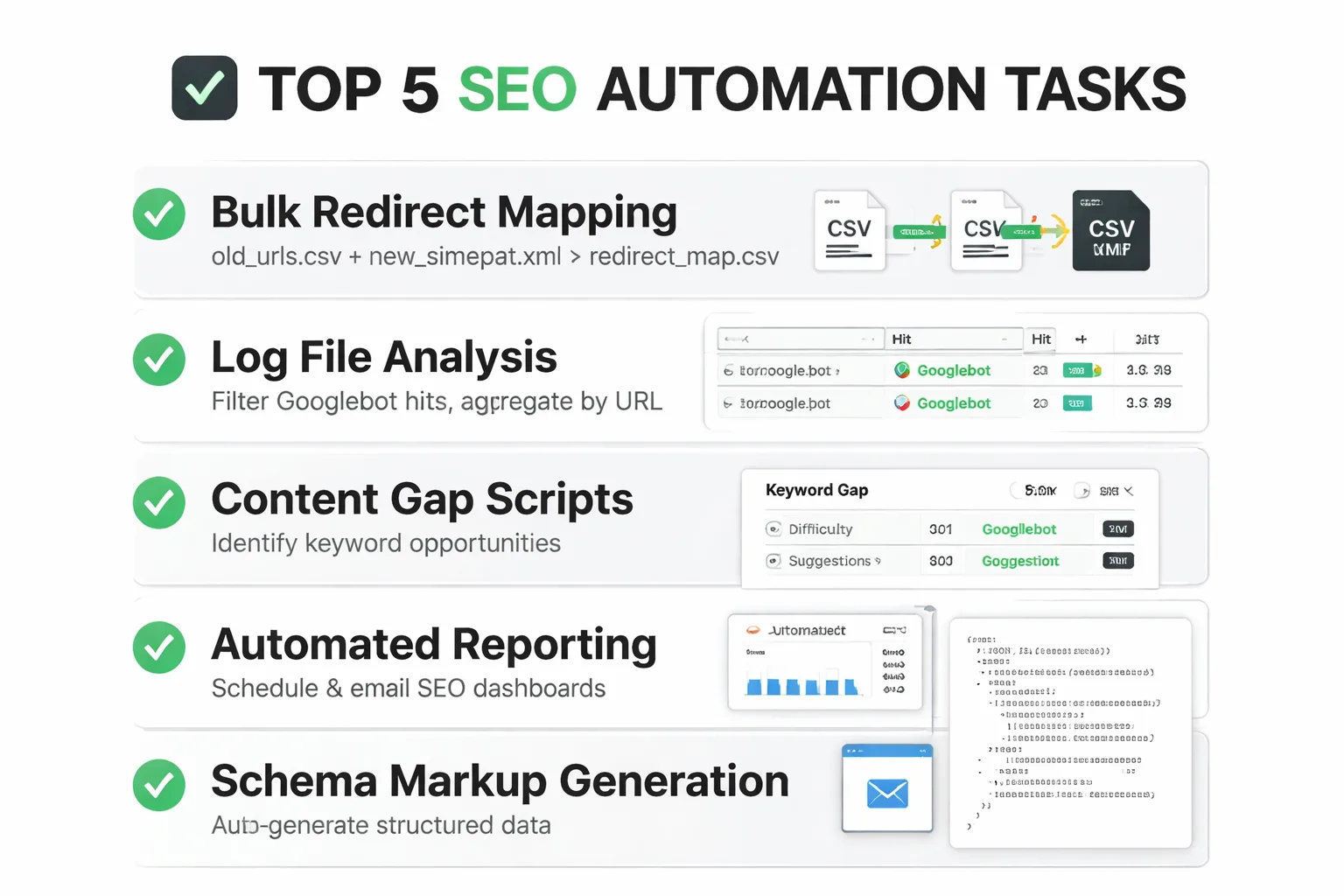
To be specific — because vague promises about "AI automation" are everywhere and most of them are useless — here are five tasks I've automated using Claude Code, with the type of prompt that actually works.
1. Bulk Redirect Mapping Feed Claude Code your old URL list and your new site architecture. Prompt: "Read old_urls.csv and new_sitemap.xml. Match old URLs to new URLs using slug similarity and category structure. Output a redirect_map.csv with columns: old_url, new_url, match_confidence, match_method." It handles fuzzy matching, flags low-confidence matches for manual review, and produces something your dev team can implement directly.
2. Log File Analysis Server log files are goldmines that most SEOs never touch because parsing them manually is brutal. Claude Code can read a raw log file, filter for Googlebot hits, aggregate by URL, and output a crawl frequency report in about 20 minutes of back-and-forth.
3. Content Gap Scripts This is one of the highest-utility applications I've found. Point it at your Ahrefs or Semrush CSV exports — your rankings, a competitor's rankings — and ask it to find high-potential keyword research opportunities where competitors rank in positions 1-10 and you don't appear at all. The output is a prioritized gap list, not a raw data dump.
4. Internal Link Audits Scripts I've built with Claude Code can crawl a site's HTML exports, map every internal link, identify orphaned pages, and flag pages with fewer than two inbound internal links. If you want to go deeper on why internal linking architecture matters for rankings, this internal linking strategy guide covers the structural logic behind it — the Claude Code script just makes executing that logic at scale actually feasible.
5. Search Console Data Pulls Connecting to the Google Search Console API used to require a developer. Claude Code can be prompted to write the authentication flow, pull 16 months of query data, and output a CSV filtered by queries with impressions above 500 and CTR below 2%. That's a click-through rate optimization list, ready to work from, generated in under an hour.
AI-Driven Development for SEO: The Skills You Actually Need
Here's where I want to push back on the intimidation factor, because it comes up constantly in my conversations with other SEOs: "I'm not a developer, I can't use this." That's not true anymore, and it's holding a lot of SEOs back from a genuine competitive advantage.
What you actually need to use Claude Code effectively is less technical than most assume, and more conceptual than most tutorials admit. You don't need to know how to write Python. You need to know what Python files look like — that they end in .py, that they import libraries at the top, that they read files using paths. You need to understand what a CSV is, what an API key is, and what "running a script in the terminal" means at a basic level. That's it. The rest is prompt quality.
And prompt quality for Claude Code SEO work comes down to one thing: specificity about inputs and outputs. Vague prompts produce vague scripts. "Analyze my site" produces nothing useful. "Read site_crawl.csv, filter rows where status_code is 404, group by parent directory, count occurrences, and output a sorted table to broken_pages_report.csv" produces exactly what you need. The SEO expertise you already have — knowing what data matters, what questions to ask, what output format your team can actually use — that's the hard part. Claude Code handles the syntax.
I also recommend getting comfortable with two things: virtual environments in Python (so scripts don't break each other's dependencies) and reading error messages without panicking. Claude Code will explain every error it encounters and fix it autonomously most of the time. But understanding that "ModuleNotFoundError" means a library isn't installed — not that your computer is broken — saves a lot of unnecessary anxiety in the process.
Where AI-Generated Code Still Breaks
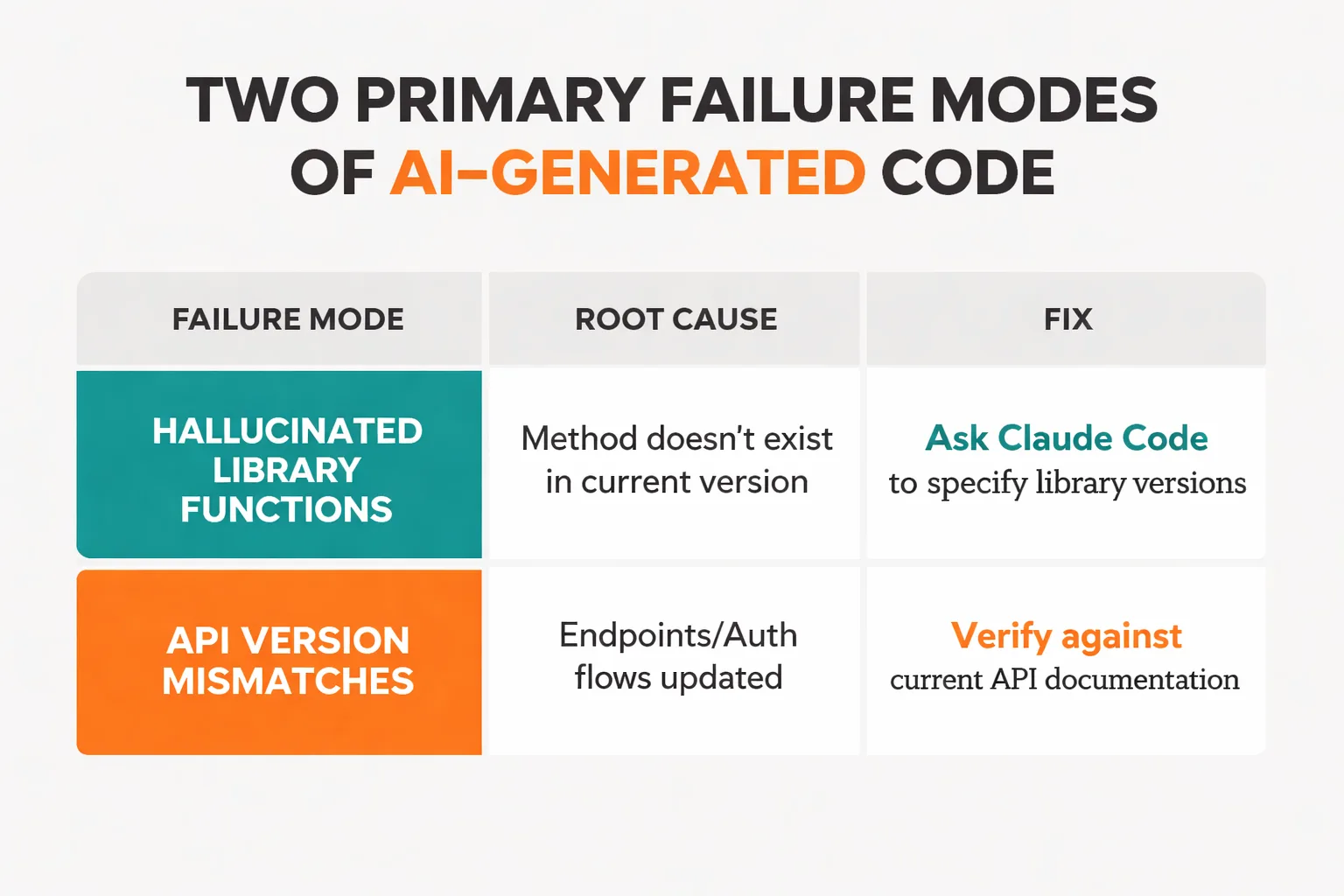
In the interest of accuracy, I've found that the hype around AI-driven development glosses over real failure modes that can cause serious problems if you're not watching for them.
The most common issue I've encountered is hallucinated library functions. Claude Code will occasionally write code that calls a method that doesn't exist in the version of a library you have installed — or that existed in an older version and was deprecated. The script looks completely plausible, runs without a syntax error, and then fails at runtime with a confusing message. The fix is to always ask Claude Code to specify which library versions it's targeting and to check those against what you have installed.
API version mismatches are the second major failure mode, and they're particularly relevant for SEO work because the tools we use often connect to Google Search Console, Ahrefs, or Semrush APIs that update their endpoints and authentication flows regularly. A script Claude Code writes based on its training data may be targeting an API version that's been deprecated. Before running any API-connected script on live data, I recommend always testing against a sandbox or a small data subset first.
Brittle scripts are the third issue — and this one is more subtle. Claude Code will often write a script that works perfectly on a test file but breaks on real data because the real data has edge cases the test file didn't: empty cells, unexpected characters, URLs with query strings, encoding issues. The mitigation here is to run every new script on a 50-row sample of actual data before unleashing it on 50,000 rows. This sounds obvious, but I've seen teams consistently regret skipping this step under deadline pressure.
The governance question matters too. If you're building Claude Code workflows that touch live site infrastructure — pushing redirects, modifying robots.txt, updating schema — you need a review gate before anything executes. Treat AI-generated code the same way you'd treat code from a junior developer: review it, test it in staging, and never give it write access to production without a human checkpoint. According to the Digital Marketing Institute's 2026 trends report, the teams seeing the best results from AI automation are the ones that built human review into their workflows, not the ones that fully automated everything — and that matches what I've observed at Meev.
Building Custom SEO Scripts with AI
This is the section most articles skip, and it's the one that actually determines whether Claude Code becomes a lasting competitive advantage or just a novelty used twice and forgotten.
The problem with re-prompting from scratch every time is that institutional knowledge gets lost. Forty-five minutes spent getting a log file analysis script working perfectly, used once, and three months later when it's needed again, you're starting from zero. At Meev, I've watched this multiply across a team of four SEOs and burn hundreds of hours annually on redundant work.
The solution is treating working scripts like a content library — documented, versioned, and organized by use case. Here's a system I recommend:
1. Create a /seo-scripts folder in a shared repository (GitHub works fine, even a private repo on a free account).
2. Name scripts descriptively: gsc_ctr_opportunity_pull.py not script3_final_v2.py.
3. Add a comment block at the top of every script with: what it does, what input files it expects, what it outputs, which API keys it needs, and the date it was last tested.
4. Keep a README.md in the folder that lists every script in plain English with a one-line description — this is the team's menu.
5. Version your prompts alongside your scripts. Save the Claude Code prompt that generated each script in a companion .txt file. When the script breaks after an API update, you can re-run the prompt with updated context instead of rebuilding from memory.
Teams I've worked with that do this consistently end up with something genuinely valuable: a proprietary automation stack that compounds over time. Research from the Marketing Agent Blog shows that marketers scaling content production by 4x while maintaining quality are doing it through documented, repeatable AI workflows — not one-off prompts.
The long-term play here connects to something bigger than individual scripts. As AI search engines like Perplexity and Google's AI Overviews change how content gets discovered, the SEOs who win will be the ones who can move faster on technical execution — auditing, fixing, and optimizing at a pace that wasn't possible before. Custom tooling is how you get there. And if you're thinking about how this fits into a broader content strategy that survives the AI search transition, this piece on building a content moat is worth reading alongside your automation work.
The bottom line on Claude Code SEO work is this: the barrier isn't technical ability. It's the willingness to treat automation as a long-term investment rather than a quick fix. The SEOs I've seen get the most out of it aren't the ones with Python backgrounds — they're the ones who document everything, test before deploying, and keep building even when individual scripts fail.
Start with one task. The redirect mapping script, the Search Console pull, whichever one would save you the most time this week. Get it working. Document it. Then build the next one. That's how an SEO automation library becomes a genuine competitive moat.