
When you sit down at your browser and your fingers hover over the address bar, you're making a choice that most people never consciously think about. Do you type the full URL — https://www.example.com — or do you just type a few words and let Google figure it out? It feels trivial. It's not. That single decision — search Google or type a URL — triggers two completely different technical pipelines, feeds different data ecosystems, and carries real implications for your privacy, your security, and how Google's algorithms learn about the web.
After years of analyzing how content gets discovered, ranked, and surfaced in search, I've found that most marketers and SEO professionals are missing a layer of the story that actually matters — and much of it lives in the mechanics of the Chrome Omnibox.
TLDR
- Typing a URL directly bypasses Google's search index entirely — your browser resolves the domain via DNS and connects directly to the server, leaving no search query data behind. - Searching via the Omnibox sends your query to Google's servers, feeds its machine learning models, and triggers a full SERP pipeline — including AI Overviews, featured snippets, and personalized results. - Over 58% of all U.S. searches now end without a click on an external website, and that number jumps to 80–83% when AI Overviews appear — meaning the search path is increasingly a dead end for organic traffic. - Security risk is real: searching for a brand instead of typing its URL exposes you to typosquatting and paid ad phishing — a threat most users completely ignore.The Anatomy of the Chrome Omnibox
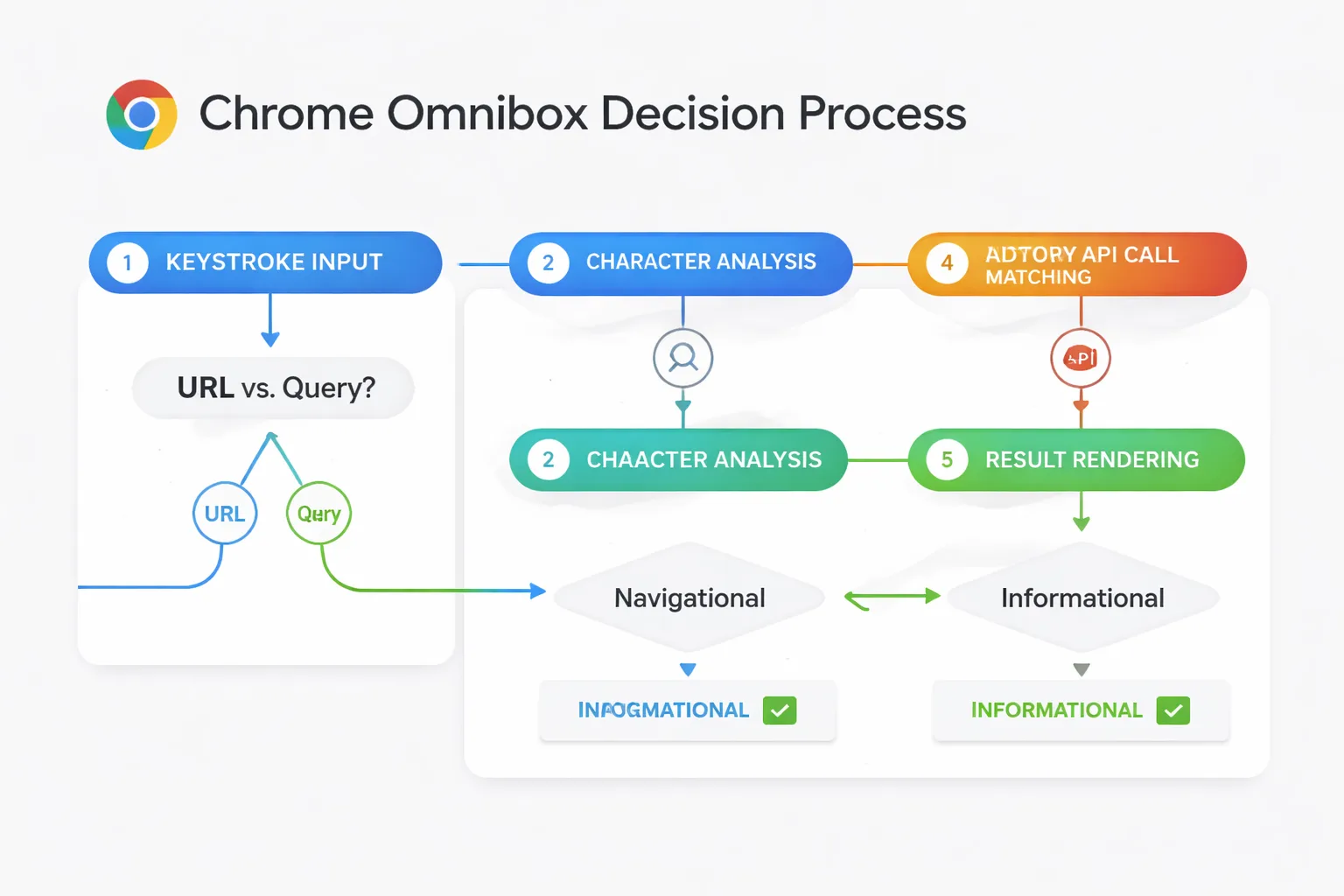
The Google address bar — officially called the Omnibox — is not just a text field. It's a decision engine. Chrome analyzes every keystroke in real time, cross-referencing your browsing history, bookmarks, open tabs, and Google's autocomplete API to predict whether you're trying to navigate somewhere or search for something.
Here's what's actually happening under the hood when you type:
1. Character analysis: Chrome checks whether your input looks like a URL pattern (contains a dot, a slash, or a known TLD like .com, .org, .io).
2. History matching: Your local browser history is scanned for matching URLs before any network request is made.
3. Autocomplete API call: If no local match is found and the input doesn't resolve as a URL, Chrome sends a partial query to Google's autocomplete servers — often before you've finished typing.
4. Intent classification: Google's backend classifies the query as navigational, informational, transactional, or local — and this classification determines which SERP features get triggered.
5. Result rendering: The Omnibox dropdown populates with a mix of history, bookmarks, and search suggestions, ranked by predicted click probability.
That's five distinct processes firing before you even hit Enter. The Omnibox is, in effect, a miniature search engine sitting on top of the actual search engine.
Direct Navigation vs. Search: The Technical Fork
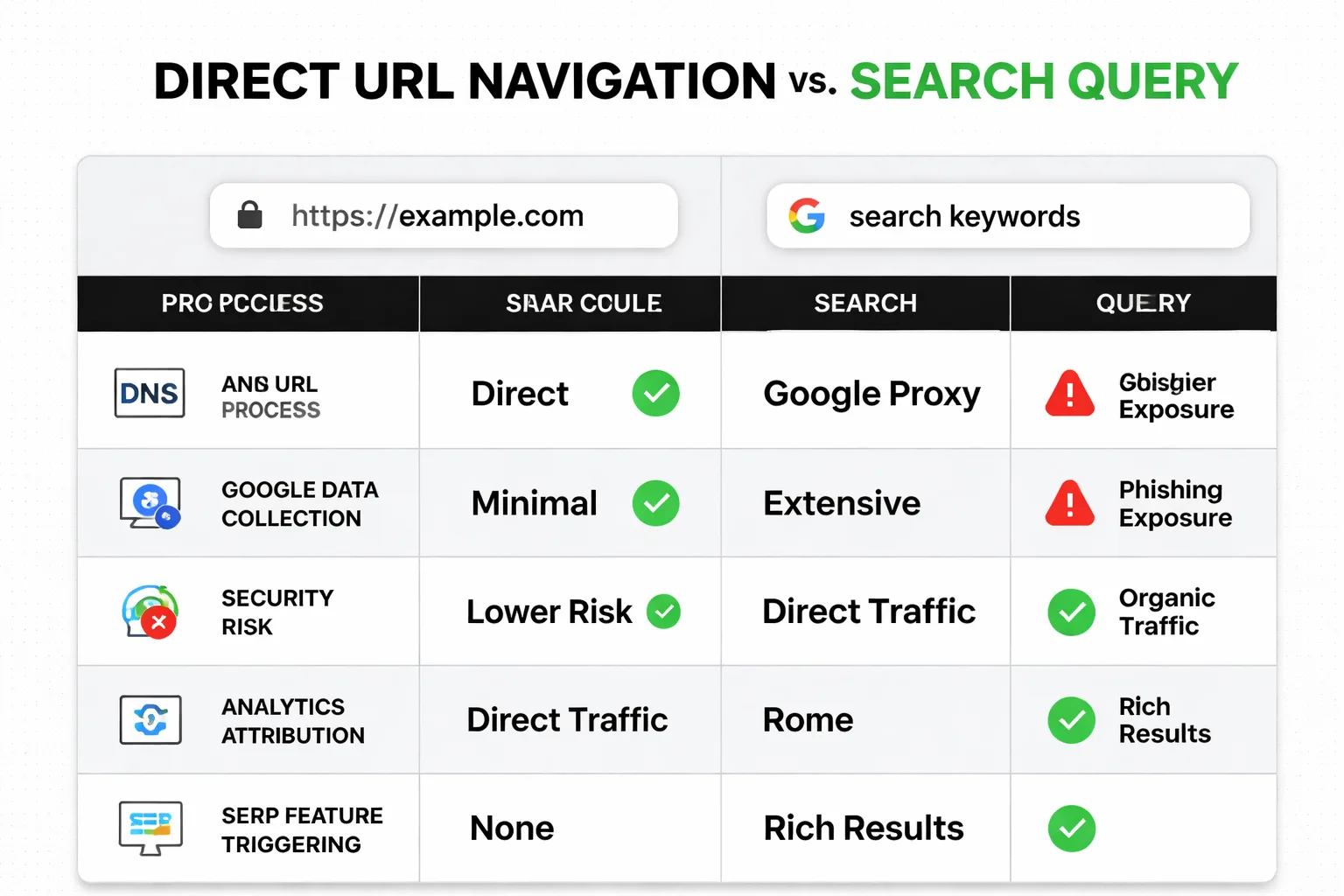
Direct URL navigation and search query processing are fundamentally different technical paths, and understanding that difference is the first step to understanding why it matters for SEO and content strategy.
When you type a URL directly, Chrome initiates a DNS lookup — your operating system queries a DNS resolver (usually your ISP's or a public one like Google's 8.8.8.8) to translate the domain name into an IP address. Once resolved, your browser opens a TCP connection to that IP, negotiates an HTTPS handshake if the site uses SSL, and requests the page. Google is not involved at any point in this chain. No query data is generated. No search impression is logged. The visit shows up in your analytics as direct traffic — and that's exactly what it is.
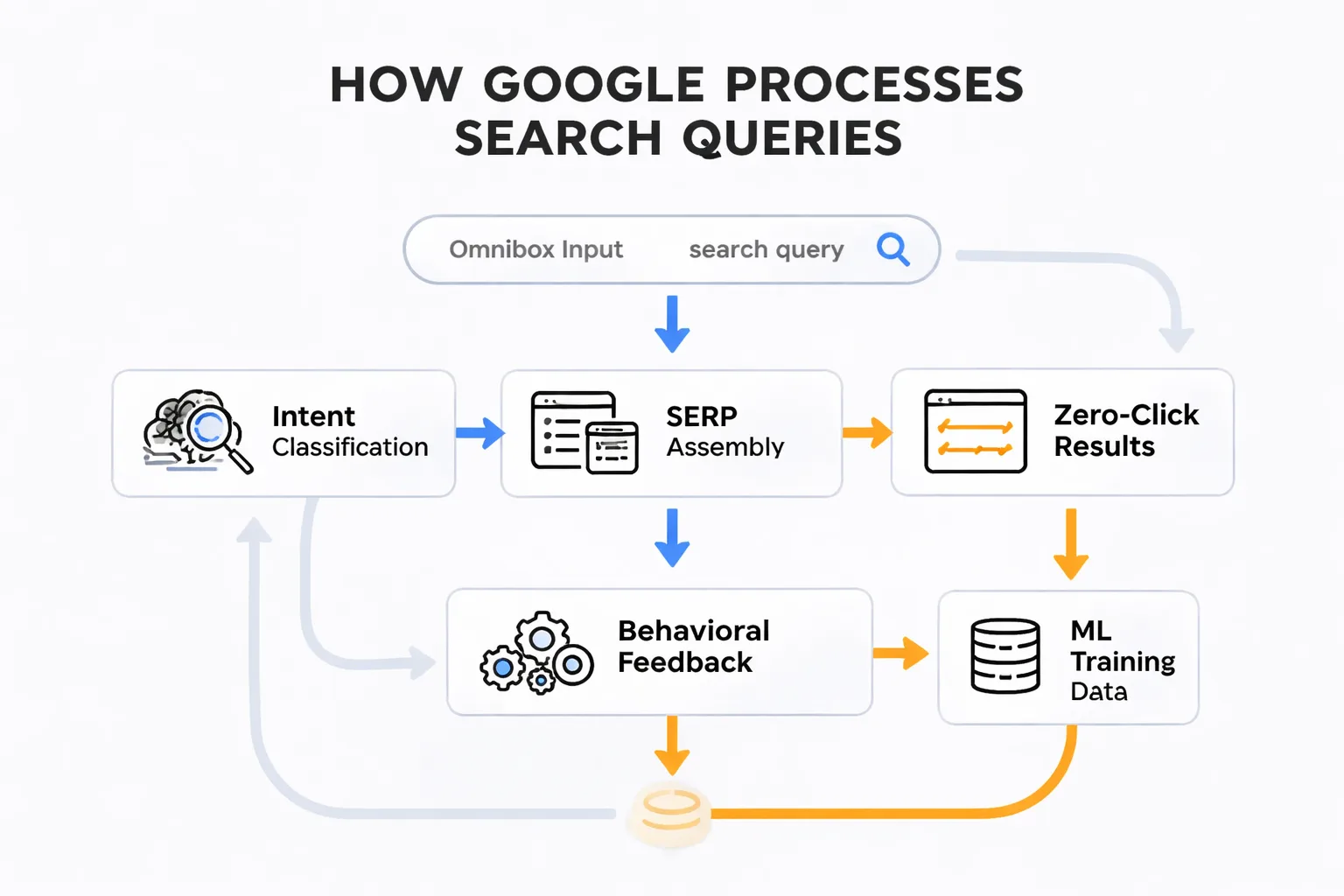
When you search via the Omnibox, the path is entirely different. Your query travels to Google's servers, where it's processed through multiple layers: spell correction, query expansion, entity recognition, and intent classification. Google then assembles a SERP — pulling from its index, knowledge graph, and increasingly, its AI Overview system. If you click a result, that click is logged as an organic search visit. If you don't click — which, as noted above, happens over 58% of the time — Google still learned something from your query. It learned what you were looking for, whether the results satisfied you, and how your behavior compares to millions of similar queries. That data feeds the ranking models that determine which content surfaces next time.
The bottom line: direct navigation is invisible to Google's learning systems. Search queries are fuel for them.
What This Means for SEO and Content Visibility
This is the part that most SEO guides skip entirely — and it's a gap I want to address directly.
According to Ahrefs, 96.55% of content gets zero traffic from Google. Zero. That's not a rounding error — that's a structural reality of how search works. The vast majority of pages on the internet are simply never surfaced in a search query, which means they're dependent on direct navigation, referral links, or social sharing to get any eyeballs at all. When I think about the technical fork between search and direct navigation, this statistic starts to make more sense. Content that isn't optimized to appear in search results — with proper structured data, clear intent signals, and strong topical authority — is essentially invisible to the search path. And with AI Overviews now intercepting 80–83% of searches before a click happens, even content that ranks is increasingly failing to generate traffic.
This is why AEO — Answer Engine Optimization — has become a central focus in my work leading content strategy at Meev. The goal isn't just to rank on page one anymore. The goal is to be the source that Google's AI Overview cites, the snippet that gets read aloud by voice search, the structured answer that appears before the user even considers clicking. If content isn't formatted to be extracted and quoted, it's competing for clicks in a game where the house is increasingly keeping them. I recommend reading how to write for AI Overviews without losing your audience — it's one of the most practical frameworks I've come across for adapting to this change.
The search path also feeds Google Search Console structured data signals. Every time a user searches a query, clicks a result, and engages with a page, that behavioral data flows back into Google's quality assessment systems. Direct navigation visits don't contribute to this feedback loop. So if a site is primarily accessed via bookmarks or direct URL entry — common for established brands — it's actually at a disadvantage in terms of the behavioral signals that influence rankings for new queries. At Meev, we've seen this play out repeatedly with clients who have strong brand recognition but weak organic search signals.
The Privacy and Security Angle Nobody Talks About
Most people think searching for a website is safer than typing its URL. In my experience, the data suggests otherwise.
When you search for a brand — say, a bank or a crypto exchange — you're presented with a SERP that includes organic results, knowledge panels, and paid ads. Those paid ads are purchased by anyone willing to bid on the brand keyword, including malicious actors running phishing campaigns. This attack vector is called typosquatting when it involves domain names, but the ad-based version is more dangerous because the URL in the ad can look completely legitimate until you're already on the fake site. Security researchers have documented cases where fraudulent Google Ads for financial services directed users to near-perfect phishing replicas — and the users found them by searching, not by mistyping a URL.
Typing a URL directly — especially one that has been verified and bookmarked — eliminates this attack surface entirely. The browser goes straight to the DNS resolution step, bypassing the SERP and its ad ecosystem. For high-stakes destinations like banking, healthcare portals, or any site where you're entering credentials, direct navigation is objectively more secure. I recommend this approach without reservation.
There's also a privacy dimension. When you search via the Omnibox, 83% of global consumers are using Google or YouTube daily, and every one of those search interactions contributes to Google's behavioral profile of that user. Search queries are stored, analyzed, and used to personalize future results and ads. Direct URL navigation generates no query data for Google — your ISP may still log the DNS request, but Google's search personalization engine doesn't see it. For users concerned about data collection, direct navigation is the lower-footprint option.
How Google Interprets Each Input Differently
This is where it gets genuinely interesting from an SEO perspective. Google doesn't treat all search queries equally — and the intent classification that happens in the Omnibox pipeline has direct consequences for which SERP features appear.
| Input Type | Intent Classification | SERP Features Triggered | Click-Through Likelihood |
| Brand name only (e.g., "Nike") | Navigational | Sitelinks, Knowledge Panel | High — user wants the site |
| Product query (e.g., "running shoes") | Transactional | Shopping ads, product carousels | Medium — comparison shopping |
| Question (e.g., "how to tie running shoes") | Informational | Featured snippet, AI Overview, PAA | Low — answer often on-SERP |
| Full URL typed | N/A — direct navigation | No SERP generated | 100% — goes straight to site |
| Partial URL with typo | Navigational (corrected) | "Did you mean" + sitelinks | High if correction accepted |
Navigational queries — where the user clearly wants a specific website — are the one category where Google's SERP is almost a formality. The user is going to click the first result (usually the brand's homepage with sitelinks) and move on. But informational queries? That's where the zero-click phenomenon is most severe. Google's AI Overviews are specifically designed to answer informational queries without requiring a click, which is why 61% of marketers now cite trust and credibility as the top return from content marketing — because the click-based ROI model is eroding. I've watched this shift accelerate dramatically over the past two years in my work with content teams.
The Omnibox isn't just a navigation tool — it's a real-time data collection instrument that feeds Google's understanding of user intent at massive scale. Every search query typed is a training signal. Every direct URL entry is invisible to that system.
Keyboard Shortcuts That Change the Game
For anyone spending significant time in a browser — and anyone reading this almost certainly is — these Omnibox shortcuts are worth burning into muscle memory. I've tested all of these across Chrome versions and use several of them daily.
- Ctrl+L / Cmd+L: Jump focus directly to the Omnibox from anywhere on the page. Faster than clicking.
- Ctrl+Enter: Automatically wraps your typed text in www. and .com — so typing meev + Ctrl+Enter navigates to www.meev.com without typing the full URL.
- Alt+Enter: Opens the search result or URL in a new tab instead of the current one.
- F6: Alternative shortcut to focus the address bar (useful on keyboards where Ctrl+L is awkward).
- Type @ after a site name: In Chrome, this triggers a site-specific search shortcut if the site has registered a search engine with Chrome — e.g., typing amazon then Tab lets you search Amazon directly from the Omnibox.
That last one is underused and powerful. It's essentially a direct navigation + search hybrid — bypassing Google's SERP entirely and querying the destination site's own search index.
The Data Ecosystem Angle: Who Benefits?
Here is something that rarely gets said plainly: every search query submitted through the Omnibox is a gift to Google's machine learning infrastructure.
With 89% of marketers now using AI for content creation, the demand for AI systems that understand natural language and user intent has never been higher. Google's search data — billions of queries per day, each tagged with behavioral outcomes — is the training corpus that makes its AI systems so capable. When users search instead of navigating directly, they're contributing to that corpus. This isn't inherently bad; it's the implicit exchange that makes Google Search useful. But it's worth understanding consciously, especially as discussions around Google-Extended blocking (the mechanism that lets site owners opt out of having their content used for AI training) become more mainstream. The data flow runs in both directions: queries train Google's models, and Google's models increasingly determine whether content ever gets seen.
For content marketers, this creates a specific strategic implication that I've seen play out firsthand at Meev: the content that gets cited in AI Overviews and featured snippets isn't just winning clicks — it's winning the training data feedback loop. Pages that get extracted and quoted become more authoritative in Google's model over time. Pages that get ignored fall further behind. The gap between visible and invisible content is compounding, not static.
Which Path Should You Choose?
Here is an honest breakdown by situation — one I share regularly in my work with content teams:
Choose direct URL navigation if you're: - Accessing a site you visit regularly and have bookmarked or memorized - Logging into any account that handles sensitive data (banking, healthcare, email) - Trying to avoid contributing behavioral data to Google's personalization system - Testing how a specific URL resolves for technical SEO purposes
Choose search via the Omnibox if you're: - Exploring a topic where you want Google to surface the best current sources - Researching competitors or market trends where freshness matters - Looking for local results, shopping comparisons, or structured data-rich results - Unsure of the exact URL and want autocomplete to help you find it
Never search for a URL if you're: - Accessing a financial institution, crypto platform, or any site where phishing is a known risk — type the URL directly or use a verified bookmark, every single time.
The choice between searching and typing isn't just a UX preference. It's a decision about data, security, and which systems are being fed. Understanding the mechanics behind that blinking cursor in the address bar is one of the more underrated pieces of digital literacy available to anyone who works on the web — and in my experience, it's one of the first things I walk new content strategists through.