
Automated Blog Publishing on Wix: Scale Your Content Engine
Automated blog publishing on Wix is no longer a workaround for lazy marketers — in 2026, it's the infrastructure that separates content teams that scale from ones that stall. If you've been manually drafting, formatting, and scheduling every post while watching competitors flood search results with consistent, optimized content, this is the setup that changes that equation.
Key Takeaways
- Wix's CMS API and Velo framework support fully automated blog publishing — connect them to Make.com or Zapier to trigger posts from an approved content calendar without manual intervention.
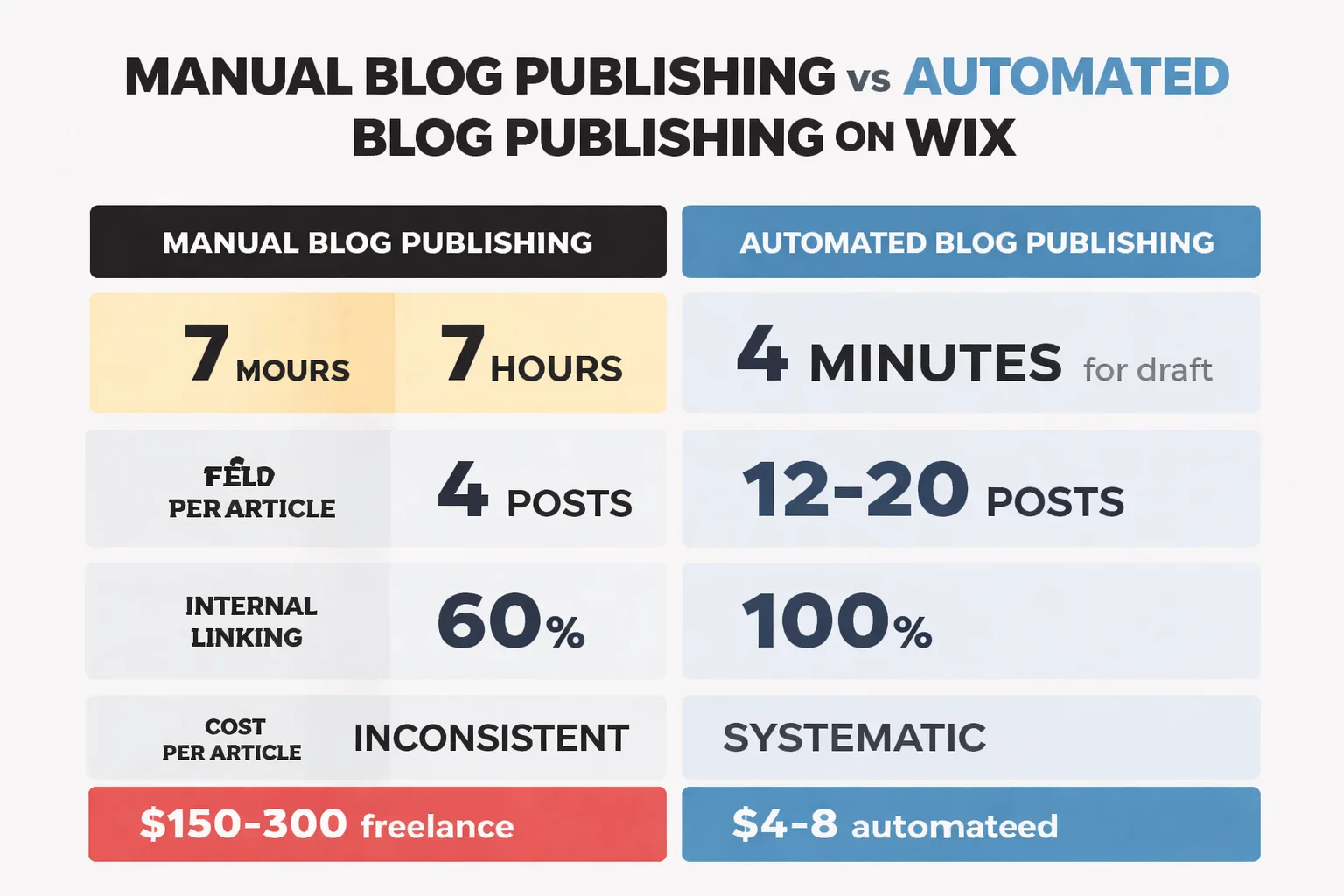
- AI content creation tools can reduce per-article production time from 7 hours to under 30 minutes, but a 15-20 minute human review step is non-negotiable for E-E-A-T compliance.
- GEO optimization — structuring posts for citation by Google AI Overviews, ChatGPT, and Perplexity — requires direct answer paragraphs after every H2, FAQ schema via Velo, and at least 6 bold standalone quotable sentences per post.
- Automated internal linking and structured data injection (Article + FAQ schema) are the two most skipped steps in Wix automation setups — and the two with the highest direct impact on ranking velocity.
Here's the number that stopped me cold when I first saw it: according to Wix's own blogging research, there are over 600 million blogs online with roughly 7.5 million new posts published daily. You're not competing against a few dozen sites in your niche — you're competing against a machine. The only rational response is to build a better machine.
The goal isn't to automate content for its own sake. It's to build a publishing engine that's fast enough to compete, smart enough to rank, and structured enough to survive Google's next algorithm update.
TLDR
- Wix's native CMS API and Velo framework let you automate publishing without third-party plugins — but the real power comes from connecting Make.com or Zapier to your content pipeline. - AI content creation tools reduce per-article production time dramatically, but E-E-A-T compliance requires a human-in-the-loop review step before any post goes live. - GEO optimization (structuring content for AI Overviews and citation by tools like ChatGPT and Perplexity) is now a non-negotiable layer of any automated blog content workflow. - Automated internal linking and structured data tagging are the two most commonly skipped steps — and the two that most directly impact ranking velocity.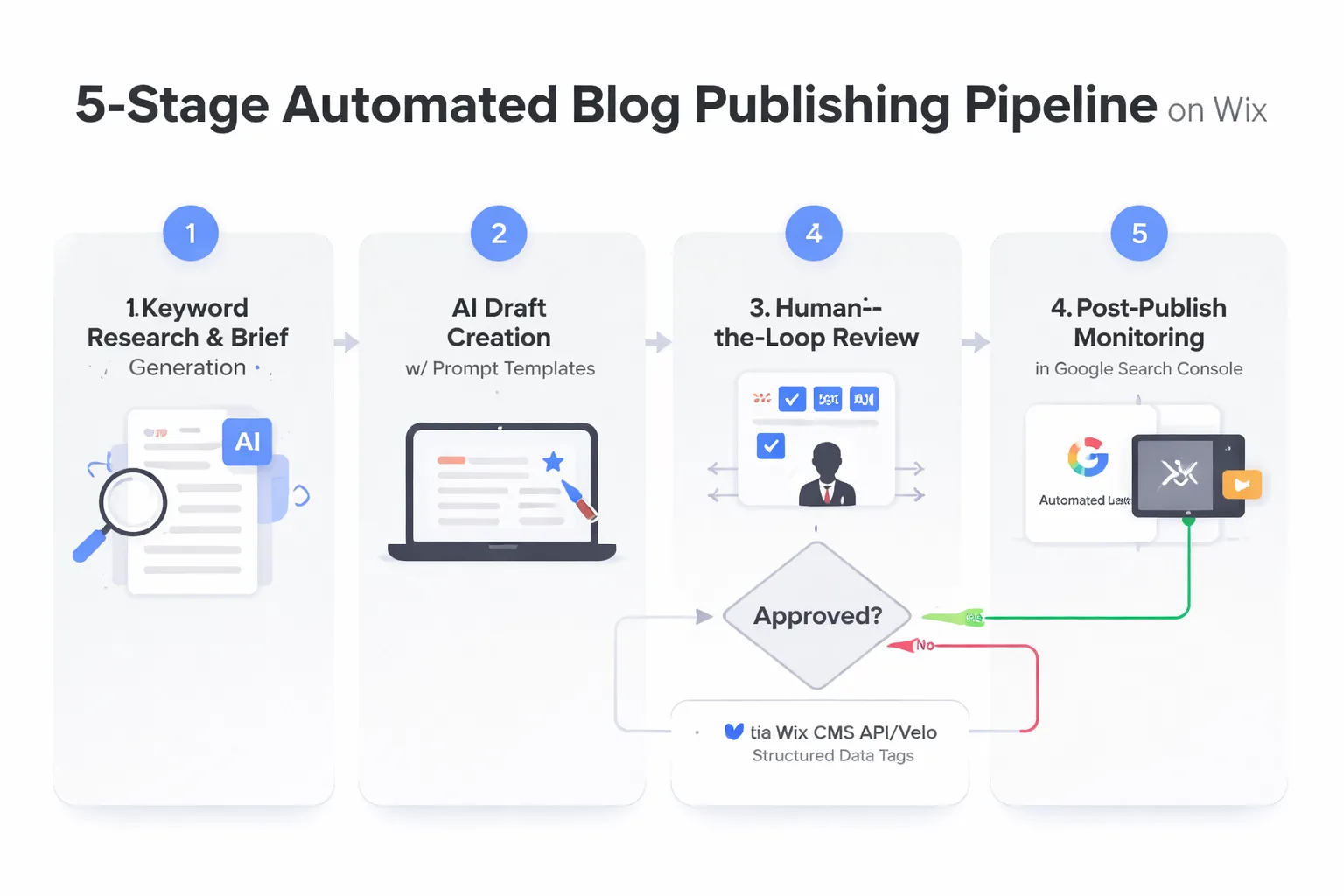
What Is Automated Blog Publishing?
Automated blog publishing is the process of using software, APIs, and AI content creation tools to handle some or all of the steps between content ideation and a live, indexed blog post — without manual intervention at each stage. On Wix specifically, this means connecting your content generation workflow to the Wix CMS through either the native Content Manager API or Wix's Velo development framework, then triggering posts via automation tools like Make.com or Zapier.
This is not autoblogging in the 2012 sense — scraped content, spun articles, zero editorial oversight. What I'm describing is a structured, quality-controlled pipeline where AI handles the time-intensive research and drafting work, humans review for accuracy and brand voice, and the publishing mechanics run on autopilot.
Why Choose Wix for Automated Blog Publishing?
Most tutorials on blog automation default to WordPress. I get it — WordPress has a massive plugin ecosystem and the REST API is well-documented. But I'm seeing more and more content teams on Wix who are stuck because the guides they find don't apply to their platform. Wix has matured significantly. The Wix CMS API now supports full CRUD operations on blog posts, and Velo (Wix's built-in JavaScript development environment) lets you write custom backend logic without leaving the platform.
The practical advantage: you don't need a separate hosting environment, a staging server, or a developer on retainer. If you're comfortable with basic JavaScript or willing to use a no-code automation layer, you can build a fully functional automated blog content workflow directly inside Wix.
How Do You Set Up Automated Blog Publishing on Wix?
The foundation of any Wix automation is the Content Manager API. Here's how to get it working:
1. Enable Velo in your Wix dashboard under Settings → Developer Tools. This enables the backend code editor.
2. Generate an API key from your Wix dashboard under API Keys Manager. Scope it to Blog permissions (read/write).
3. Create a backend module in Velo (a .jsw file) that handles your POST requests to the Wix Blog API endpoint.
4. Test with a single post using Postman or a simple Make.com HTTP module before connecting your full pipeline.
5. Set up error handling — log failed publish attempts to a Google Sheet or Airtable base so nothing falls through the cracks silently.
The Wix Blog API accepts title, content (rich text or HTML), slug, tags, categories, and SEO metadata fields including meta title and meta description. That last point matters enormously — you can pass fully optimized SEO fields programmatically, which means your automated posts arrive pre-optimized rather than requiring a manual SEO pass after publishing.
Once your Wix API connection is tested, the automation layer is where the workflow actually comes alive. I prefer Make.com for this because its visual scenario builder handles conditional logic better than Zapier for multi-step content pipelines — but either works.
A typical automated blog content workflow in Make.com looks like this: a Google Sheet (or Airtable) acts as your content calendar and brief database. Each row contains a target keyword, a content brief, a status field, and a scheduled publish date. Make.com watches for rows where status changes to "Approved" and triggers the publish sequence automatically.
The sequence itself: Make.com pulls the approved brief, sends it to your AI writing tool via API (OpenAI, Anthropic, or a purpose-built tool like Meev), receives the completed draft, runs it through a formatting module that injects your standard HTML structure and internal links, then fires the Wix Blog API call to create and schedule the post. The status field in your sheet updates to "Published" and a Slack notification fires to your team. The whole sequence runs in under 90 seconds per article.
According to Semrush's analysis of content automation workflows, automation like this can free up to 30% of work hours previously spent on routine publishing tasks — and that figure tracks with what I've seen firsthand. The teams that implement this stop burning hours on formatting and scheduling and redirect that time toward strategy, link building, and content quality review.
Want to see how a research-first automated content pipeline actually performs on your niche?
Start Automating Your Blog →How Do You Create High-Quality Content for Your Automated Blog?
This is where most automated blog setups fail. The automation mechanics work fine — the content quality doesn't. And in 2026, with Google AI Overviews appearing in 88% of informational queries and pushing organic links further down the page, mediocre automated content doesn't just underperform — it actively damages your domain's authority.
The prompt engineering layer is what separates a content machine from a content spam operation. Here's the framework I use for every automated article brief:
Structural prompt elements that consistently improve output quality: - Role assignment: "You are a senior content strategist with 10 years of experience in [niche]. Write for practitioners, not beginners." - Search intent specification: Explicitly state whether the post is informational, commercial, or navigational — and what the reader should be able to DO after reading it. - E-E-A-T anchors: Require the AI to include specific data points, named sources, and at least one concrete example per major section. - GEO optimization directives: Instruct the AI to include a 40-60 word direct answer paragraph after every H2, formatted as a standalone snippet. This is the single most impactful change I've made to my prompt templates for getting content cited in AI Overviews. - User intent search optimization: Specify the exact query the post should answer, and require the first 200 words to directly address it.
I want to be direct about something here: AI-generated content without these structural constraints produces generic, hedged, forgettable articles. With them, it produces drafts that need 20-30 minutes of human editing rather than a full rewrite. That's the difference between automation that scales and automation that creates a quality debt you'll spend months cleaning up.
I'll be blunt — fully automated publishing with zero human review is a bad idea in 2026. Not because AI can't write well, but because Google's quality rater guidelines explicitly evaluate Experience, Expertise, Authoritativeness, and Trustworthiness (E-E-A-T), and the "Experience" component requires demonstrable first-hand knowledge that AI cannot fabricate credibly.
The human-in-the-loop (HITL) step doesn't need to be a full editorial review. In a well-designed pipeline, it's a 15-20 minute quality gate that checks four things:
1. Factual accuracy: Are all statistics linked to real, current sources? Are any claims that could be verified actually verified? 2. Brand voice alignment: Does the post sound like your brand, or does it sound like a generic AI assistant? 3. E-E-A-T injection: Add one specific first-hand observation, a named client example, or a proprietary data point that only your brand could provide. 4. Internal linking: Does the post link to 2-3 relevant pages on your own site? (More on this below.)
The meev case study I've seen illustrates this perfectly. An outdoor gear e-commerce brand went from 2 manual posts per month to 12 automated posts per month after implementing a structured content pipeline. Their top article — "Best Hiking Boots for Pacific Northwest Rain" — generated 12,000 organic visits in its first month and drove $8,400 in attributed revenue. The key wasn't just volume. It was that every article went through a quality gate before publishing, which meant their domain authority kept climbing rather than getting dinged for thin content.
How Do You Optimize Your Automated Blog for SEO, Internal Linking, and GEO?
This is the most commonly skipped step in every automated blog setup I've reviewed — and it's also one of the highest-impact SEO tasks you can automate. Internal linking distributes page authority across your site, helps Google understand your topical structure, and keeps readers engaged longer.
In a Wix automation pipeline, you can handle internal linking two ways. The first is a static link injection module in Make.com: maintain a lookup table of your top 20-30 target pages with their target anchor text phrases, and have your automation scan each draft for those phrases and inject links programmatically before publishing. The second is a dynamic approach using the Wix CMS API to query your existing published posts for semantic overlap and suggest links — this requires more Velo development work but produces better results at scale.
If you want to go deeper on the strategic side of this, building topical authority with AI content is the framework that makes internal linking decisions systematic rather than arbitrary — and it's the difference between a blog that ranks for one keyword and a blog that owns an entire topic cluster.
Here's the contrarian take most automation guides miss entirely: in 2026, your automated blog content needs to be optimized not just for Google's traditional ranking algorithm, but for citation by AI search engines — ChatGPT, Perplexity, Google AI Overviews, and Gemini. This is what GEO (Generative Engine Optimization) means in practice.
The data is stark. According to Semrush's research, roughly 60% of Google searches in 2025 ended without a click to a website — up from 58% in 2024. That trend is accelerating. If your content isn't being cited inside AI Overviews and AI chat responses, you're invisible to a growing share of your potential audience.
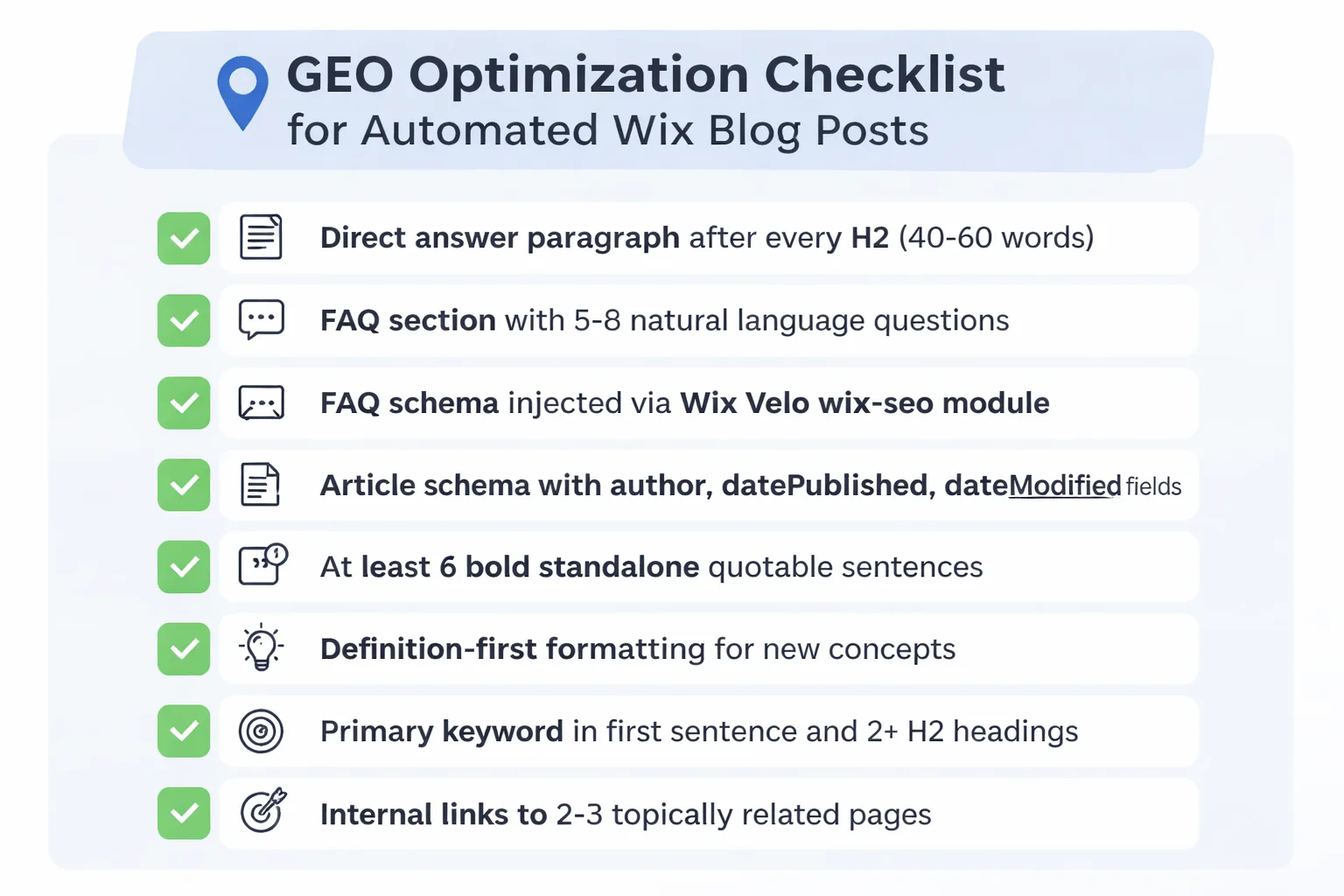
The structural changes that improve GEO performance — and that you can bake directly into your AI prompt templates and Wix publishing automation:
- Direct answer paragraphs (40-60 words) after every H2, formatted as standalone snippets
- FAQ sections with 5-8 questions using natural language phrasing
- Structured data markup — specifically FAQ schema and Article schema, which you can inject via Velo's wix-seo module programmatically on every post
- Quotable standalone sentences — bold, specific, data-backed claims that make sense extracted out of context
- Definition-first formatting for any new concept: "[Term] is [definition]" in a single clear sentence
The Semrush study on AI citation speed found that 36% of test pages were cited in Google AI Mode within 24 hours of publishing — but only pages that followed these structural patterns. That's not a coincidence.
Wix has historically been weak on structured data, but Velo changes that. You can now inject JSON-LD schema markup programmatically on every blog post using the wix-seo API. For an automated pipeline, this means every post that publishes automatically gets Article schema, FAQ schema (if a FAQ section is present), and BreadcrumbList schema — without any manual intervention.
The code pattern in Velo looks like this: in your blog post page's $w.onReady() function, pull the post metadata from the Wix Blog API, construct your JSON-LD object dynamically, and pass it to wix.seo.setStructuredData(). Connect this to your Make.com trigger so it fires immediately after the post goes live. Google Search Console's structured data report will confirm successful implementation within 48-72 hours of your first automated posts.
How Do You Monitor and Update Your Automated Blog?
Publishing is not the finish line. This is where most automated blog setups create a long-term liability: they publish at scale and never revisit what's live. Google's algorithm updates — particularly those targeting helpful content signals — will surface and suppress thin or outdated automated content over time.
Build a monitoring loop into your automation from day one. Connect Google Search Console to a Google Sheet via the GSC API (or use a tool like Semrush's Position Tracking). Set up automated weekly reports that flag posts where impressions are declining month-over-month, average position is dropping below page 2, or CTR falls below 1.5%. These are your refresh candidates.
For each flagged post, the refresh workflow is simple: pull the current content, run it through your AI tool with a "content refresh" prompt that adds updated statistics, expands thin sections, and improves GEO formatting, then republish with an updated dateModified field in your Article schema. Posts refreshed this way consistently recover lost rankings within 4-8 weeks in my experience — and the automation means you're doing it systematically rather than reactively.
The teams winning with automated blog publishing on their automated blog in 2026 aren't the ones publishing the most. They're the ones publishing consistently, optimizing for AI citation, and maintaining what they've already built.
Frequently Asked Questions
Does Wix support automated blog publishing natively?
Wix supports automated blog publishing through its CMS API and Velo development framework. You can create, schedule, and publish blog posts programmatically without third-party plugins. For no-code automation, connecting Wix to Make.com or Zapier via the Wix API is the most practical approach for most content teams.Is automated blog content penalized by Google?
Automated blog content is not automatically penalized by Google. Google's guidelines target low-quality, unhelpful content regardless of how it was produced. Automated content that includes accurate information, genuine expertise signals, proper sourcing, and E-E-A-T compliance can rank as well as manually written content — and often ranks faster due to consistent publishing velocity.What's the best AI content creation tool for Wix automation?
The best ai content creation tools for Wix automation are ones with accessible APIs that can be triggered via Make.com or Zapier. Purpose-built blog automation tools like Meev are designed specifically for SEO-optimized output and integrate cleanly into CMS publishing workflows. OpenAI's API works well if you invest time in prompt engineering for SEO structure.How do I add structured data to automated Wix blog posts?
Add structured data to automated Wix blog posts using thewix-seo module in Velo. In your blog post page code, call wix.seo.setStructuredData() with a dynamically constructed JSON-LD object containing Article schema and FAQ schema. This fires on page load and is crawlable by Google within 48-72 hours of publishing.How many blog posts can I automate per month on Wix?
Wix does not impose a hard limit on blog post volume through the API, but your API key has rate limits that vary by plan. Most content teams automate 15-30 posts per month — enough to build topical authority without triggering quality concerns. Publishing 50+ posts per month without a solid HITL review significantly increases the risk of thin content accumulation.What is the human-in-the-loop step in blog automation?
The human-in-the-loop (HITL) step is a quality review checkpoint where a human editor reviews AI-generated content before it publishes. In an optimized pipeline, this takes 15-20 minutes per post and focuses on factual accuracy, brand voice, E-E-A-T signal injection, and internal link verification. It's the step that separates sustainable automated publishing from content spam.How does GEO optimization differ from traditional SEO for automated content?
GEO optimization structures content specifically for citation by AI search engines like Google AI Overviews, ChatGPT, and Perplexity — not just for traditional ranking. This means including direct answer paragraphs after every H2, FAQ sections with natural language questions, and bold standalone quotable sentences. Traditional SEO focuses on keyword placement and backlinks; GEO focuses on extractability and citation-readiness.Can I automate internal linking on Wix?
Yes. You can automate internal linking on Wix by maintaining a lookup table of target pages and anchor text phrases in a Google Sheet or Airtable, then using a Make.com module to scan each draft for matching phrases and inject links before the post publishes via the Wix API. More advanced implementations use semantic matching via the Wix CMS API to identify topically related existing posts automatically.Stop publishing one post at a time. Build the automated blog content workflow that runs while you focus on strategy.
Start Automating Your Blog